The number and types of devices that you can connect to the dual delegate interface depends
on the selected mode. You can set the mode with the mode selector.
No. Mode
0* Dual delegate
1 Chairman
2 Dual delegate with one microphone
3 Dual delegate with muted loudspeakers
4 Single delegate
5 Entrance unit
6 Exit unit
7 Ambient microphone
Table 7.32: Signal level switch (* = default)
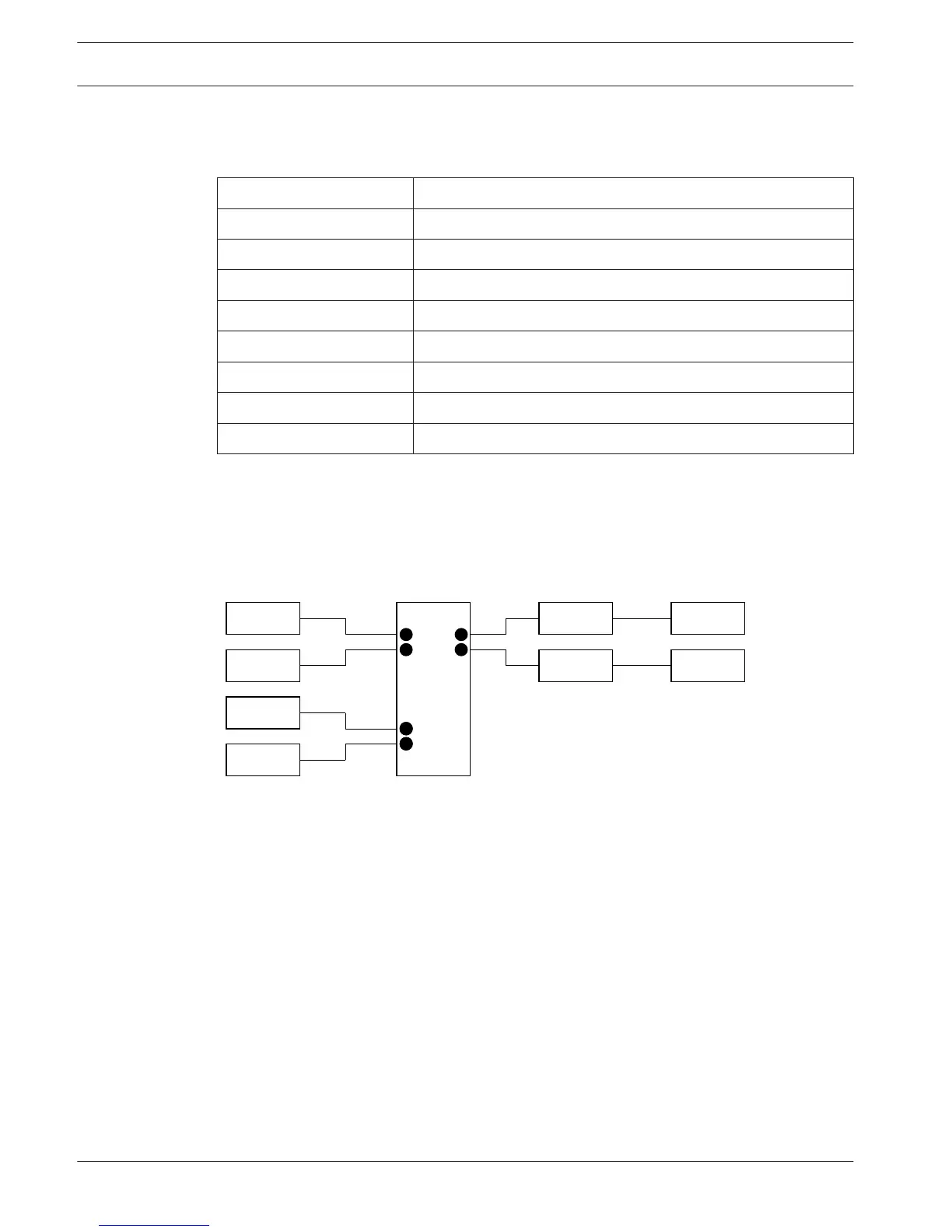
Dual delegate
When the dual delegate interface is in the dual delegate mode, it is a delegate device for 2
delegates. The system sees the dual delegate interface as two separate devices, but it gives
only one address to the dual delegate interface. Refer to the figure for a typical example.
Figure 7.18: Dual delegate mode (0) and Dual delegate with both loudspeakers muted mode (3)
When audio input 1 is enabled, the dual delegate interface disables audio output 1. When
audio input 2 is enabled, the dual delegate interface disables audio output 2.
Chairman
When the dual delegate interface is in the chairman mode, it acts as a chairman device for 1
chairman. You can connect 2 audio inputs in the chairman mode. Refer to the figure for a
typical example.
214
en | Configuration Conference System
2013.11 | V2.0 | DCN-NG_OM_V4.x Operation Manual Bosch Security Systems B.V.












 To Next Page