DCN-FCS Channel Selector
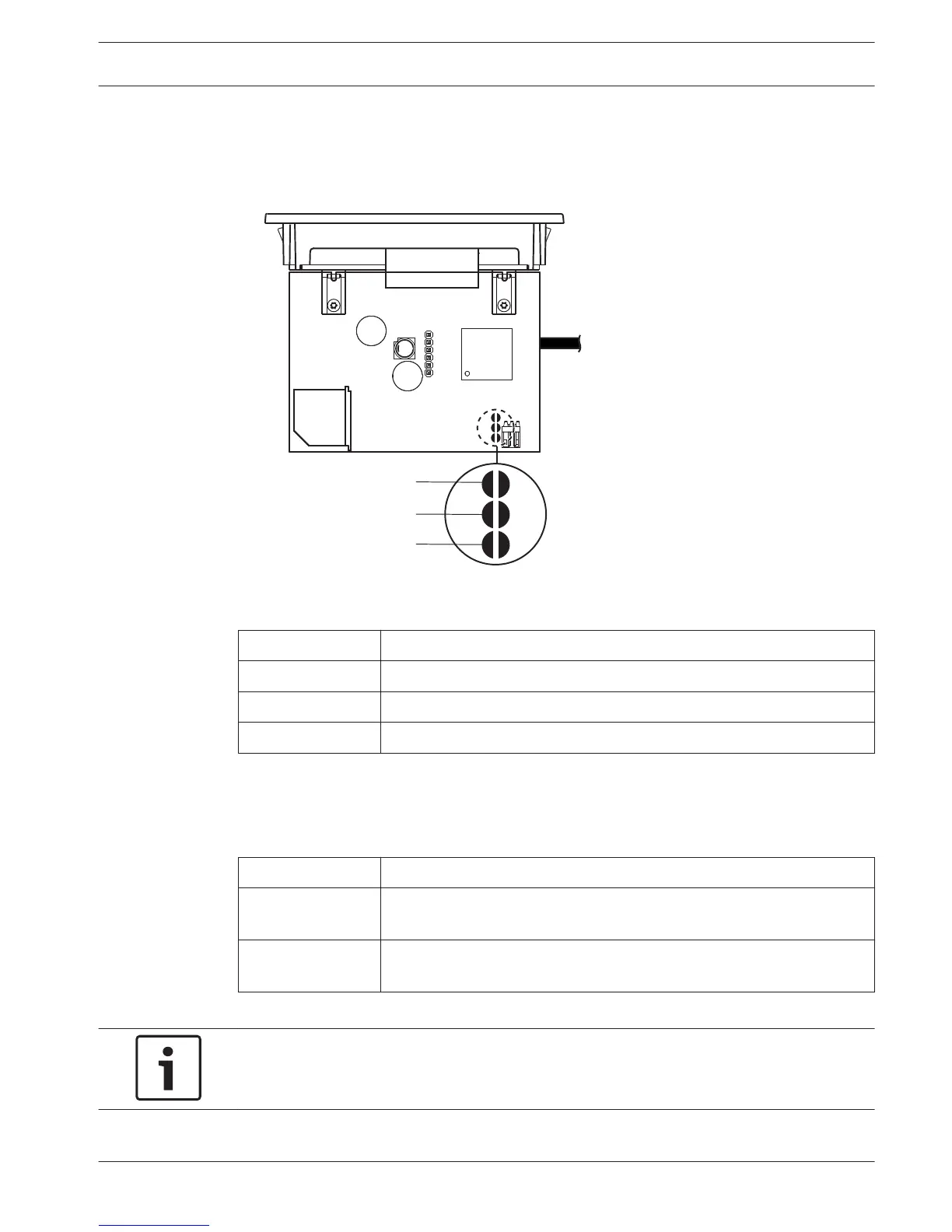
The component side of the PCB of the channel selector contains solder spots. With these
solder spots, you can configure the channel selector.
Figure 7.25: Solder spots
Solder spot
Function
X11 Auto-standby function.
X12 Volume increment/decrement function.
X13 Channel/volume restore function.
Table 7.35: Solder spots
Auto standby function
Use the X11 solder spot to enable or disable the auto standby function of the channel
selector.
Solder spot
Function
Not Soldered* The auto standby function is enabled. When the headphones are
disconnected, the channel selector is disabled.
Soldered The auto standby function is disabled. When the headphones are
disconnected, the channel selector remains enabled.
Table 7.36: Solder spot X11 (* = default)
Notice!
When you use the channel selector to record audio, you must close the X11 solder spot.
7.14
Conference System Configuration | en 219
Bosch Security Systems B.V. Operation Manual 2013.11 | V2.0 | DCN-NG_OM_V4.x












 To Next Page