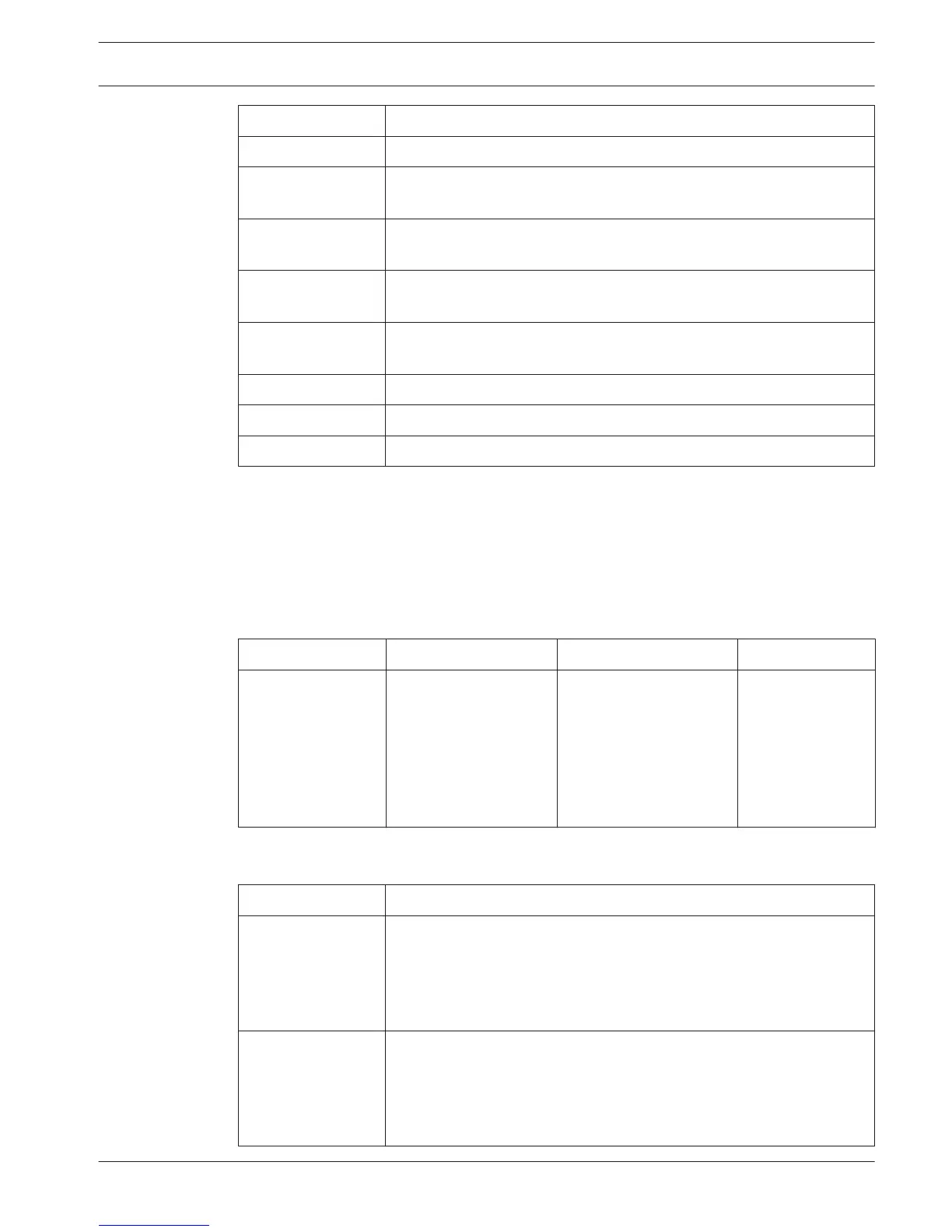
Messages Description
No Network Optical network is disconnected.
No Master CCU The CCU is in multi-slave mode and the Ethernet connection with the
master CCU is lost.
CCU Missing If the master CCU detects that the Ethernet connection with a slave
CCU is lost.
Download CCU CCU software does not start up properly or an internal version conflict
has occurred.
Download CCUs If the master CCU detects incompatible software versions between
master and one or more slave CCUs.
Download WAP The WAP contains an incompatible SW version.
Bad Signal A bad signal for a wireless unit is notified.
Low Battery A low battery for a wireless unit is notified.
Table 8.1: Messages (low to high importance)
When a fault condition is resolved, the fault message will disappear. The message goes out of
view when you push the knob.
Microphone mode
Use the 1 Mic. Mode menu item to set the microphone mode.
When the central control unit is connected to the PC control software, the microphone mode
can be controlled from the PC and the CCU menu.
Menu item
Parameter Value Description
1 Mic. Mode Mode:
Open*
Override
PTT
Voice***
Operator**
Response**
NOM:
1, 2*, 3 - 25
1, 2*, 3 - 25
1, 2*, 3 - 25
2*, 3, 4
1, 2*, 3 - 25
1
The microphone
mode of the DCN
and the maximum
number of enabled
delegate
microphones.
Table 8.2: Microphone mode sub-menu under PC control software (* = default). ** only available in PC
control. *** only available when number of interpretation channels is 26 or less.
Mode
Description
Open In the open mode, delegates can enable their microphones with the
microphone button on their contribution devices. When the maximum
number of delegates speak, the next delegate that enables his or her
microphone is added to a request-to-speak list. The microphone is not
enabled until another delegate disables his or her microphone.
Override In the override mode, delegates can activate their microphones with
the microphone button on their contribution device. When the
maximum number of delegates speak, the next delegate that activates
his or her microphone automatically deactivates the microphone that
was activated for the longest time.
Conference System Operation | en 233
Bosch Security Systems B.V. Operation Manual 2013.11 | V2.0 | DCN-NG_OM_V4.x















 To Next Page