72
Technical Manual
GB
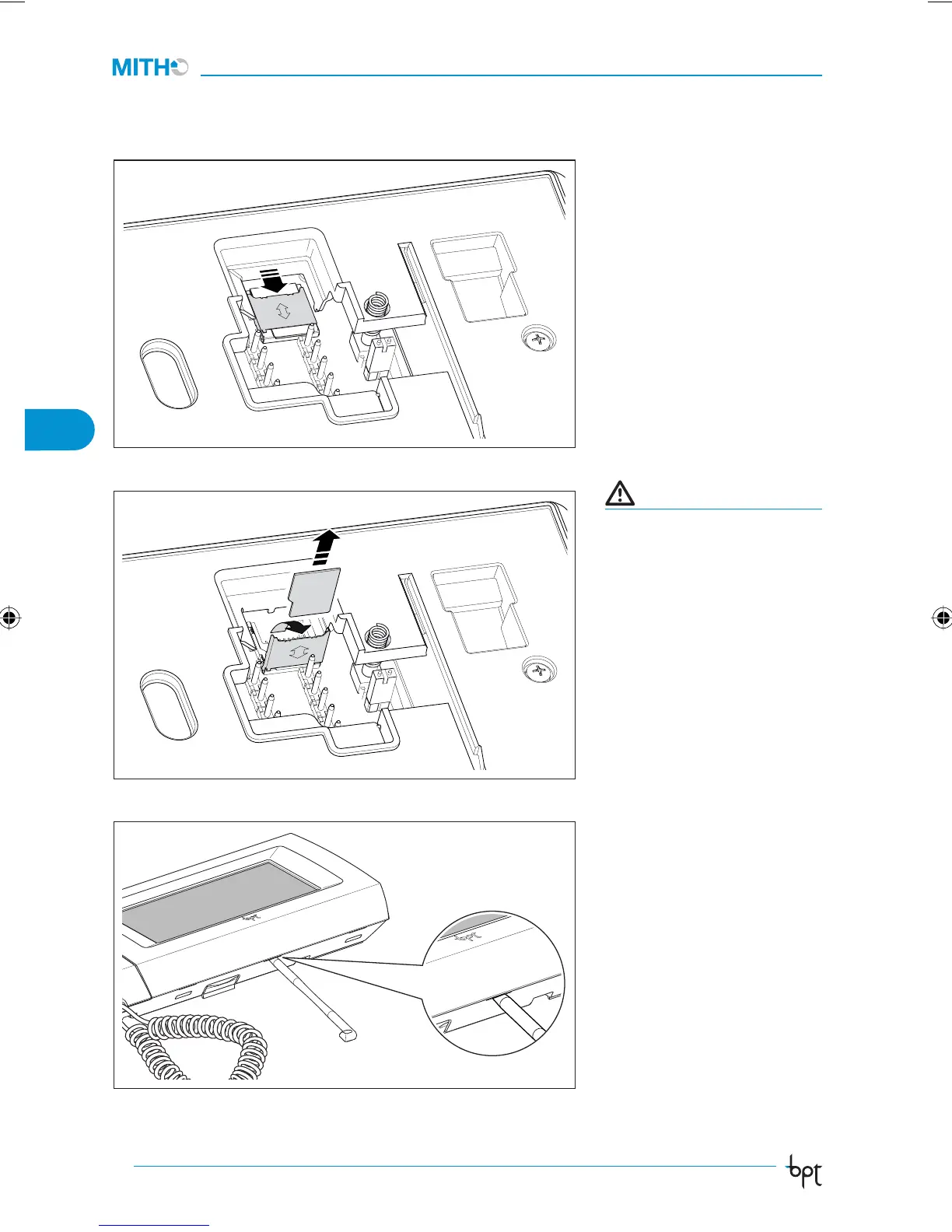
Insertion/removal of the
MICRO SD card
To access the MICRO SD card
proceed as illustrated in figure
6 and 7.
ATTENTION
Before inserting or removing
the MICRO SD, cut o the pow-
er supply to the video termi-
nal by removing the terminal
boards M1 and M2.
Function of the RESET
button
Any time that operating anoma-
lies, servicing or other technical
reasons require the unit to be
reset, press lightly on the button
located inside the opening un-
der the body of the device (see
figure 8), using the pen provided.
Release the button as soon as the
screen goes dark and wait for the
main menu to reappear before
resuming normal use of the unit.
NOTE: This operation does NOT
delete any programmes, which
will be restored, along with
other data, when the unit is re-
started.
MICRO SD
6
7
RESET
8
ManTecnico_MithoPlus IT_GB 2484572 72ManTecnico_MithoPlus IT_GB 2484572 72 18-06-2008 11:50:2318-06-2008 11:50:23



 To Next Page