16
1. Before You Begin
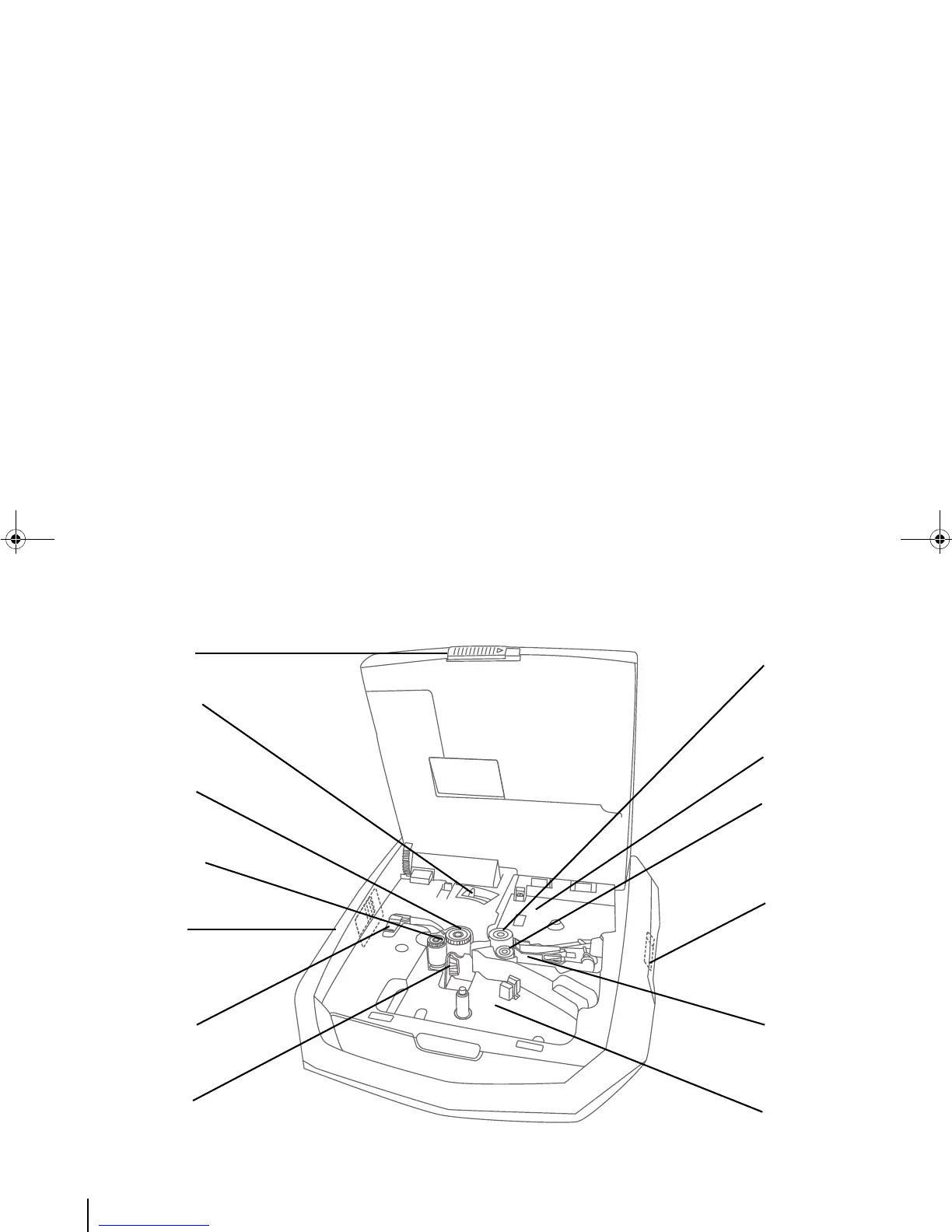
The latches, rollers, cutter, printhead, and cartridge holding areas inside the printer.
Cover latch: Pull this to
open the printer cover.
Media Channel latch: If
and when an externally
fed tube cannot get
through to the rollers,
flip open the flap of this
latch.
Ribbon cartridge
holding area.
Printhead: This presses the
ribbon against the medium
and prints the text and
symbols of predefined
tag(s).
Cutter: This cuts the
medium (tube or label)
into preset segments.
Wrap roller: This roller
holds the tube/label in
place against the Platen
roller.
Media cartridge holding
area.
Feed roller: This roller
helps to move the
tube/label forward or
backwards,
depending on the
function triggered in
the printer.
Pinch roller: This roller
holds the tube/label in
place against the Feed
roller.
Wrap Roller latch: Pull
this to move the Wrap
roller away from the
Platen roller.
Platen roller: This roller
provides the backing
against which the
printhead can strike.
Media Inlets: Tubes are
fed into the printer from
outside (externally)
through these two inlets
— round tubes through
the large hole and flat
tubes through the slit.
Media Outlet: This is
where the medium (fed
externally or internally)
finally emerges after
printing.



 To Next Page