81
6. Maintaining Your Printer
F. Replacing the Cutter
When the cutter is blunt, you need to replace it. For
details on how to obtain a replacement cutter, contact
your nearest dealer.
Follow the instructions here closely and dispose of the old
cutter immediately. Although the cutter is designed such
that you cannot touch the blade directly, you (or someone)
might still be hurt if you mishandle it.
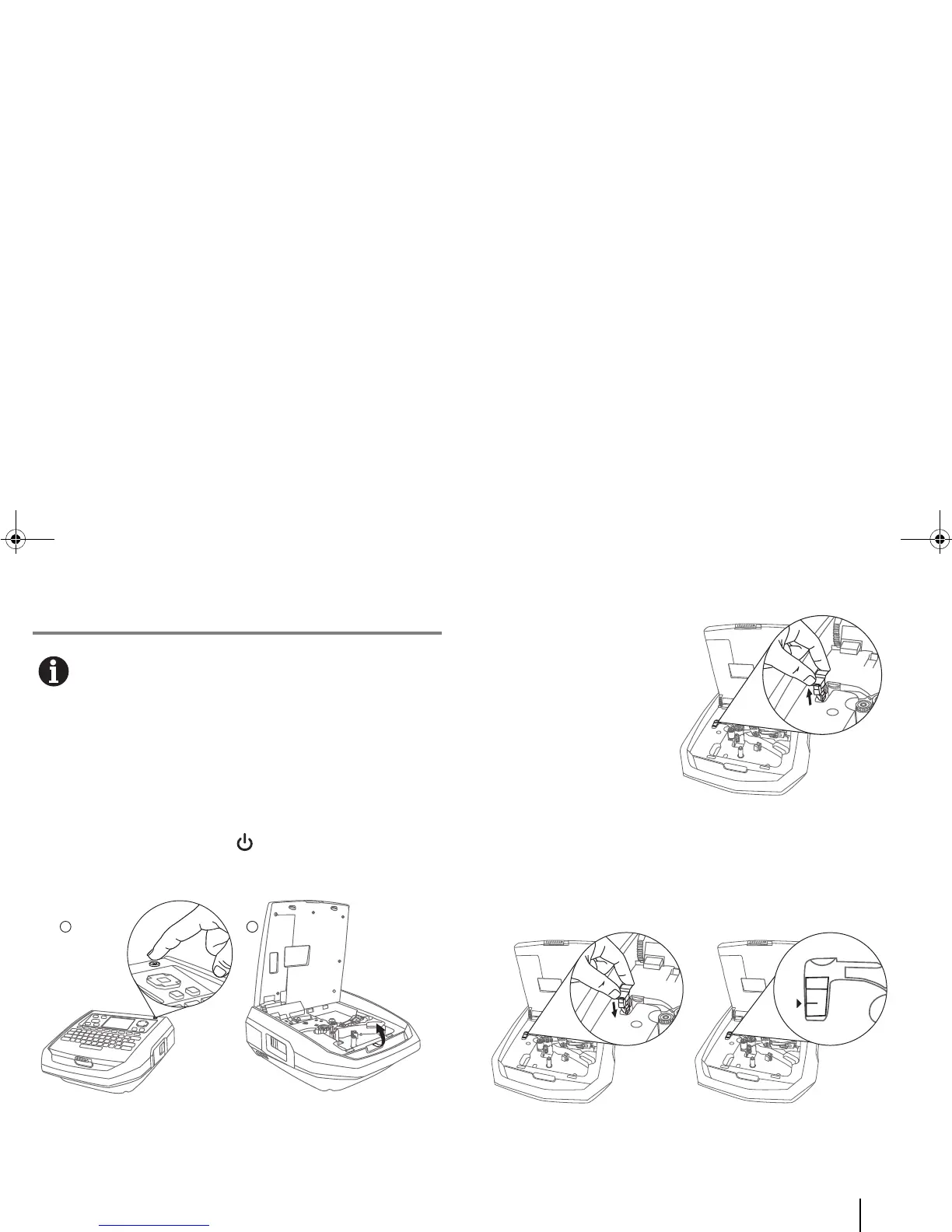
1 If the printer is still on, press [Power] to switch it off.
2 Pull the cover latch and open the printer cover.
3 Pull out the cutter.
4 Dispose of the old cutter right away, in compliance with local
regulations on the disposal of such items. Do not touch it
anywhere other than the cutter’s handle (see figure above).
5 Install the new cutter. It is inserted properly when the arrow
and line are inline as shown.
6 Close the cover firmly so that you can hear and feel that it latches.



 To Next Page