English
54
5. Advanced Functions
If barcodes on two-line tags are required, the “HR” option
must be off. If HR barcodes are required, the tags can
only have one line.
G. Serialization
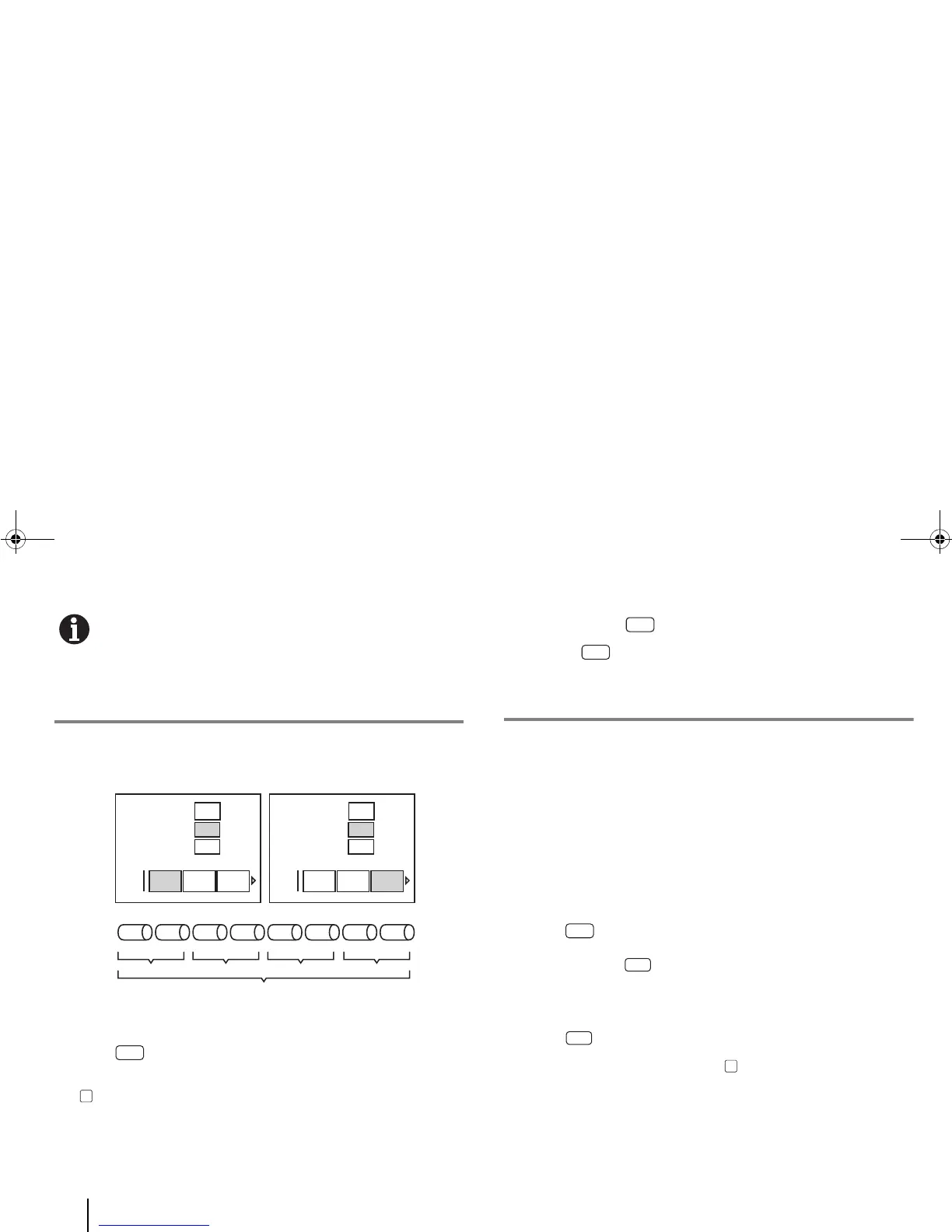
2D serialization
To add serialization:
1 Enter [Menu] > Quick Keys > [Serialization].
2 Select a sequence (0-999 or a-z), enter the steps and press
[OK].
3 To add a second sequence, repeat step1.
Shortcut: Press the [Serial] quick key instead of going
through the [Menu] key.
H. Tag Files
The BMP
®
91 printer supports two types of files:
• “Tag files”, managed through the File menu, which contain the
contents and settings of a tag editing job.
• “User graphics”, managed through the User Graphics menu,
which are the external graphics that can be imported and
inserted into a tag.
To open the File menu:
1 Enter [Menu] > Quick Keys > “File”.
Shortcut: Press the [File] quick key.
To save a tag file:
1 Enter [File] > “Save” (or “Save as”).
2 Type in the filename and press [OK].
End
Increment By
a-z A-Z
3
0
0-999 0-999
Start
1
End
Increment By
a-z A-Z
B
A
0-999 0-999
Start
1
0A 0B 1A 1B 2A 2B 3A 3B
segments
Serial 2
Serial 1
222
LCD Screen LCD Screen
Serialisation 1 Serialisation 2



 To Next Page