RTU32M Series User Guide
Brodersen A/S, Islevdalvej 187, DK-2610 Roedovre, Denmark, Tel: +45 45 35 26 27, Fax: +45 45 35 26 29, Email: sales@Brodersen.com
August 2018
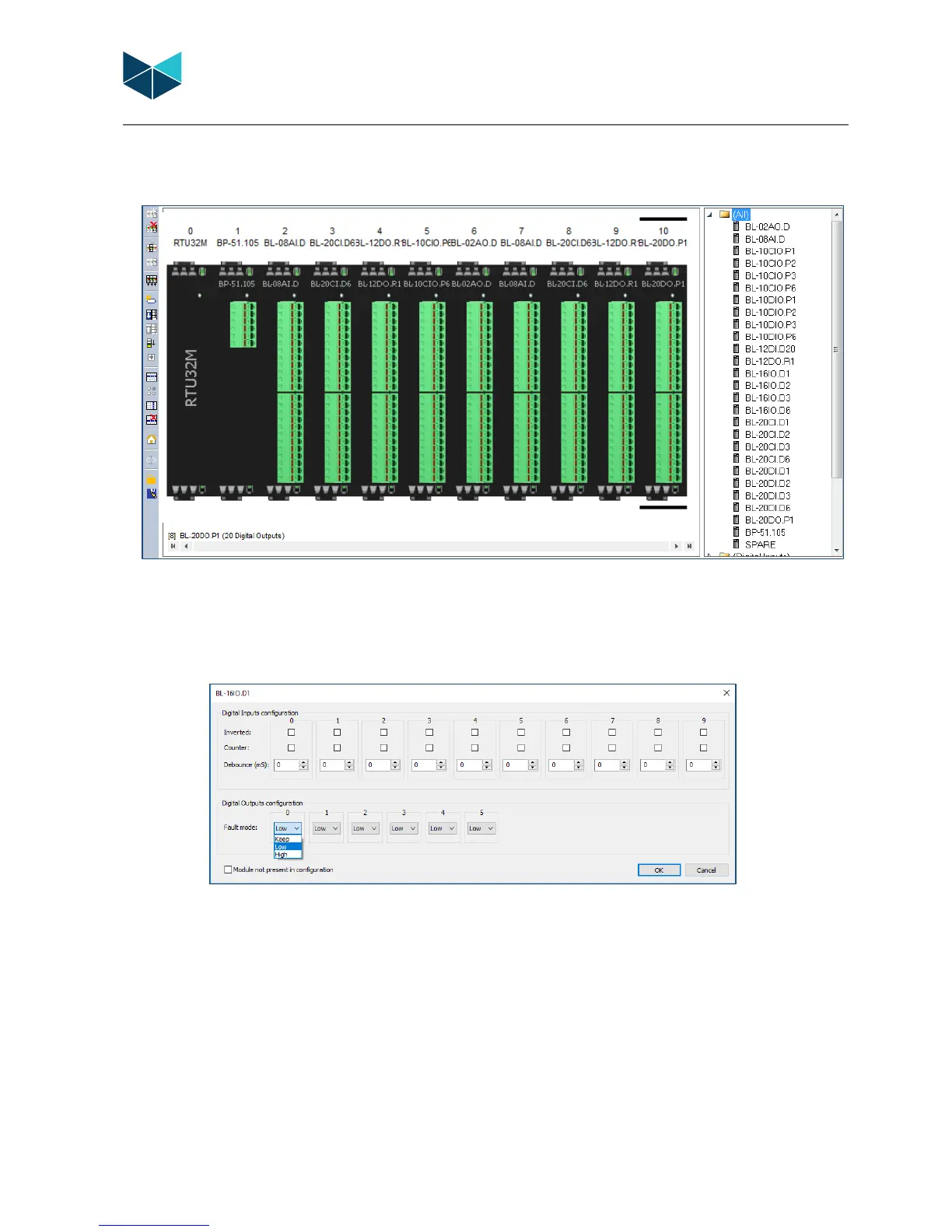
6.4.7 Configure Module Defaults
After creating or uploading a module array, module configurations can be modified from their default settings if required. Features and
settings for each module can be found on their respective datasheets.
DoubleClick on a module in the I/ O configurator to access the module I/O editor.
6.4.8 Configure Combination DI/DO module example
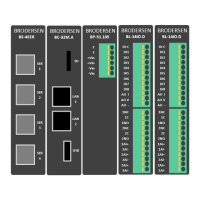
In the example below a combination DI/DO module with 10 DI and 6 DO has been selected.
Configuration Fields - Inputs and Outputs:
• Inverted: Select if input is to be inverted.
• Counter: Select if input is a counter. Note: If an input is receiving a 5 Khz pulse/count, but not defined as a counter, the I/O
bus will be spammed with 5000 pulses/sec!
• Debounce: Debounce in milliseconds, determines how long time the I/O must be high or low before it is detected as state
change.
• Fault Mode: Fault mode is when the module loses contact with the CPU. It is necessary to select for all channels.
o Keep (I/O module will keep last state)
o Low (Output will be forced Low)
o High (Output will be forced High)


 To Next Page