RTU32M Series User Guide
Brodersen A/S, Islevdalvej 187, DK-2610 Roedovre, Denmark, Tel: +45 45 35 26 27, Fax: +45 45 35 26 29, Email: sales@Brodersen.com
August 2018
Appendix 1 – RTU32M Factory Reset
RTU32M complete Reset
You can make a complete reset of the RTU32M that will reset it back to factory default settings. Note that during reset process all
settings in the RTU32M are lost.
To make a complete reset you will need a small screwdriver, pointed pen or paperclip for activating the reset button.
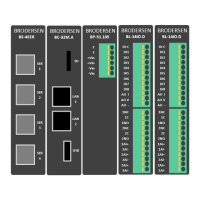
On the front panel of the RTU32M you will find a small 3mm hole located between the SD card and LAN 1. Behind this is a small push
button that is used in the reset process.
Procedure:
Use a small pointed device to push/activate the reset button while you apply power to the
RTU32M. Keep the reset button pressed for a minimum of 9 seconds before it is released.
The RTU32M logic application will be erased and the RTU32M will then start-up with factory
default settings. LAN IP address = 192.168.0.1 and password at default setting.


 To Previous Page