4-1
GF Series
Installation and Operation Manual
X-TMF-GF Series-MFC-eng
Part Number: 541B137AAG
March, 2010
Section 4 MultiFlo
®
Configurator
4-1 Introduction
The MultiFlo Configurator application is used to configure the gas and
range of the GF1XX. This section describes the MultiFlo Configurator and
its usage.
4-2 MultiFlo Configurator
The MultiFlo Configurator application allows communication to the GF1XX
through a personal laptop computer. Its primary function is to configure gas
and flow ranges within six, defined standard configurations (SH). Flow
ranges are configured to the Nitrogen equivalent. The MultiFlo Configurator
interfaces to the GF1XX through 9 pin RS-232 on the PC to the diagnostic
port on the MFC via a 2.5mm jack.
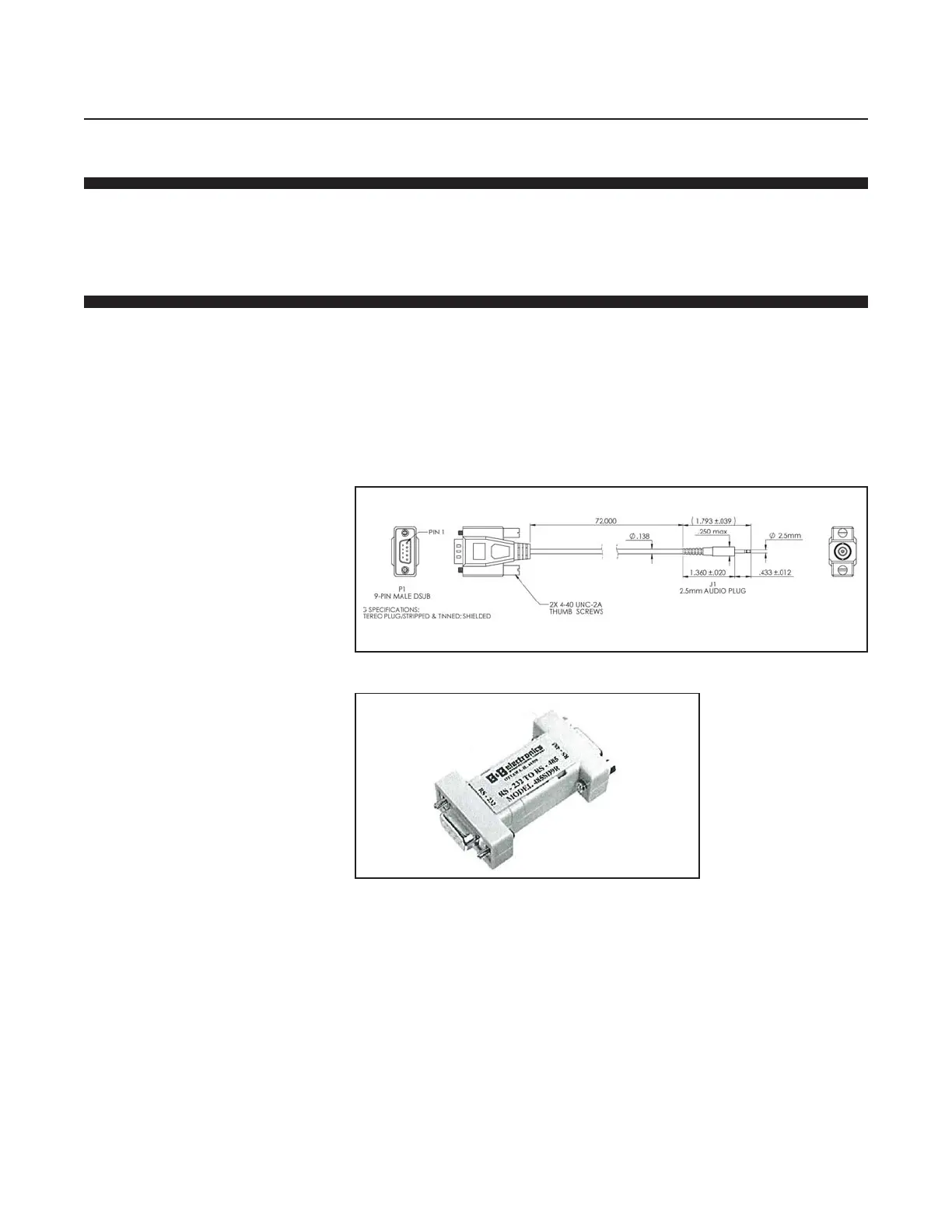
Refer to Figure 4.1 and obtain the MultiFlo Cable Adaptor
(P/N A331710003) from Brooks.
Connect the MultiFlo Cable Adapter 2.5mm jack to the Diagnostic Port on
the top of the device.
Figure 4-1 MultiFlo Cable Adaptor
Figure 4-2 RS-232/RS-485 converter (P/N A3323000001)


 To Next Page