S-7300A
5. USING THE OPERATION PANEL (BASIC OPERATIONS)
5. USING THE OPERATION PANEL
(BASIC OPERATIONS)
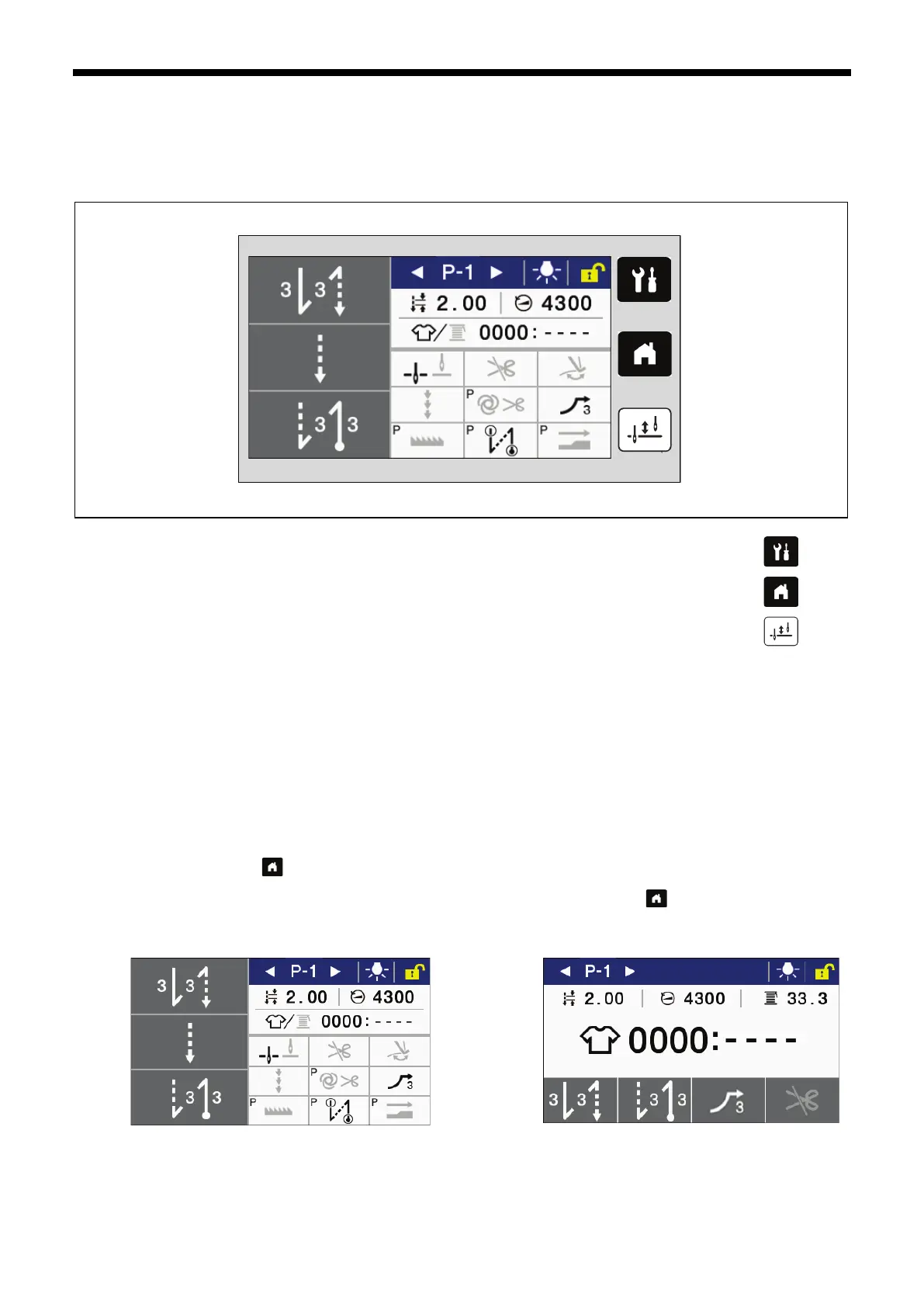
5-1. Names and functions
(1) Menu key
This key is used to move to the menu screen.
(2) Home key
This key is used to return to the home screen.
(3) Half stitch key
When the sewing machine is stopped, the needle bar can be moved up and down by pressing this key.
(4) Touch panel (display)
This displays messages and touch keys (icons).
5-2. Home screen
・ The home screen is displayed when the power is turned on.
・ Sewing operations are normally carried out while the home screen is displayed.
・ The home screen can be switched between the detailed home screen and the simple home screen.
*At the time of shipment from the factory, the detailed home screen is set to be displayed.
・ If you keep pressing the key while the home screen is displayed, you can switch between the detailed home screen
and the simple home screen.
Furthermore, you can return to the home screen from any other screen by pressing the key.
Detailed home screen Simple home screen
(2)
(4)



 To Next Page