S-7300A
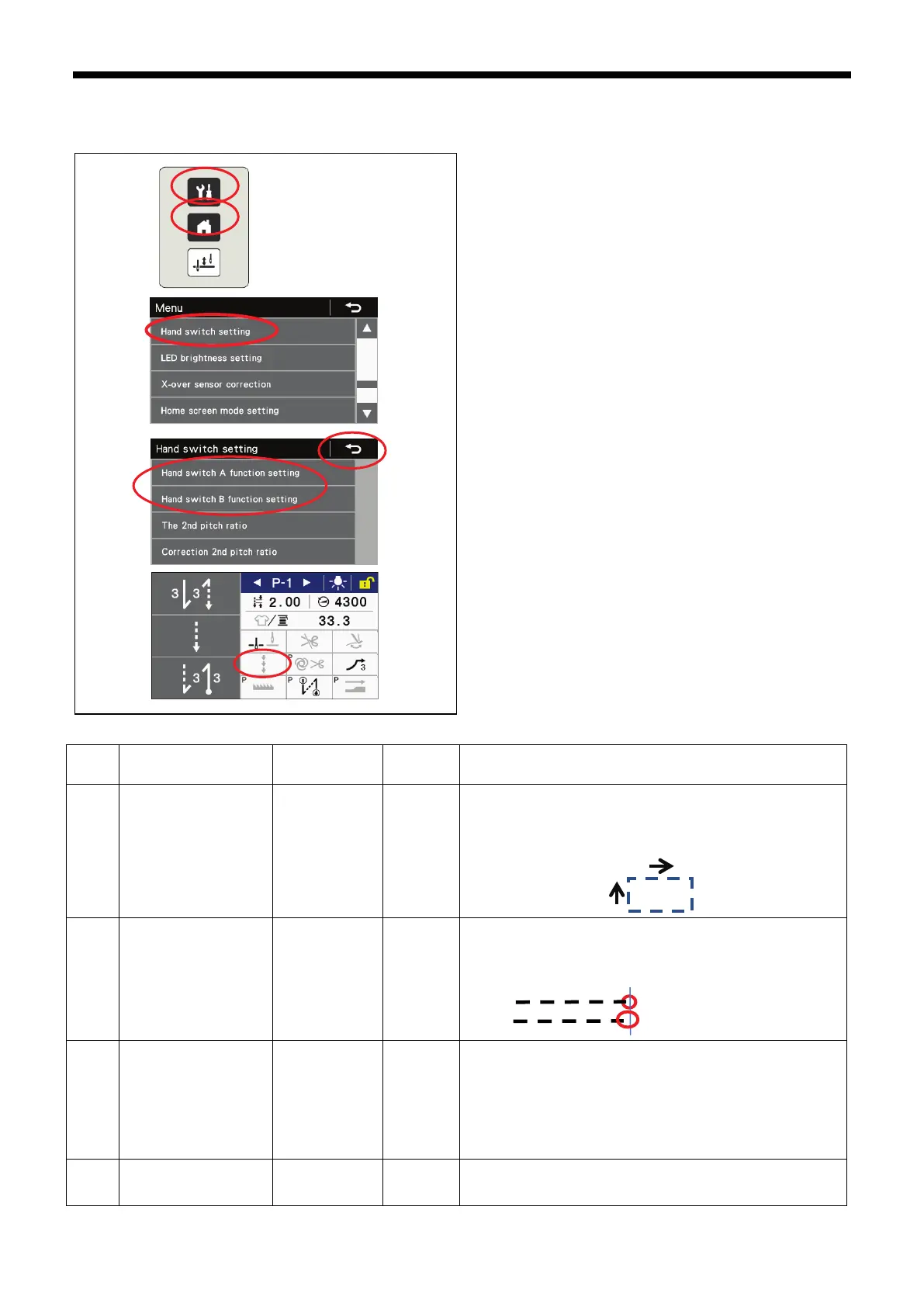
8-4. Example of using hand switch settings
Functions can be easily assigned to the hand switches.
1. Press the menu key (1).
2. Press the “Hand switch setting” key (2).
3. Press the “Hand switch A function setting” key or the
“Hand switch B function setting” key, and then assign the
required function.
4. Press the return key (3) or the home key (4) to return to
the home screen.
5. If necessary, press the correction sewing key.
Sewing example
No. Hand switch A Hand switch B
Correction
sewing
Use
1 5: Second pitch 1: Reverse OFF
If the sewing pitch changes according to the material sewing
direction
Example: If set to main sewing pitch for horizontal direction and
second pitch for vertical direction, use hand switch A to change the
pitch in order to prevent unevenness in the stitch pitches.
2
1: Correction sewing u
sing second pitch
1: Single c
orrection
sewing
ON
To match the sewing end, such as for corner sewing, set the
correction 2nd pitch to 50%.
Example: If sewing stops half a stitch short before the sewing end,
press hand switch A; if it stops a single stitch short, press hand
switch B.
3 4: Second pitch 1: Reverse OFF
・
If dividing sewing between condense backtack sewing and
reverse backtack sewing in places where a single sewing
machine is being used
・If you would like to make the sewing pitch narrower to increase
sewing strength in some sections
Example: Set the second pitch to condense sewing pitch (around
0.7), and then press hand switch A at the condense sewing places,
and press hand switch B at the reverse backtack sewing places.
4
10:
Presser foot lifter
(switching)
1: Reverse OFF
If you would like to use a hand switch to operate the presser foot
lifter
(The optional solenoid presser foot lifter set is required.)
* Refer to “6-10. Hand switches” for other settings.
Press switch A
Press switch B



 To Next Page