S-7300A
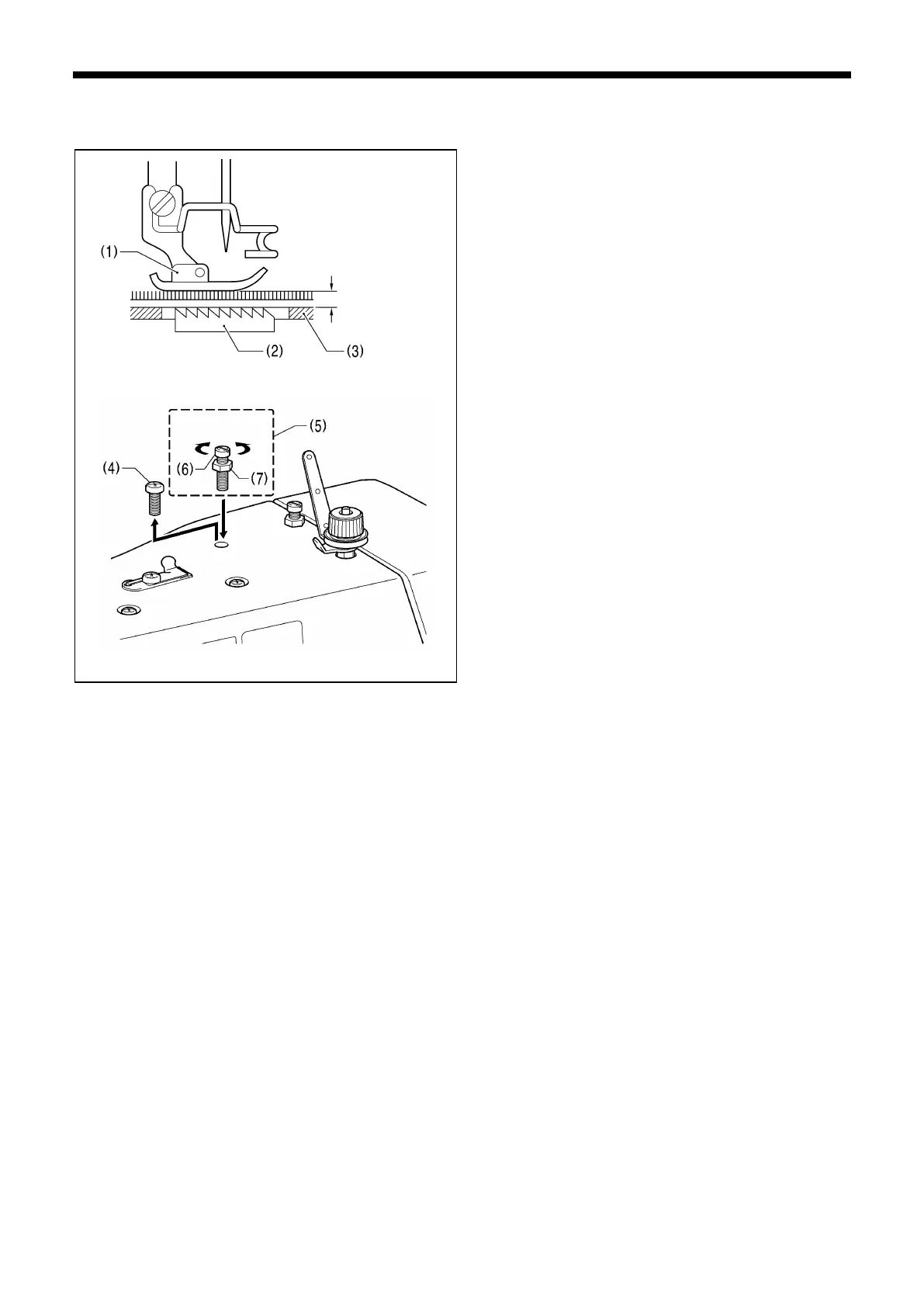
12-10. Adjusting the presser foot floating amount (minute lifting amount)
(option)
When sewing stretch materials and materials with long pile,
you can make minute adjustments to the floating amount for
the presser foot (1) in accordance with the material.
1. Turn the sewing machine pulley by hand to move the feed
dog (2) below the needle plate (3).
2. Use the lifting lever to lower the presser foot (1).
3. Remove the screw (4), and then replace the adjustment
screw set (5) (option SB6564).
4. Turn the adjusting screw (6) to adjust the floating amount.
・ To raise the presser foot (1)…Turn the adjusting screw
(6) clockwise.
・ To lower the presser foot (1) ... Turn the adjusting
screw (6) counterclockwise.
5. Tighten the nut (7).
* After making the adjustment, sew a piece of material to
check the floating amount.



 To Next Page