S-7300A
6. USING THE OPERATION PANEL (ADVANCED OPERATIONS)
6-11. Reading and writing data using USB media
Programs and memory switch data can be copied between sewing machines by means of USB media.
Do not connect anything to the USB port other than the USB memory. If this is not observed, problems with
operation may result.
<Switching to USB media read/write mode>
1. First connect the USB media to the sewing machine.
2.
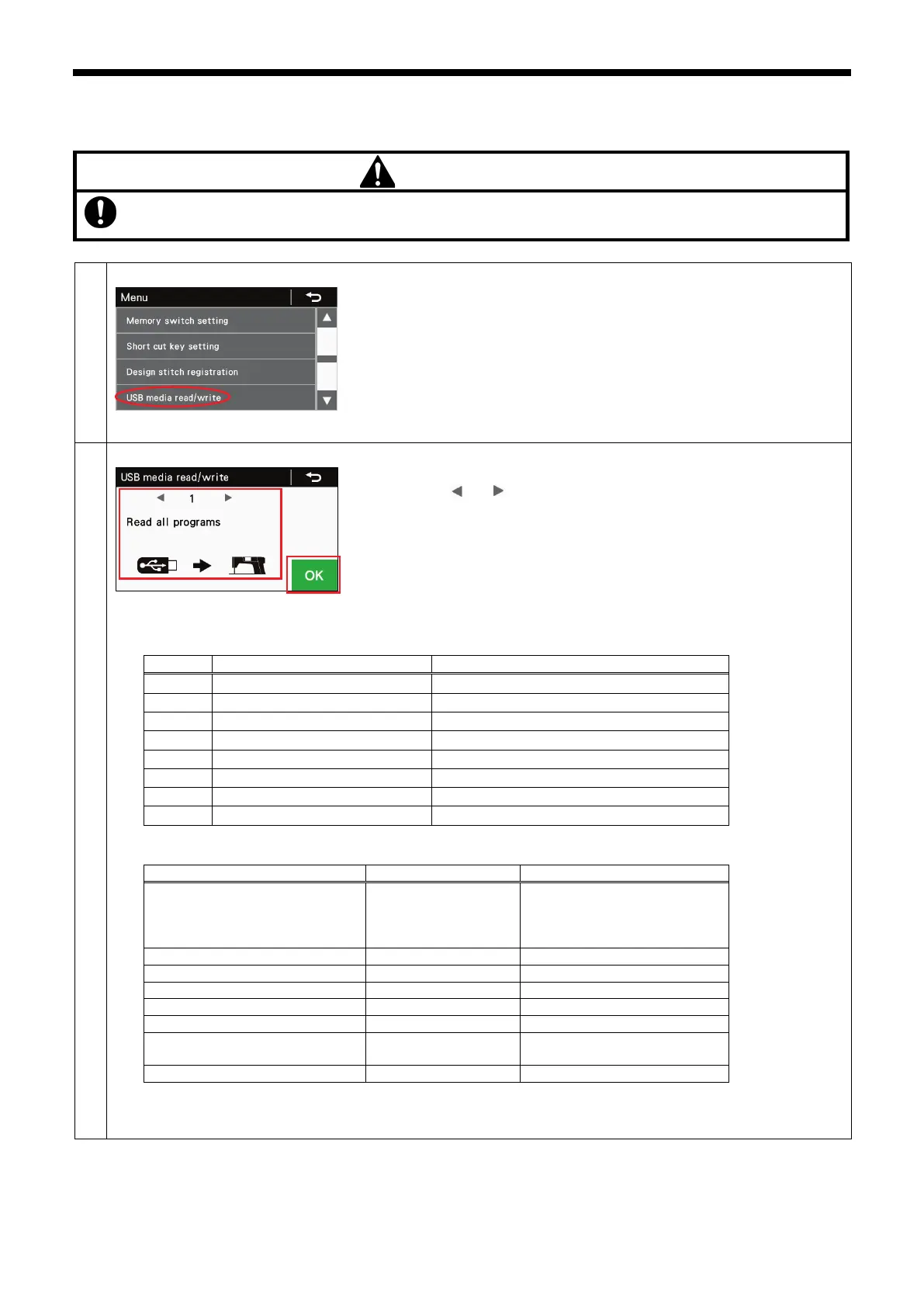
At the menu screen, select "USB media read/write" to switch to USB media
read/write mode.
* Multi card readers may not be recognized correctly.
<USB media read/write mode>
(1) The currently-selected read/write item and illustration are displayed, so
press the or key to change the read/write item.
(2)
Press the OK key to run the selected read/write item. The read/write in
progress screen will be displayed.
* If no USB media is connected at this time, the message "USB media can not
be detected." will be displayed.
・ Press the return key to return to the setting menu.
The read/write items that can be selected are as follows.
→
→
←
←
→
→
Write all memory switches
←
←
→
→
←
←
Write production information
←
←
←
←
Creating folders for USB media
Program ISMUPG.SEW
(** is the value for MSW-750)
(Refer to the Service Manual
Error log
E*******.LDT
M*******.LDT



 To Next Page