SMART MATRIX FEEDER Operation
SMART MATRIX FEEDER 2-5
3 – Entering Alphanumeric Values
Some functions of SMART MATRIX FEEDER terminal require typing alphanumeric data fields (e.g. Style
Name setup or change).
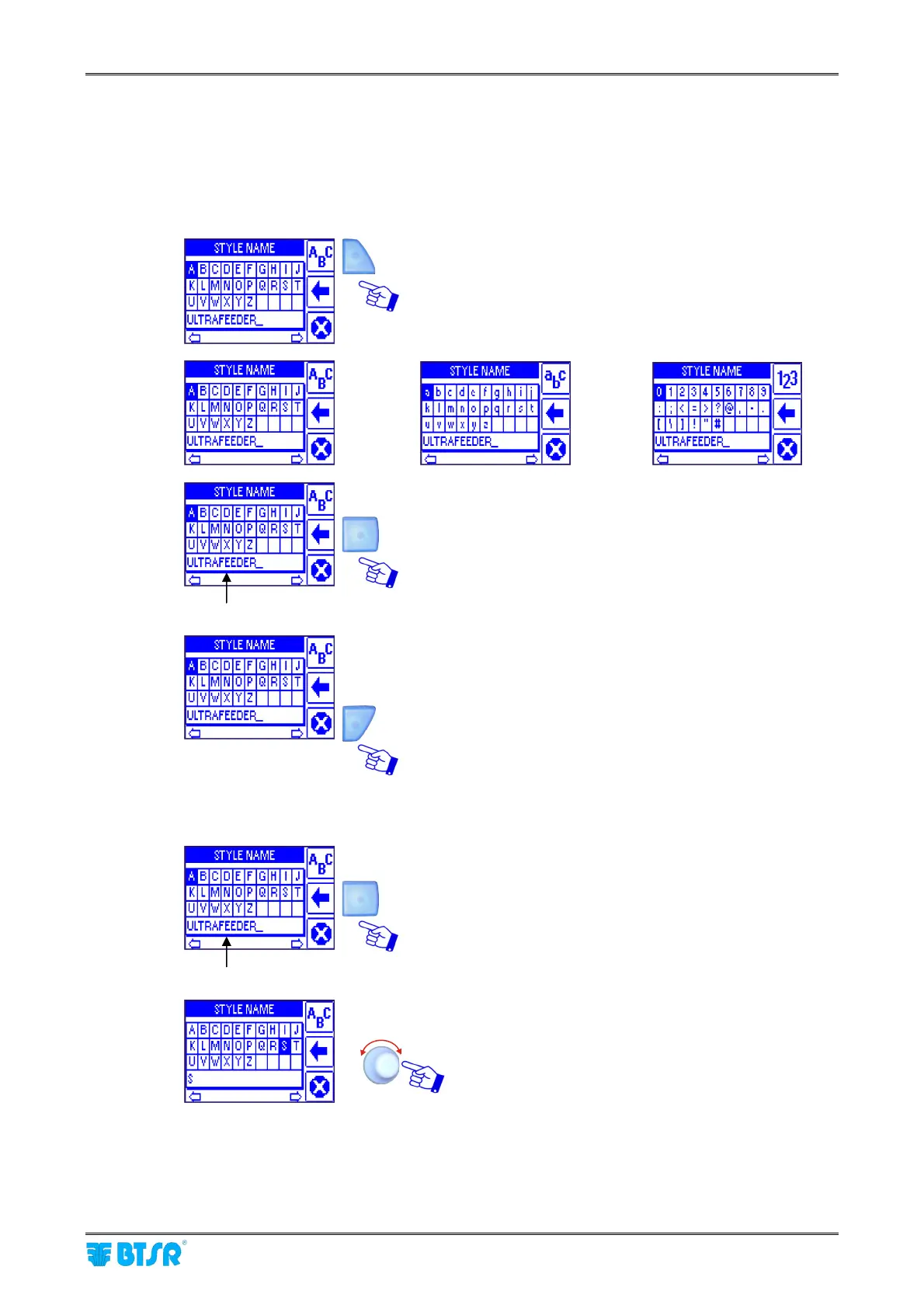
To make this operation easier, a soft keyboard has been implemented, which allows entering capital/small
letters, numbers and graphic symbols.
While entering the desired character string, the shortcut buttons provide the following functions:
It allows selecting, in sequence, the set of capital letters,
small letters and numbers/graphic symbols.
DEFAULT STYLE NAME
It allows clearing the character to the left of cursor in the
STYLE NAME field.
It allows leaving the string entering function.
To enter the Style Name (e.g. STYLE1), operate as follows:
DEFAULT STYLE NAME
Press repeatedly the indicated button to clear the
Default Style Name.
Select, in sequence, the S, T, Y, L, E characters.
Î
Î
1)
2)
3)



 To Next Page