SMART MATRIX FEEDER Operation
SMART MATRIX FEEDER 2-7
Immediate Function Activation through the SMART MATRIX
FEEDER Buttons
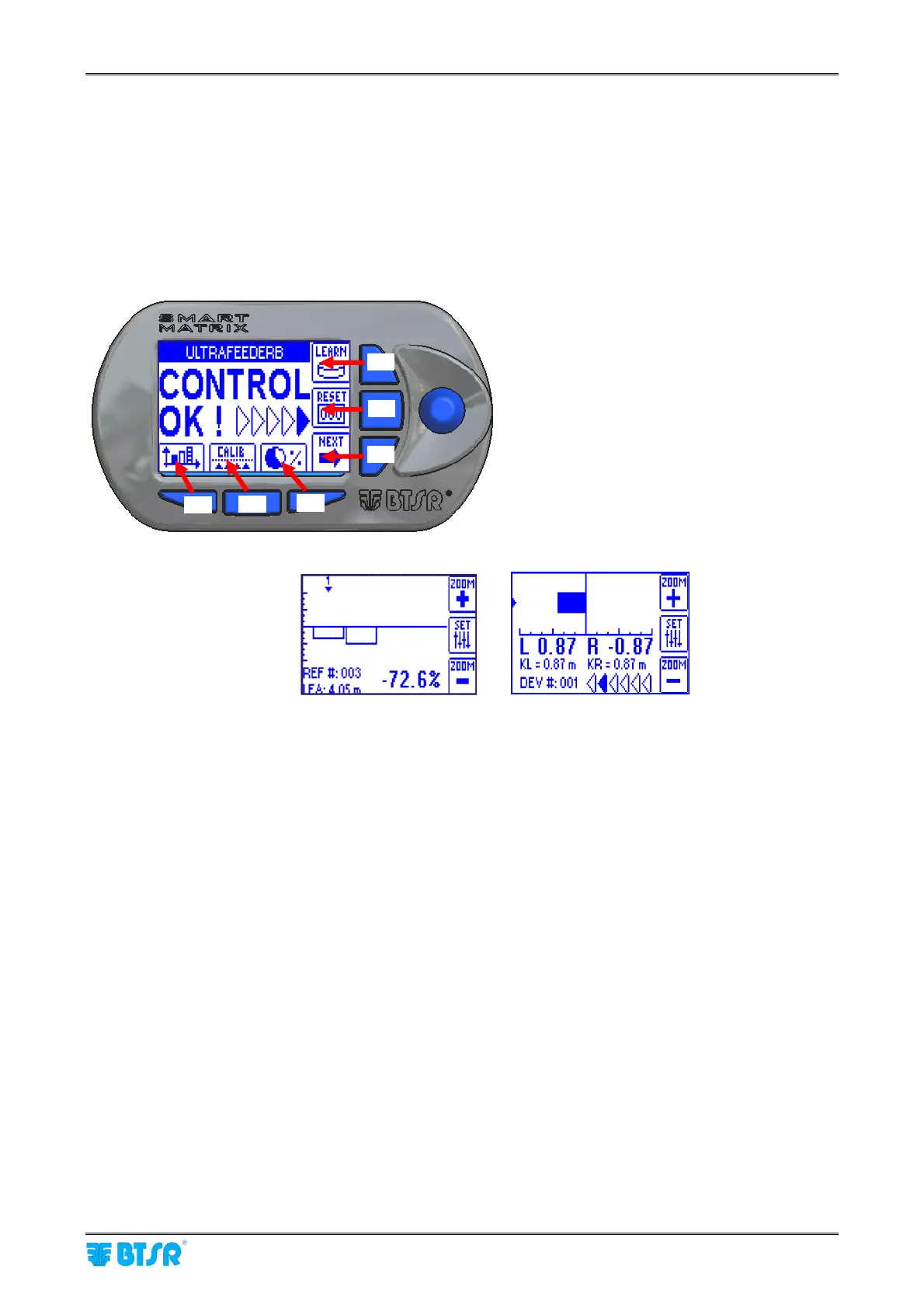
The 6 blue buttons (B1 ~ B6) allow you to directly activate some system functions without passing through
the menu items. Such functions are indicated by the icons associated with the buttons, as shown on the
following figure.
The detailed explanation of the various functions will be provided on next paragraphs.
The following examples are only provided to summarize the Button → Function association.
Within some configuration/parameter setting functions, the B1 ~ B6 buttons may also perform a “shortcut”
function, which will be explained each time.
Immediate function activation buttons.
B1 = Histogram
Visualization:
B2 = Calibration:
It allows you to perform the automatic calibration of the device work
tensions, to smooth the yarn absortion of the various feeds.
B3 = Efficiency Data: It allows you to display the efficiency values of your production.
B4 = LEARN Activation It allows you to activate the LFA self-learning function.
B5 = Fault Reset It allow you to reset the fault/alarm signaling.
B6 = Next Function
It allows you to view further information (for instance in case of multiple
errors)
The function associated with buttons B2 and B3 depends on whether the calibration is enabled or
disabled.
B4
B5
B6
B3
B2
B1



 To Next Page