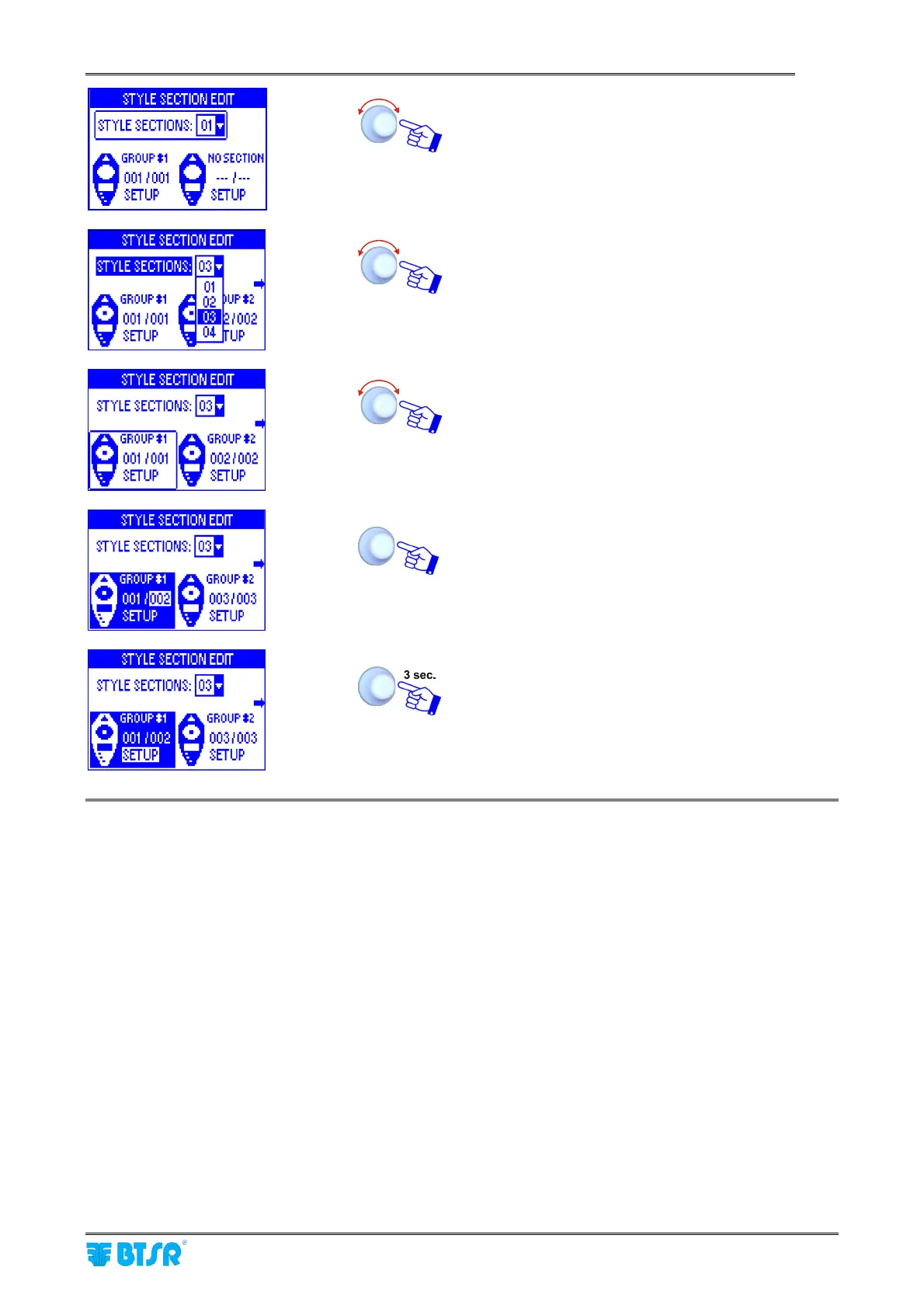
Style Programming
SMART MATRIX FEEDER 2-29
Select STYLE SECTIONS.
Set the number of sections i.e. the number of device
groups [1-12] (03 in this example).
Select GROUP #1.
Set the identification number of the last device
belonging to the first section (002) and confirm.
To start setting the parameters related to section 1
(GROUP #1).
At this point you will be requested to setup the operation parameters for each ULTRAFEEDER, ROLLING
FEEDER or UNIFEEDER device group.
The parameters change:
- according to the application previously selected with the SETUP
→
APPLICATION function. More
precisely, for SEAMLESS, SOCKS, PANTYHOSE, JERSEY KNIT and JACQUARD KNIT (*)
applications, basically the same parameter set will be used, while the FLAT KNIT application uses a
different specific set of parameters.
- according to the device type selected for the group (ULTRAFEEDER, ROLLING FEEDER or
UNIFEEDER)
The following pages show the sets of parameters related to both the above described cases.
(*) The JACQUARD KNIT application uses and additional parameter with respect to the other applications,
as indicated on the note of next page.



 To Next Page