Operation
- 3.18 - SMART WARP
TEST - SENSOR Test of Individual Sensors
SETUP
!
!!
!
CONFIG
!
!!
!
TEST
!
SENSOR
This function gives you the possibility to check communications between the
SMART WARP terminal and (one by one) each of the connected sensors.
In this way it is possible to check that:
" All sensors are correctly numbered and identified
" All sensors respond correctly to the terminal
" The same number has not been assigned to more than 1 sensor.
This function is particularly useful during the testing phase (immediately after
installation) and when operation problems occur which require a check of each
sensor individually.
The test does not send any diagnostic message to the SMART WARP system
display!
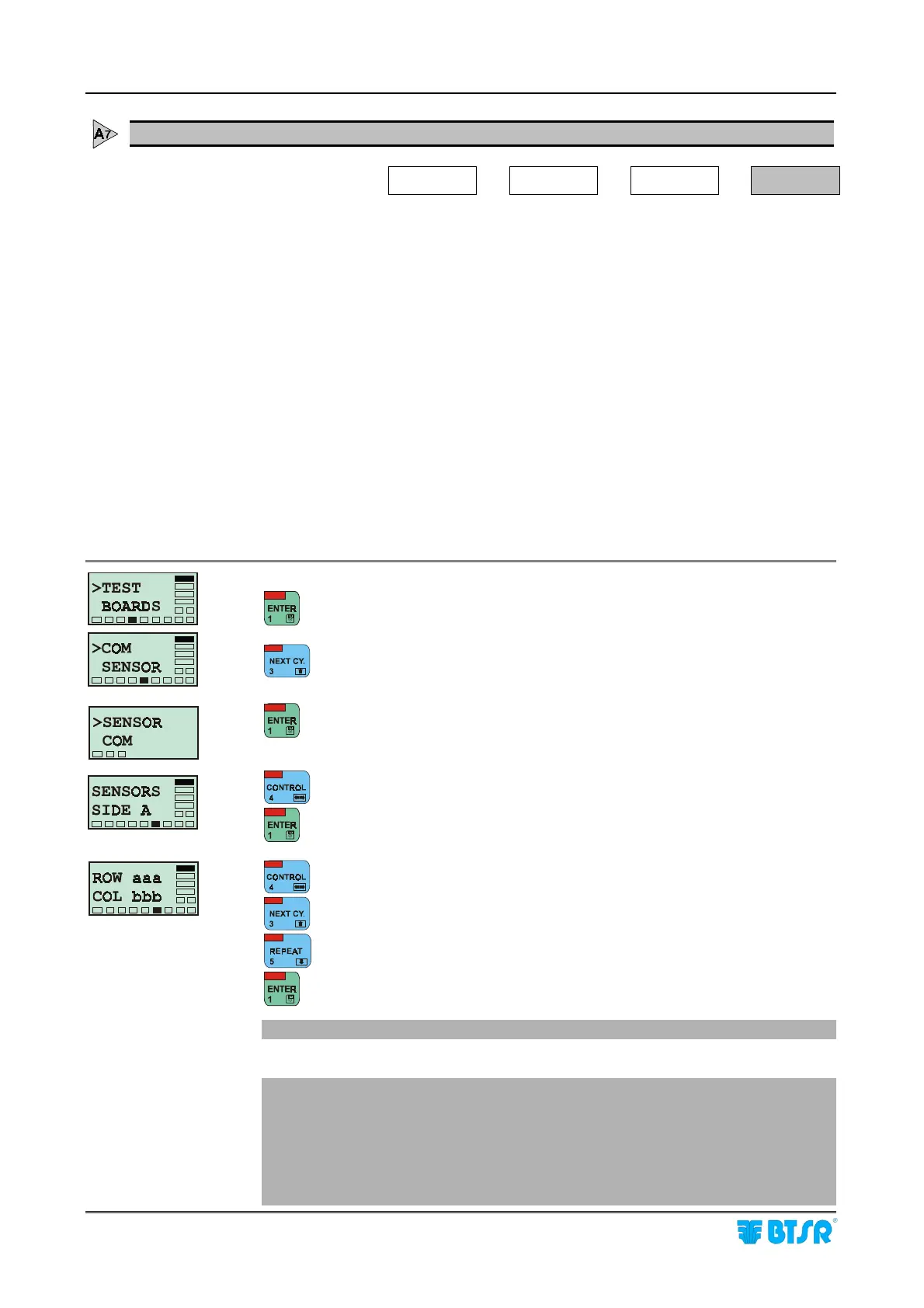
The operator shall simply select the number of the desired sensor, within òthe map
defined with the MAP function:
" Machine side (either Side A or Side B)
" Sensor position (Row aaa, Col bbb)
confirming that the red LED of the selected sensor is flashing.
to activate the function test.
to select the Sensor option.
to access the Test of Sensors.
to move from SIDE A to SIDE B or viceversa.
to confirm the selection.
to move from ROW field (aaa) to COL field (bbb) or viceversa.
to increase the selected value “aaa” or “bbb”.
to decrease the selected value “aaa” or “bbb”.
to confirm the selection.
! Check that the Red LED of the selected sensor is blinking.
Repeat the operation selectively, for all the sensors you want to test.
!
If the Red LED of the sensor is not blinking, it means that the sensor is
faulty or that the sensor numbering procedure was not performed correctly.
In this case try to renumber the sensors and, if required, replace the sensor.
! If the Red LED is blinking on more than one sensor, it means that the same
number has been assigned to more than one sensor. In this case it will be
necessary to repeat the sensor numbering procedure.











 To Next Page