Operation
- 3.22 - SMART WARP
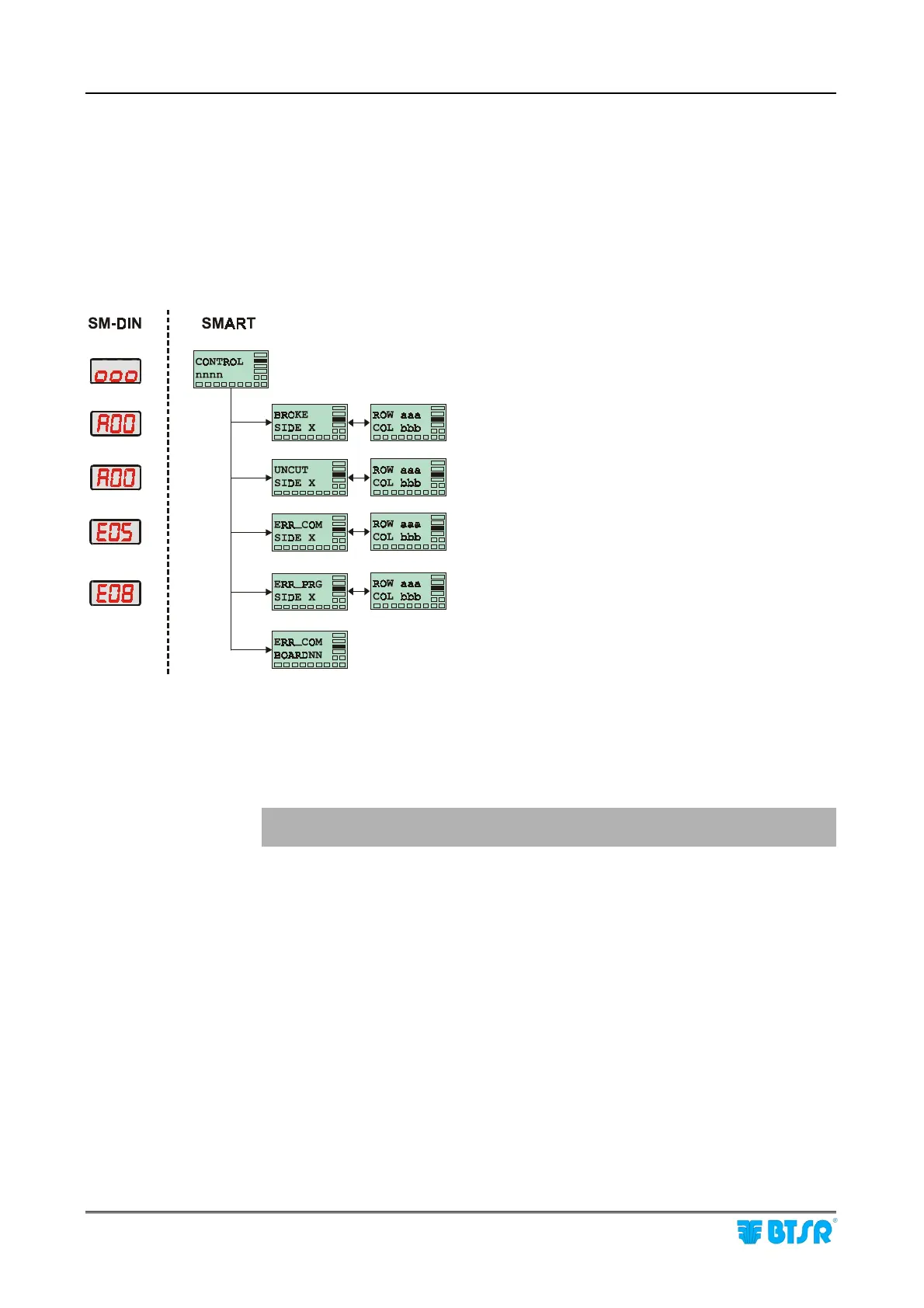
Display Signalings during the Control Process
During the Control process, the display of the SMART WARP terminal as well as
the display of SM-DIN modules may show various failure signaling messages.
When the failure refers to a sensor two alternate screens appear which indicate the
machine side (either Side A or Side B) and the co-ordinate (ROW/COL) of the
sensor that detected the failure.
Example:
SMART WARP in control mode
(no failure detected)
Machine STOP due to broken yarn (BROKE)
on the indicated device (SIDE, ROW, COL).
Machine STOP due to uncut yarn (UNCUT)
on the indicated device.
Communication error between SMART terminal and
device nn
During parameter programming on the indicated sensor.
Communication error between SMART WARP and
SM-DIN module NN
! To restore the correct operating conditions, press RESET and refer to
chapter 4 "Troubleshooting and Maintenance".
Alternate
Alternate
Alternate
Alternate











 To Next Page