Start-up procedure 9
Logamax plus GB162-80 kW/100 kW - Subject to modifications resulting from technical improvements! 57
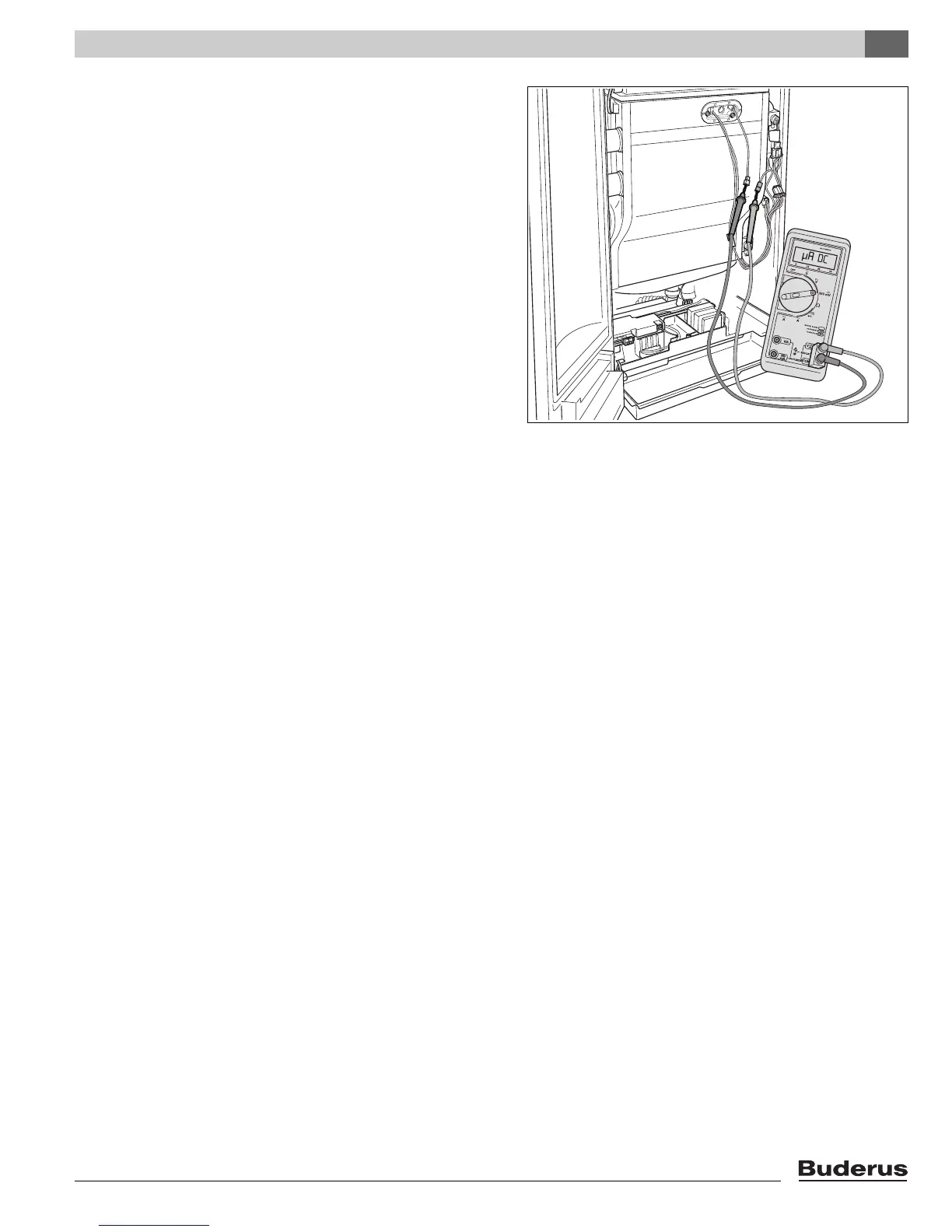
z Connect the multimeter in series (fig. 68).
Select the µA DC range on the multimeter. The multim-
eter must have a resolution of at least 1 µA.
z Switch ON the heating system by pressing the main
switch of the BC10 basic controller (fig. 66, pos. 1).
z Activate the Service mode in accordance with the
"Service mode" menu (table 9, page 42).
z Set the capacity to minimum (part load) according to the
"Service mode" menu (table 9, page 42).
z After the LED "Burner operation" (fig. 66, pos. 6) has lit
wait for one minute until the boiler is burning at part load.
z Measure the ionization current. The ionization current
must be > 5 µA DC at part load operation.
z Enter the result in the start-up report (see paragraph 15.1
"Start-up report", page 85).
z If the result is not as it should be, check the gas/air ratio
(paragraph 9.8, page 52) or check the ionization elec-
trode (paragraph 12.3.4, page 68).
z Press and hold the "Chimney sweep" button (fig. 66,
pos. 3) (approx. two seconds), until the dot in the right-
hand bottom corner of the display (fig. 66, pos. 9)
appears. See also table 8, "Flue gas test", page 41.
z Switch OFF the heating system by pressing the main
switch of the BC10 basic controller (fig. 66, pos. 1).
z Remove the multimeter and reconnect the monitoring
cable.
z Switch ON the heating system by pressing the main
switch of the BC10 basic controller (fig. 66, pos. 1).
z Check that the boiler performance is still at the required
value. See the "Service mode" menu (table 9, page 42).
9.13 Test the Ignition Safety shut off device
z Switch OFF the heating system by pressing the main
switch of the BC10 basic controller (fig. 66, pos. 1).
z Disconnect the plug and socket connection of the moni-
toring cable.
z Switch ON the heating system by pressing the main
switch of the BC10 basic controller (fig. 66, pos. 1).
z Press the "Chimney Sweep"
d button and hold it (for
approx. two seconds), until the display shows the
decimal point.
z Check if the boiler does one start-up attempt and three
restart attampts.
After each start-up attempt the boiler will signal a start-up
failure. A "6A" code can be seen in the display.
After the last start-up attempt, the boiler will lock out.
The "6A" code is blinking in the display.
z Connect the plug and socket connection of the moni-
toring cable.
Fig. 68 Measuring the ionization current







 To Next Page