23
EN
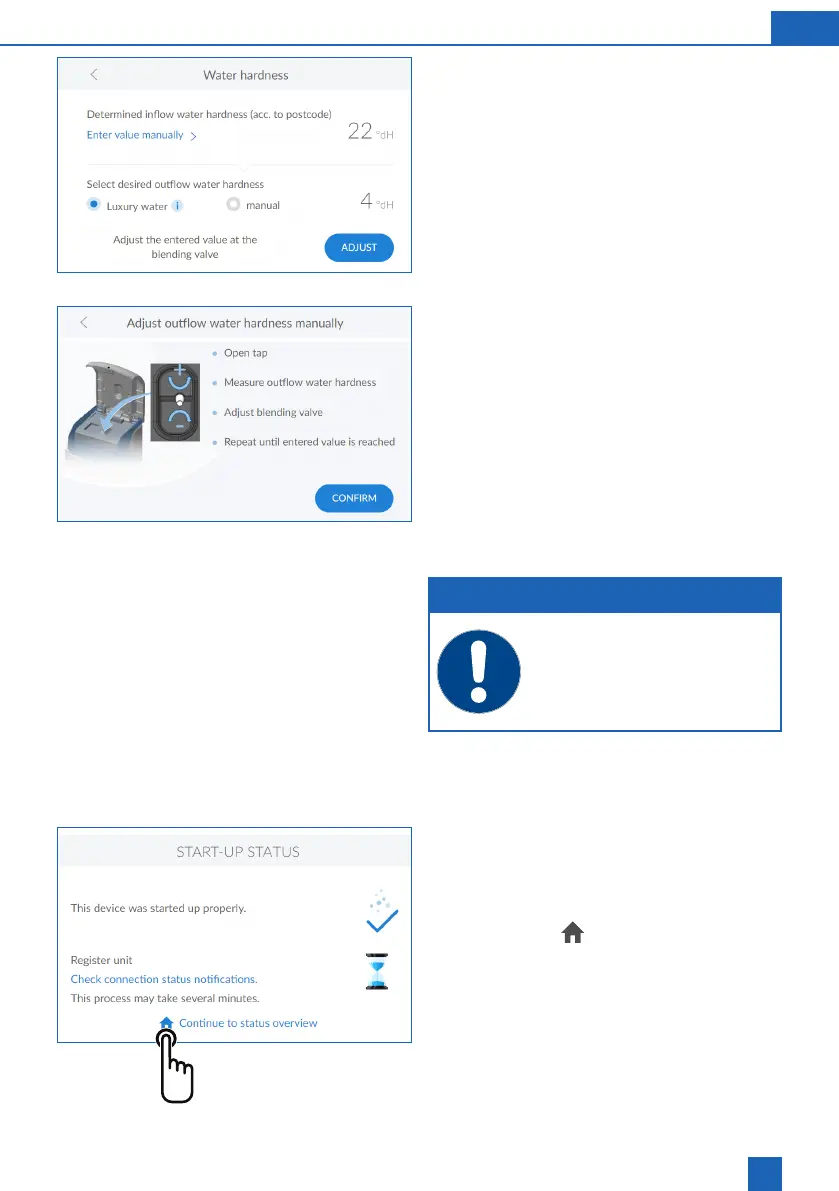
Water hardness
from a database. Check the database value corre-
sponds to the water hardness at the installation site.
If the database value deviates from the measured
manually.
To change the water hardness, press
ENTER VALUE
MANUALLY
>
The desired outlet water hardness can now be se-
lected. It is possible to select the qualities of pearl
outlet water hardness.
The design of the unit does not permit setting it to
hardness.
The adjustment of the manual blending of the prod-
of 300 to 600 l/h. First of all, measure the hardness
of the pearl water at the nearest fully opened tap
downstream from the product. Compare this value
with the value in the control unit and, if necessary,
adjust it, i.e. increase or reduce the hardness.
NOTE
The mixing valve must always be set to
the value shown on the display.
Following screen:
Completing the start-up procedure
Completing the start-up procedure
Once the water hardness is set, the start-up proce-
dure is complete.
Tap the
HOME
icon



 To Next Page