42
EN
Connection via the home network
If your product is not yet integrated in the home
network, follow the steps described in chapter 9.2
(LAN) or 9.3 (WLAN).
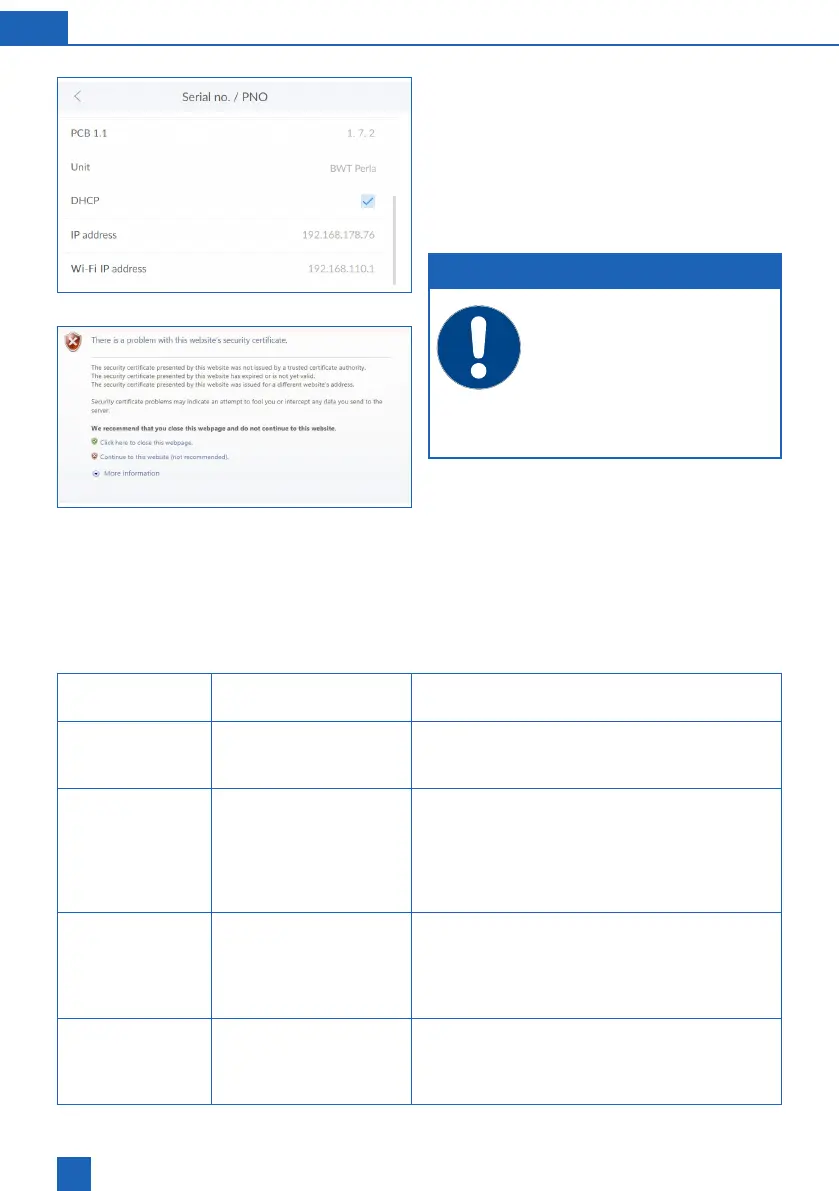
Open the browser of a device in the home network
(smartphone/tablet/computer) and enter the IP
address displayed under Info / Serial no. / PNR in
the address bar.
NOTE
If a eld opens with a security warning,
press
NEXT
or
CONTINUE
.
To enable data transfer, the follow-
ing port must be open on your router:
TLS / SSL port 443.
Depending on the conguration of your
router, the assigned IP address may
change daily.
The login window of the BWT product appears.
Enter the login code that you received from BWT
by e-mail.
Your BWT product is now connected and can be
operated.
9.7 Fault during start-up
Fault Possible source of the
fault
Steps to resolve the fault
1 Fault when acti-
vating the product
1.1 Were all mandatory
Make sure the Title, Surname and E-mail address
-
rectly, please follow step 1.2.
1.2 Is the product connect-
reception bars on the top right of the display. If no
GSM connection is established, please follow the
steps to connect the product to the home network
(chapter 9.2 and 9.3 (LAN, WLAN)). If a connection
is established, please follow step 1.3.
1.3 Is there a success
report in the message
-
message, start the activation process again. If you
2 Fault when deliv-
ering the activa-
tion message
2.1 Has sufficient time
Activation of your product may take up to an hour.
If after this period you have not received an acti-
vation e-mail to the address you have provided,
please follow step 2.2.



 To Next Page