26
EN
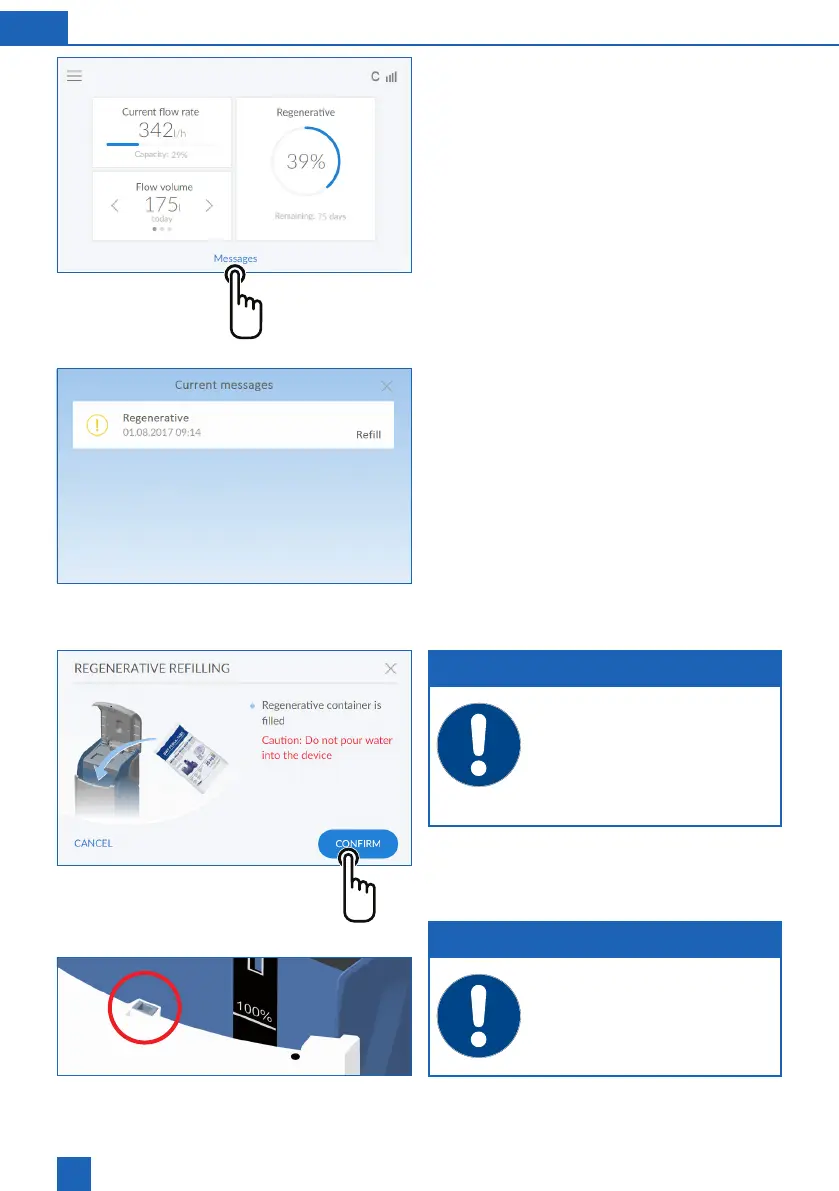
8.4 Operating display (home screen)
and range of coverage.
Outlet water ow rate: Pressing < or > displays the
daily, weekly or monthly consumption.
Messages: Pressing
MESSAGES
displays additional
information in chronological order.
Following screen:
Messages
8.5 Relling the regenerative
The product monitors the regenerative supply with a
sensor and reports a shortfall via the device status
display (yellow) and the display. All commonly avail-
able regeneratives that comply with DIN EN 973
type A, (e.g. Perla tabs) can be used.
Press gently to open the Easy Fill technology
cover.
Fill the regenerative container (R) with regener-
ative.
Close the Easy Fill technology cover.
NOTE
It is important that no dirt gets into the re-
generative container when you are rell-
ing (if necessary, clean the regenerative
packages before use). Clean the regener-
ative container with drinking water if dirt
does get into the unit.
CONFIRM
button in the
Messages menu or in the Functions menu under
RE-FILL REGENERATIVE.
NOTE
When lling the regenerative, make sure
that no dirt gets into the locking mecha-
nism (red circle).



 To Next Page