39
EN
9.3 WLAN connection
WLAN connection to the home network via an
existing router
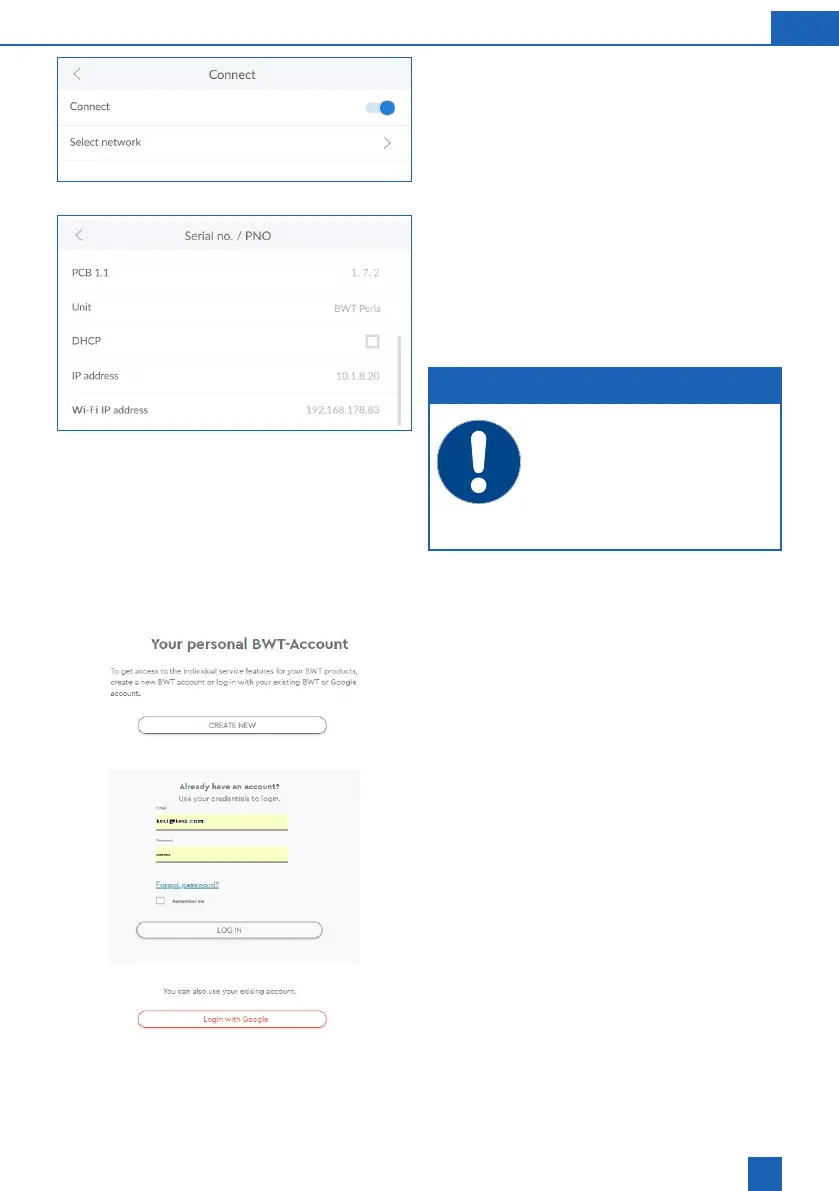
In the control panel of your BWT product, select
Settings / General / WLAN connection and activate
the connection.
Select Network under the menu item. You can now
select your home network, enter the corresponding
security key and connect via Connect.
If the connection is successful, press
CONTINUE
.
The IP address assigned by the router is now
Info / Serial no. / PNR.
NOTE
Integration into a home network is pos-
sible using either LAN or WLAN. It is not
possible to have two connections at the
same time.
To enable data transfer, the follow-
ing port must be open on your router:
TLS / SSL port 443.
9.4 Activating your BWT product
After registering your BWT product, you will receive
Use the user data of your existing BWT customer
account or create a new account.
by e-mail. Please keep this e-mail safe, as the pass-
words it contains are required for remote operation.
Your BWT product is now registered and you can
use all additional online functions.



 To Next Page