79
Reference
Section 5: Reference
Occlusion Pressure Range Test II
Description
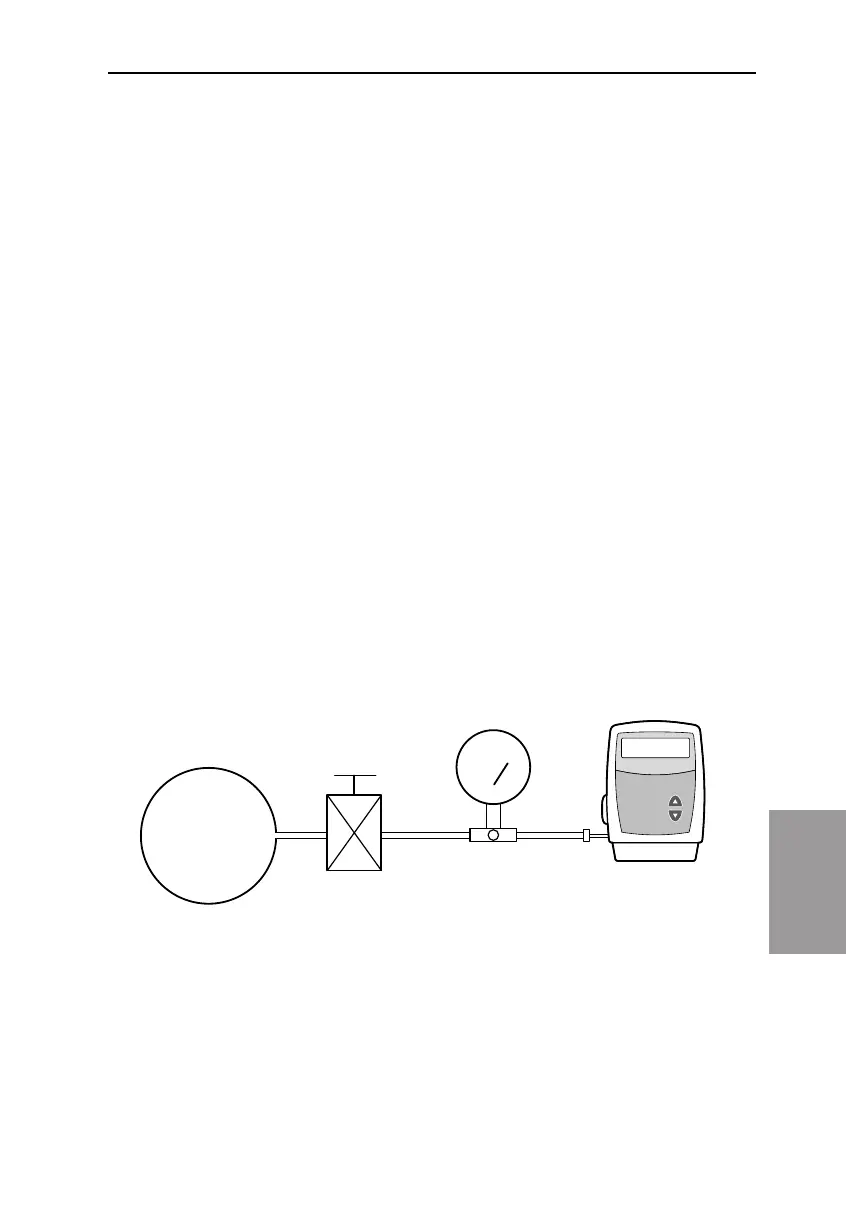
An adjustable metered pressure source is connected to the Medication
Cassette Reservoir tubing. e pressure is slowly increased until the high
pressure alarm sounds.
Equipment needed
Pressure gauge, 40 ± 1 psi [2.76 ± 0.07 bar]
Pressure vessel, partially lled with water
Pressure regulator, 40 psi [2.76 bar]
50 or 100 ml Medication Cassette Reservoir containing water
Procedure
1. Insert 2 AA batteries and wait for the pump to power up.
2. Attach a Medication Cassette Reservoir to the pump.
NOTE: e pressure from the source must be zero when the cassette
is attached.
3. Assemble the apparatus as shown.
4. Connect the Medication Cassette Reservoir outlet tube to the me-
tered pressure source.
NOTE: Do not use a CADD™ Extension Set with Anti-Siphon Valve.
5. Start the pump and run at 50 ml/hr.
1999-01-23 D. Zurn
«Lgc Occlusion NoText»
Regulator Pressure Gauge
40 PSI
[2.76 bar]



 To Next Page