Section 2: Pump Setup and Programming
Pump Setup &
Programming
33
Attaching a Cassette
Obtain a new, lled Medication Cassette Reservoir, or CADD™ Adminis-
tration Set attached to a non-vented, exible IV bag.
WARNING: For detailed instructions and warnings pertaining to the
Medication Cassette Reservoir or CADD™ Administration Set, please
refer to the instructions for use supplied with the product for prepar-
ing the product for use.
Aer attaching the cassette, proceed to the Reservoir Volume screen to
reset the value for the volume, and then prime the tubing.
CAUTION: Frozen medication must be thawed at room temperature
only. Do not heat the Medication Cassette Reservoir in a microwave
oven as this may damage the medication, the Medication Cassette
Reservoir, or cause leakage.
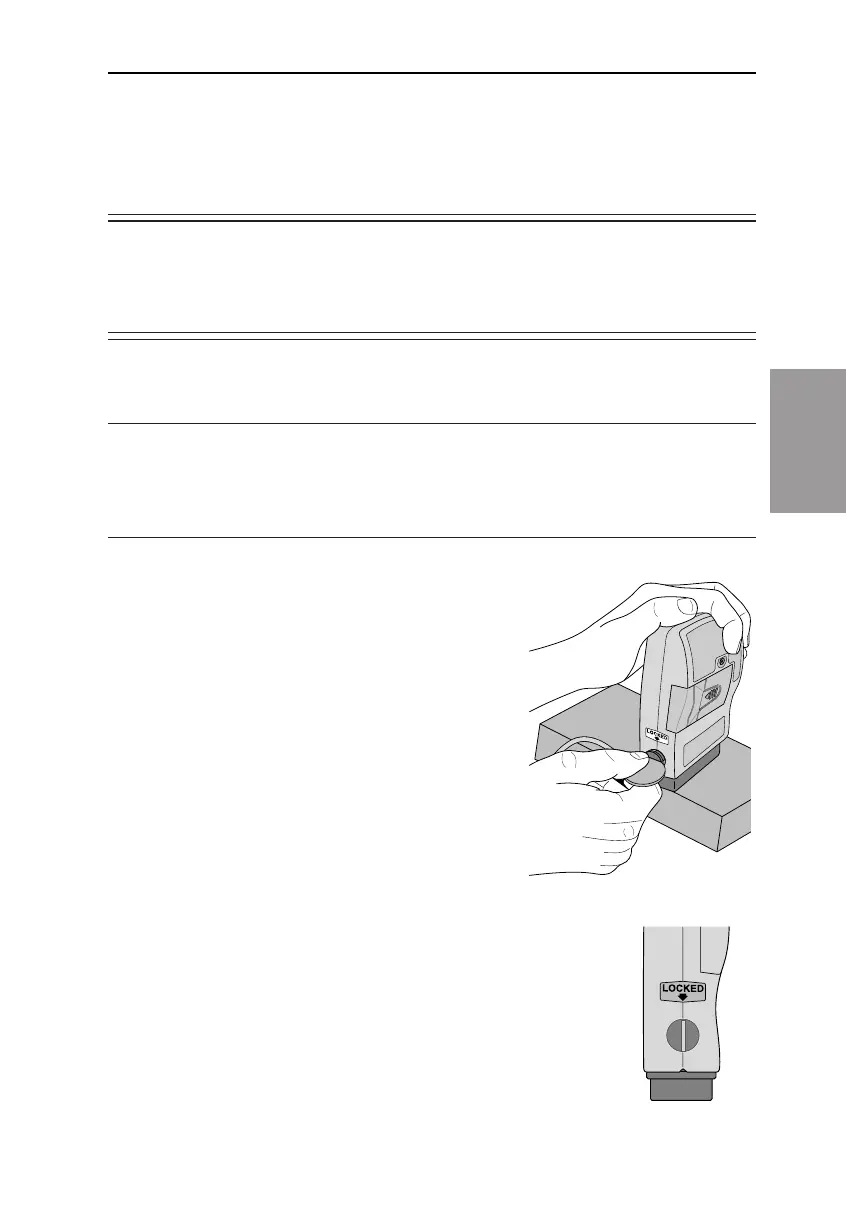
To attach the cassette to the pump
1. Clamp the tubing.
2. Insert the cassette hooks into the
hinge pins on the pump.
3. Place the pump upright on a rm, at
surface. Press down so the cassette ts
tightly against the pump.
4. Insert a coin into the lock, push in, and turn
counterclockwise until the line on the lock lines
up with the arrow on the side of the pump and
you feel the lock click into place.
1999-08-17 D. Zurn
«Lgc Attach Cass Coin»
1998-12-16 D. Zurn
«Lgc Locked Side»
®



 To Next Page