Appendix B - Wireless Voice Link
86 ©2020 CAE 905K351052 v1.1
CAEApollo
The base station should come already connected and installed inside the simulator.
To prepare the base station:
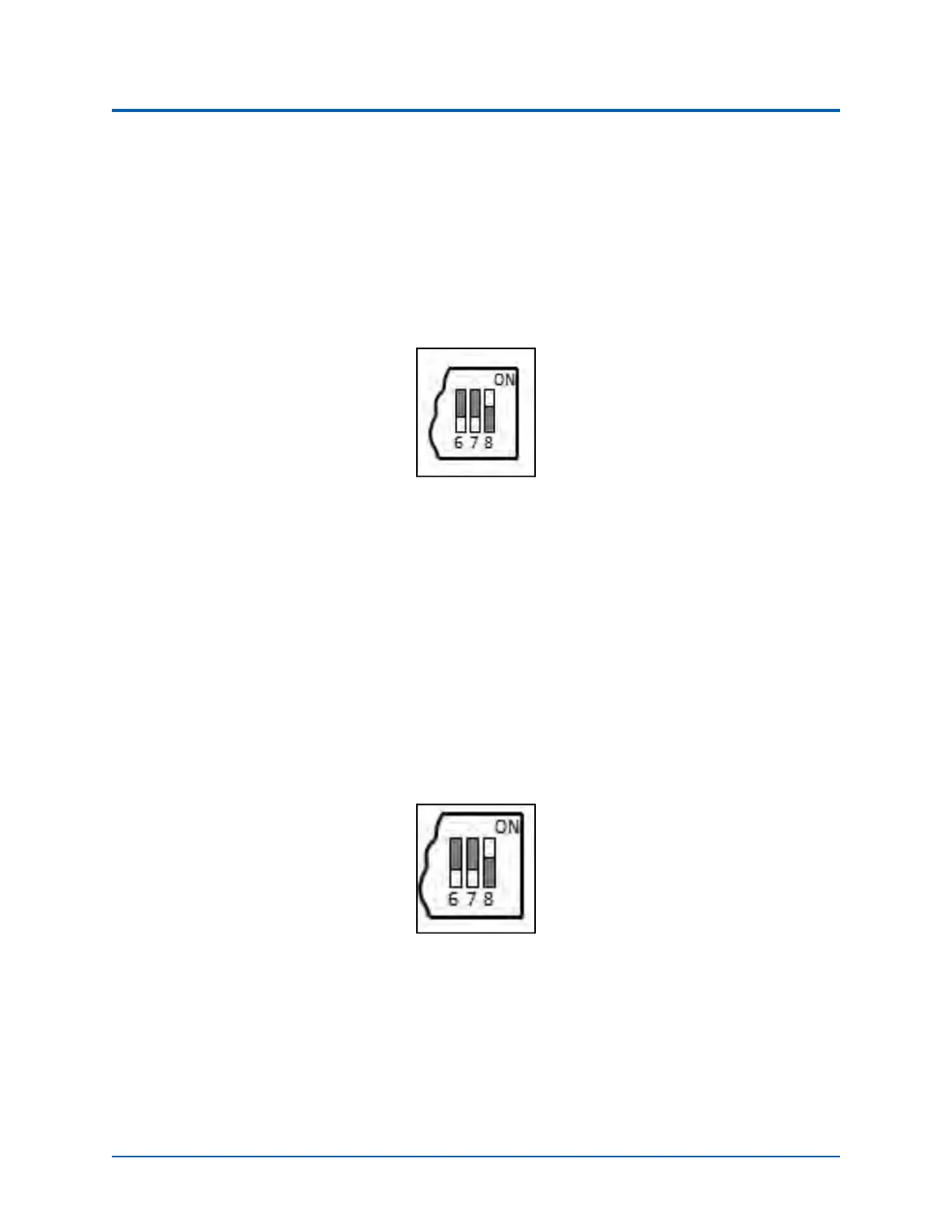
1. Set the base station DIP switch positions 6 and 7 to OFF, and 8 to ON.
2. Turn the power off and on using the power switch on the outside of the base station to
ensure the DIP switch changes take effect.
3. Leave the power switch on the outside of the base station in the on position.
DIP Switch Settings for the Base Station
Note: Since the base station receives power from the simulator, the power switch on the outside of
the base station must remain in the ON position. Use this power switch to refresh DIP switch settings.
Do not turn the simulator off and on to refresh the DIP switch settings.
Preparing the Handset for Use
To prepare the handset for use:
1. Insert two AAA batteries into the battery compartment.
2. Set the handset DIP switch positions 6 and 7 to OFF and position 8 to ON.
3. Turn the power switch off and back on to ensure the DIP switch changes take effect.
DIP Switch Settings for the Handset
While DIP switch positions 6 through 8 affect the handset and base station settings, DIP switch
positions 1 through 5 are used to set the radio frequency channel used for communication between
the handset and the base station.



 To Next Page