©2020 CAE 905K351052 v1.1 89
Appendix B - Wireless Voice Link
Please note that an iPhone-compatible microphone is not provided as part of the product package.
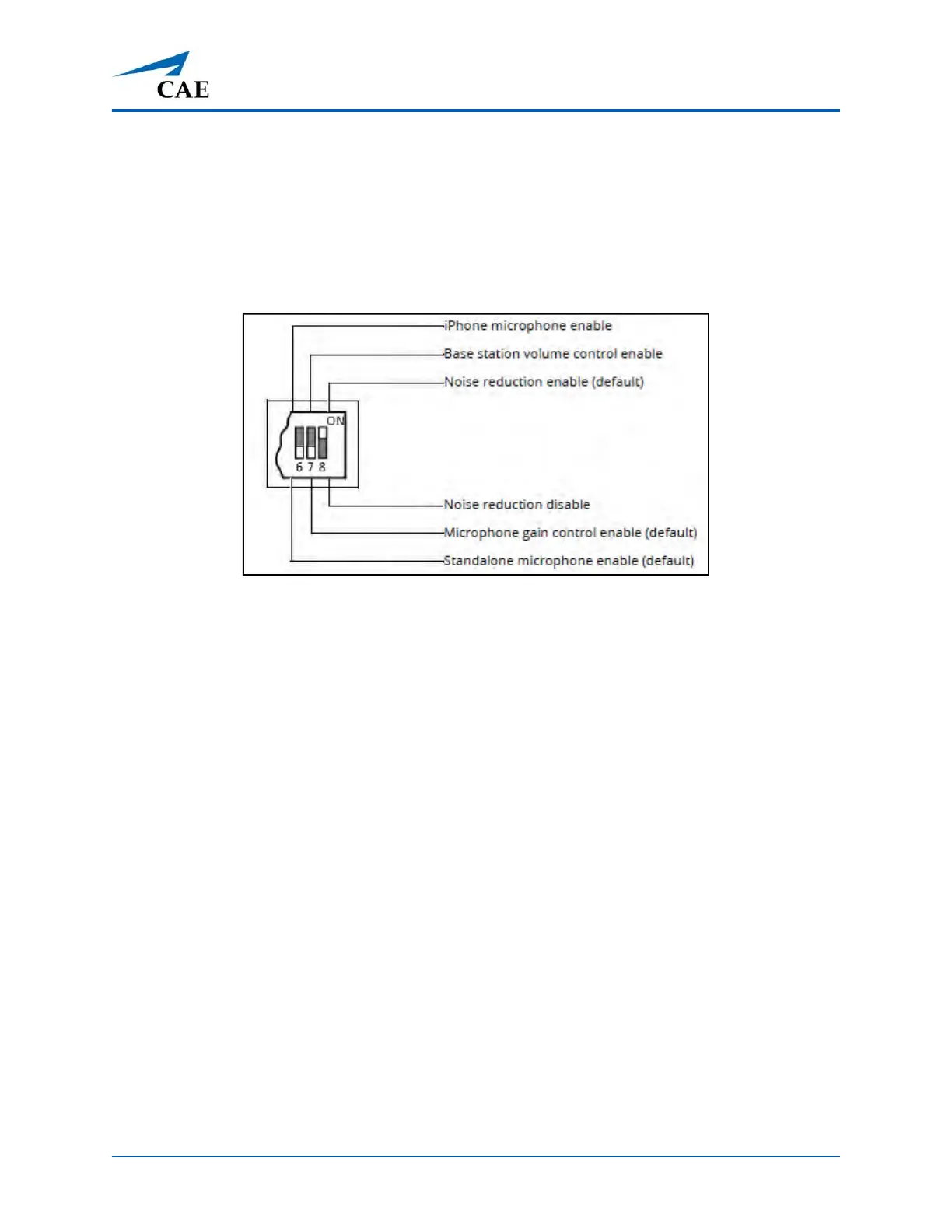
Any microphone with a common 3.5 mm input jack can be used with the handset when DIP switch
position 6 is set to ON.
Special Handset Settings
Advanced settings for the handset DIP switch are available.
Advanced DIP Switch Settings
DIP switch settings are only refreshed when the handset is powered on. To ensure the DIP switch
changes take effect, turn the power off and back on after making changes.
To enable noise reduction and minimize background noise in high ambient noise environments,
place the position 8 DIP switch in the ON position.
Battery Capacity Indicator
The red power light flashes one time every second when the battery capacity is good. When the
battery capacity is nearly depleted, the red power LED flashes twice in quick succession every second.
This indicates the batteries need to be replaced.
To get the most battery life out of the handset, the handset should be powered down when it is not
in use.
Troubleshooting
CAE Customer Service is available to help with issues, should they arise. However, sometimes you can
speed up the customer service process by performing diagnostics before calling and eliminating
some problems on your own with the help of the following instructions.
Note: The loss of Wi-Fi connection for approximately 60 seconds may also cause a loss of Voice over
IP connection. To solve this, click Disconnect then click Connect once the Wi-Fi connection has been
reestablished.



 To Next Page