©2020 CAE 905K351052 v1.1 87
Appendix B - Wireless Voice Link
Selecting the Radio Frequency Channel
There are two ways to configure the radio frequency (RF) channel spacing. The first method reduces
channel-to-channel interference but allows only 12 channels to operate simultaneously. The second
method increases the number of channels that can be used simultaneously to 20 channels. However,
this method diminishes the channel-to-channel noise immunity.
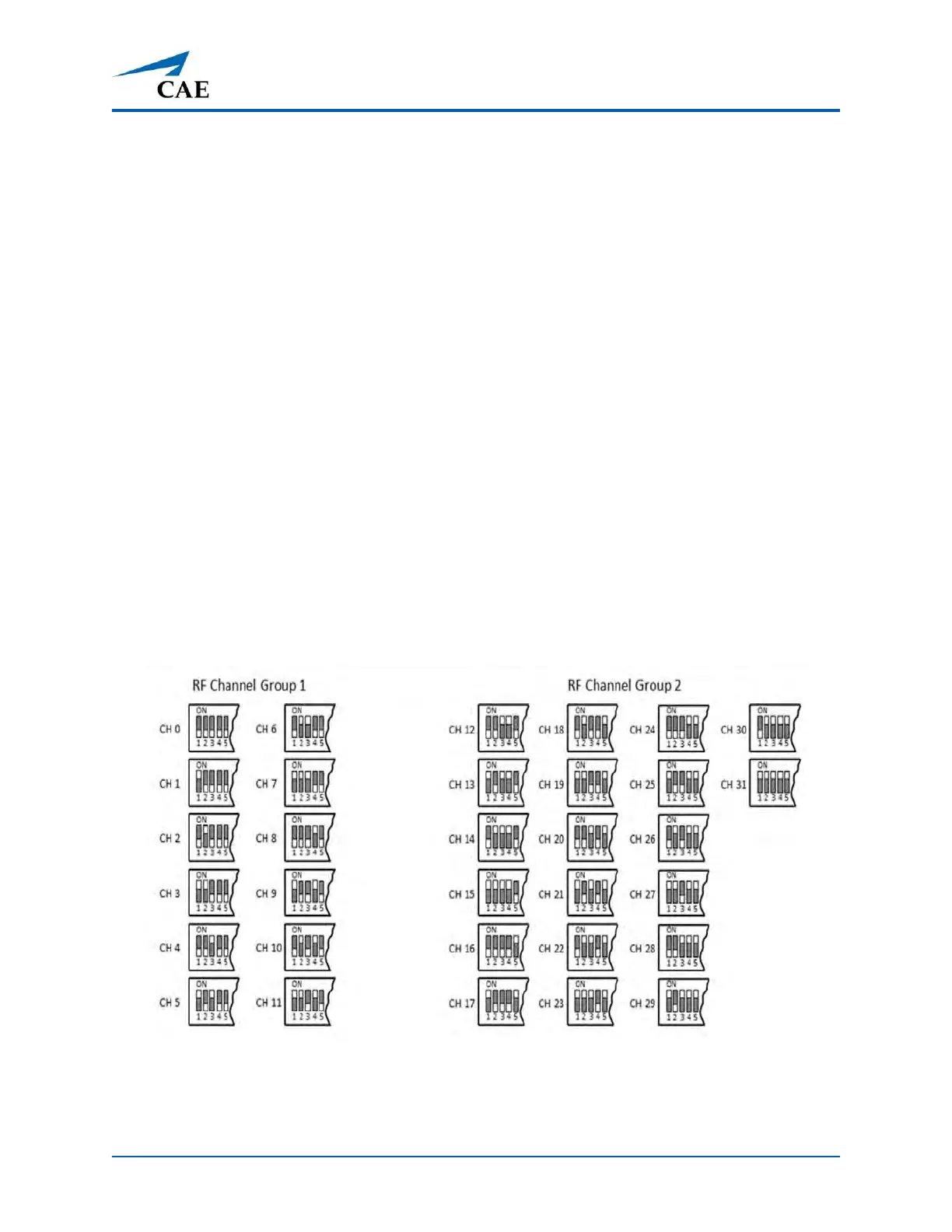
All the WVL pairs in the same vicinity must use channels from either RF Channel Group 1 or 2. The
channels used must belong to the same group. The DIP switch determines the initial communication
frequencies that the WVL pair use to communicate when the power of the base station and handset
is first turned on. If there is too much interference at the initial channel, the WVL pair changes
frequency automatically and continues operating. The WVL pair will repeat this process
automatically as needed.
Multiple WVL pairs can be set to the same initial frequency. However, setting different initial
frequencies helps the WVL pairs quickly find a stable operating frequency.
For example, if there are 12 or fewer simulators in the same vicinity, set all the WVL pairs to use
channel 0 of RF Channel Group 1. To give unique initial RF frequencies, assign each WVL pair to its
own RF channel with the settings found in CH 0 through CH 11.
If you have 13 to 20 simulators in the same vicinity, set all the WVL pairs to use channel 12 of RF
Channel Group 2. To give unique initial RF frequencies, assign each WVL pair to its own RF channel
with the settings found in CH 12 through CH 31.
RF Channel Selection Methods
For a complete list of the initial frequencies associated with the RF Channels, see RF Channel Initial
Operating Frequencies.



 To Next Page