Mod. NIM8304 12 slot 7U(5+2) Switching NIM Crate
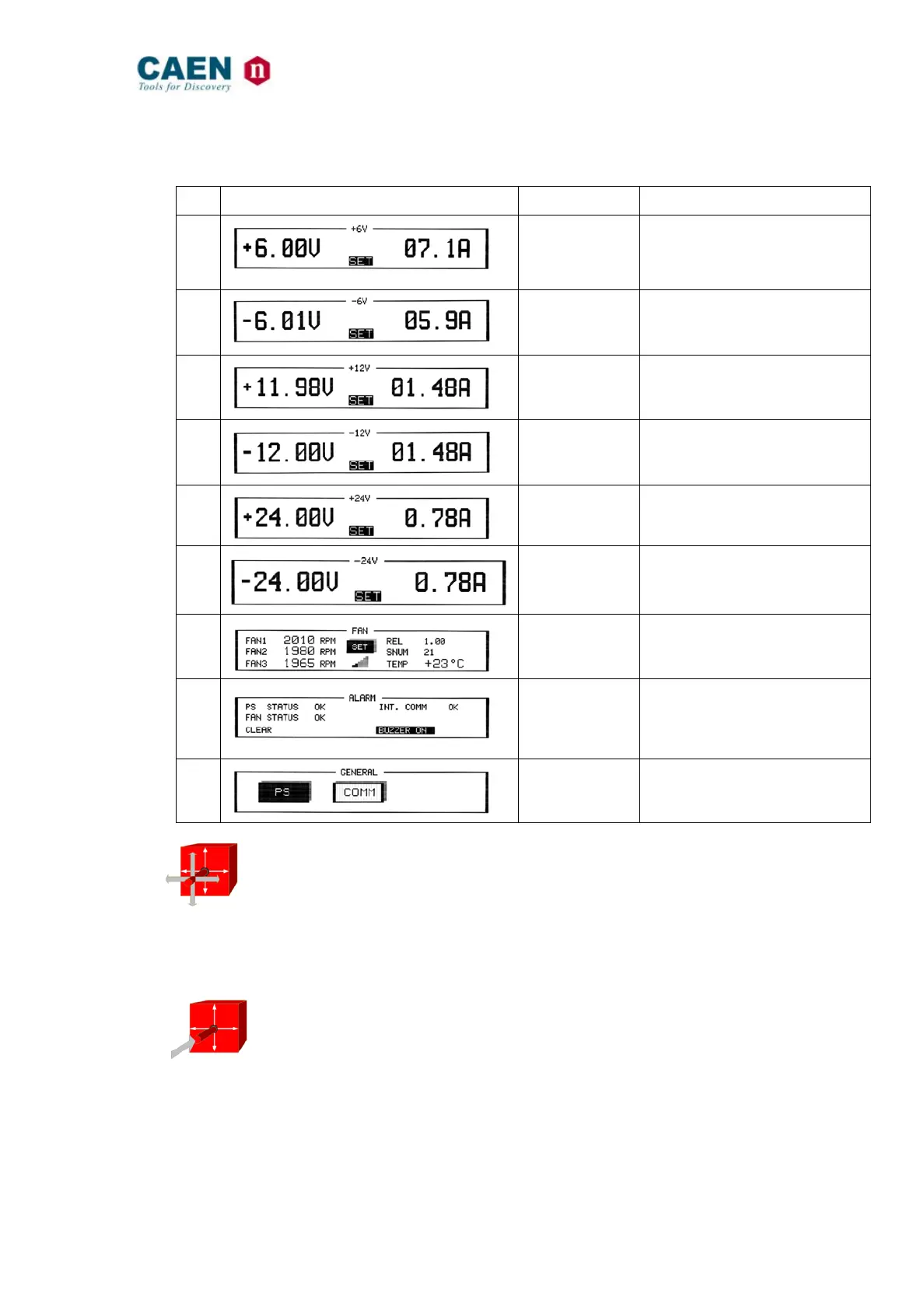
Table 5.1: Mod. NIM8304 FAN Tray Menu
Nr. Display Description Parameters displayed
1.
+6 V Monitor
- Vout Value
- Current Value
2.
-6 V Monitor
- Vout Value
- Current Value
3.
+12 V Monitor
- Vout Value
- Current Value
4.
-12 V Monitor
- Vout Value
- Current Value
5.
+24 V Monitor
- Vout Value
- Current Value
6.
-24 V Monitor
- Vout Value
- Current Value
7.
FAN status
- FAN unit firmware release
- Serial Number FAN Unit
- Temperature of FAN Unit
8.
ALARM
- FAN Status
- INT Comm PS & FAN Unit
- Clear Alarm
9.
GENERAL
- PS Sub menu
- COM Sub Menu
In the above described menu, by pulling the switch RIGHT/LEFT and UP/DOWN, it
is possible to shift between the available sub-menu/command. The selectable
command/menu is high lit.
On Menu 7 it is possible only to move RIGHT/LEFT
NOTE: ! before any value signal anomalous value.
In order to enter a Sub-menu or launch a command, it is necessary to push the
button.



 To Next Page