Mod. NIM8304 12 slot 7U(5+2) Switching NIM Crate
6.4.3.1 Fan Unit firmware update
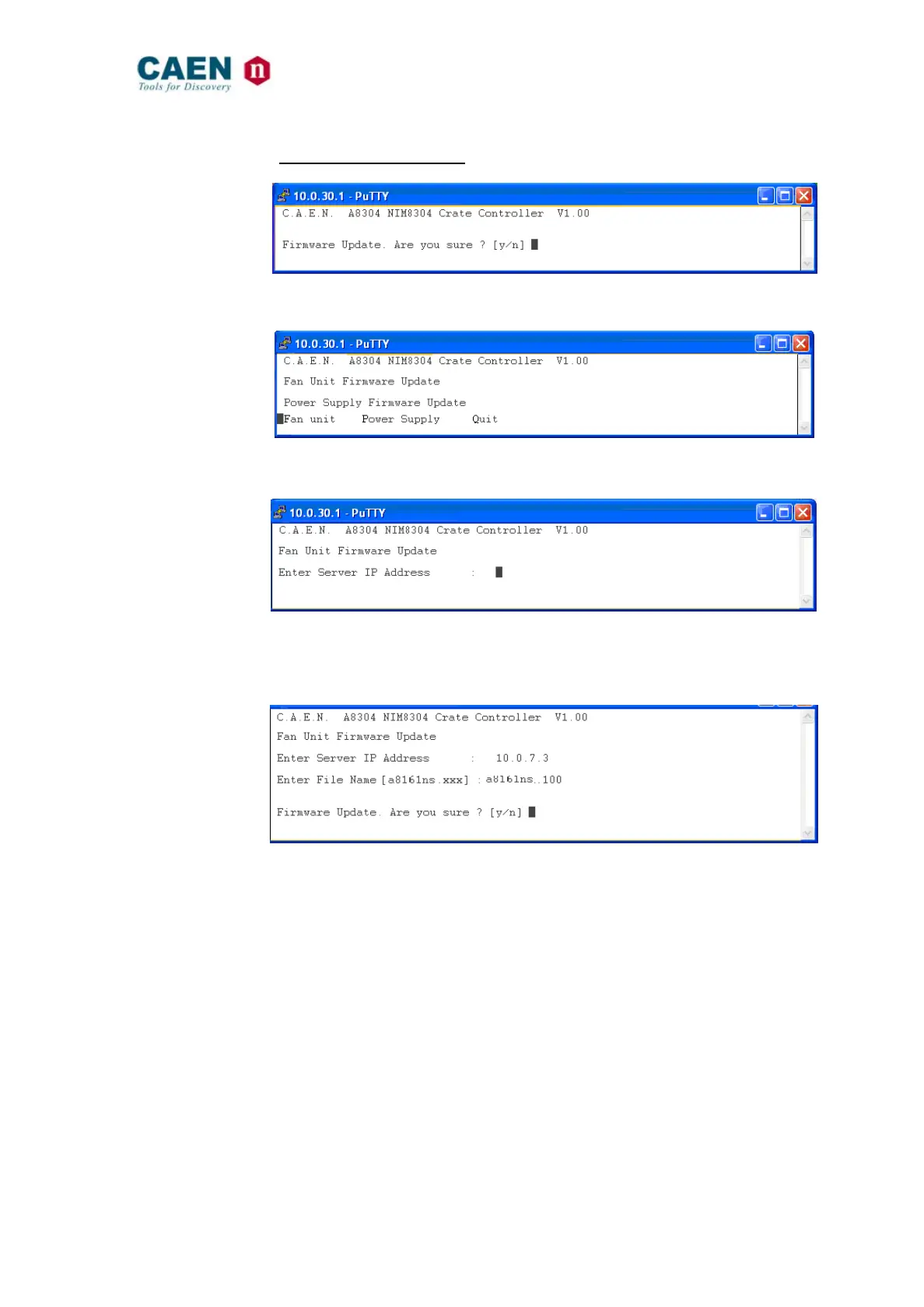
In order to update the Fan Unit firmware, go to the Update Menu (figure below):
Fig. 6.10: Mod. NIM8304 Firmware Update window 1
by pressing “Y”, it opens:
Fig. 6.11: Mod. NIM8304 Firmware Update window 2
In order to update the Fan Unit firmware, press “F”; the next menu will be as follows:
Fig. 6.12: Mod. NIM8304 Fan Unit Firmware Update window
Type the IP Address of the computer where the image file is.
Type the Filename you want to load in the flash memory (the filename must be the real
filename of the file you want to add),
Fig. 6.13: Mod. NIM8304 Fan Unit Firmware Update window
By pressing “Y”, the new file is loaded into the flash memory and the procedure
completed.
In order to update the Power Supply firmware, return to the Update Menu, choose “Power
Supply Firmware Update” <P>, then repeat the same procedure as above.



 To Next Page