cnPilot Enterprise AP User Guide CAMBIUM NETWORKS
Timezone can be set according to the location where the
AP is installed. By selecting the appropriate timezone
from the drop-down list, ensures that the device clock is
synced with the wall clock time.
Note: Accurate time on the AP is critical for features such
as WLAN Scheduled Access, Syslogs etc
You can configure the above parameters through the UI or CLI.
In the UI
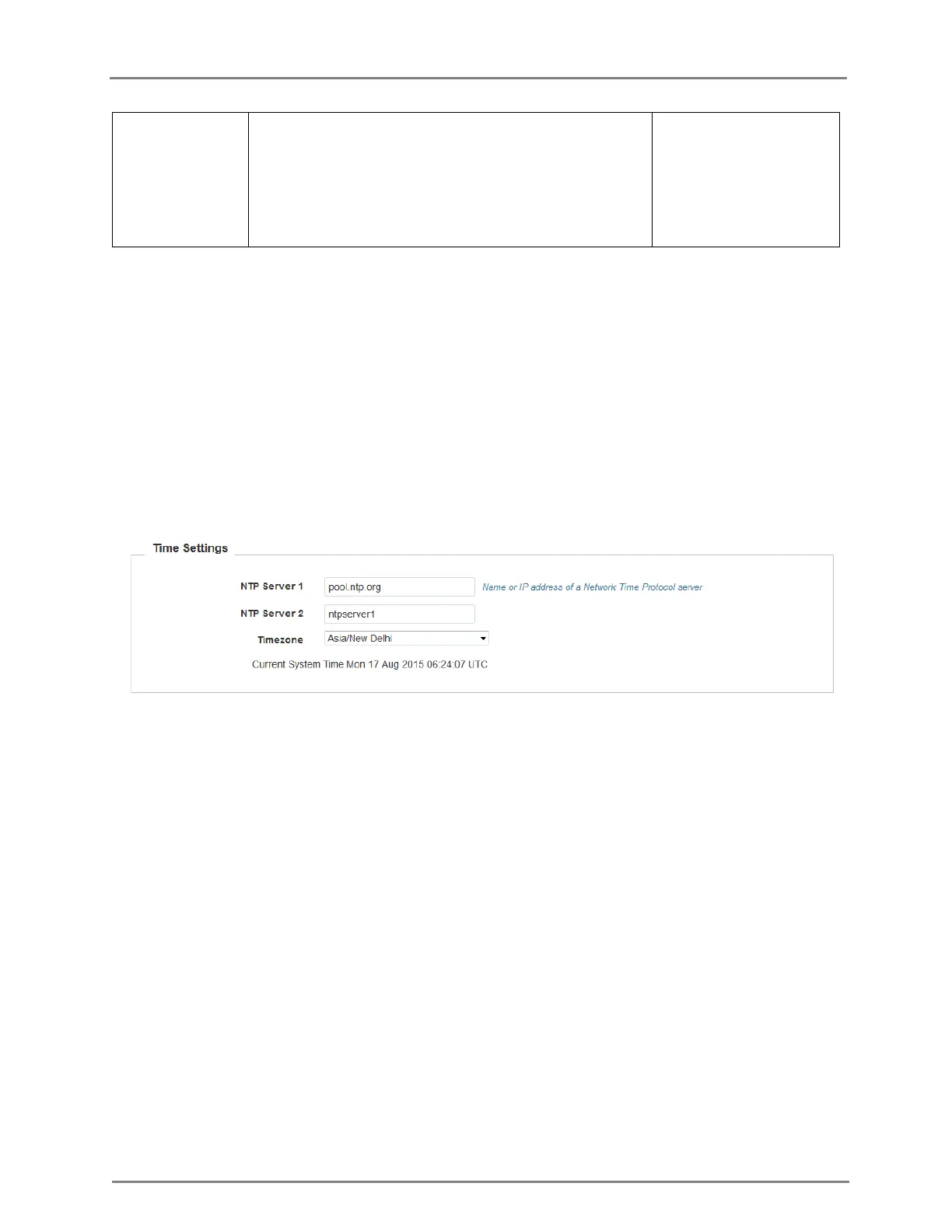
1. Navigate to the Configuration > System tab. The following fields are displayed in Time
Settings:
a. Enter the name or IP address of the NTP server 1 in the NTP Server 1 text box.
b. Enter the name or IP address of the NTP server 2 in the NTP Server 2 text box.
c. Select the time zone settings for the AP from the Timezone drop-down list.
2. Click Save.
Figure 3: Configuration: Time settings page
In the CLI
To configure NTP server:
(cnPilot Enterprise AP) (configure)# ntp <server>
To configure Timezone:
(cnPilot Enterprise APv) (configure)# timezone
To view the current system time:
(cnPilot Enterprise AP) # show clock
Event Logging
The user can configure upto 2 Syslog servers on the device. All important events regarding device
operation will be logged into these servers as standard RFC5424 complaint syslog messages.



 To Next Page