+
_
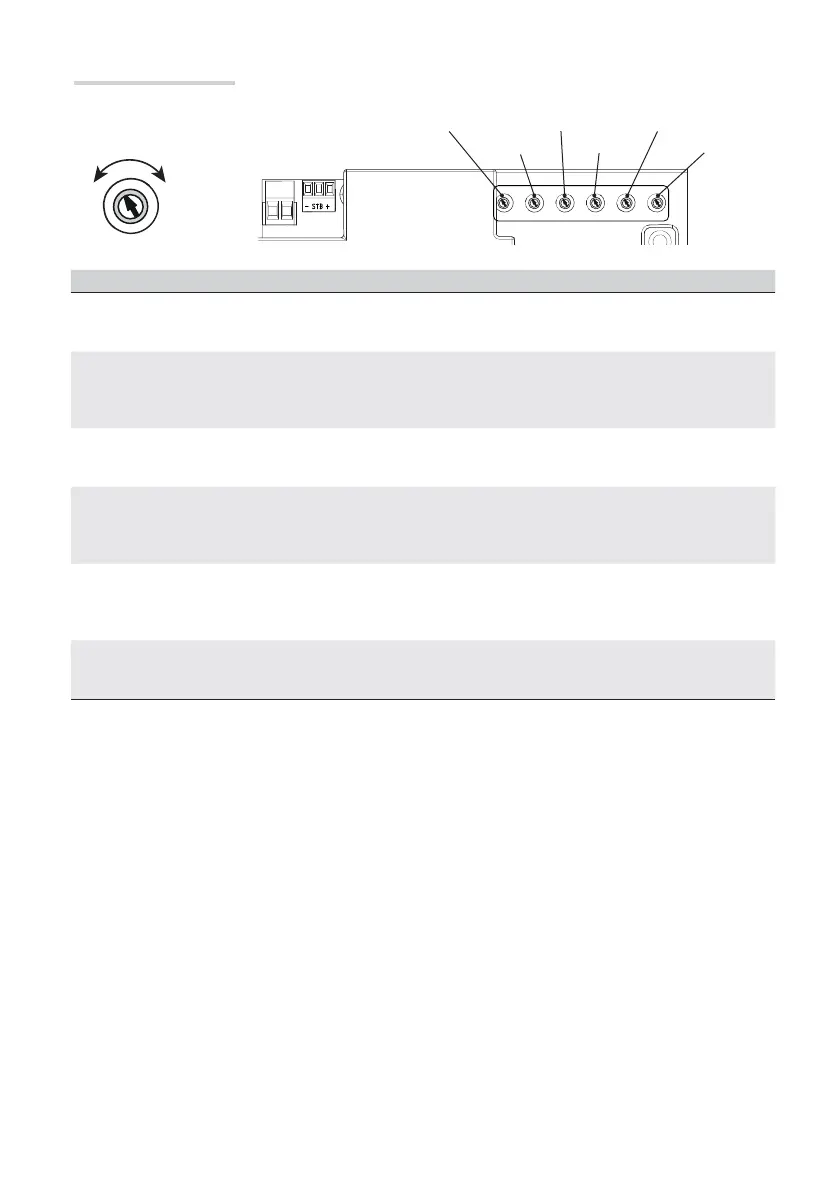
A.C.T. 2M DELAY
SENSAPP./O.T.
SLOW
SPEED
p. 25 - Manual FA01054-EN - 01/2018 - © CAME S.p.A. -
Translation of the original instructions
After adjusting the trimmers, select the DIPs and press the PROG key on the board as
shown in functions programming section.
Trimmer Description of functions
A.C.T.
Automatic Closing Time
It sets the open gate's waiting time. Once this time elapses, the shutter automatically closes.
The waiting time can be set to between 1 and 180 seconds.
APP./O.T.
The final resting point (encoder enabled) or working time (encoder disabled)
It adjusts the motors fi nal resting point before the opening and closing endstops.
The starting fi nal resting point is calculated as a percentage of the gate leave's complete travel, from 1% to 10%.
With the encoder disabled, use the trimmer to adjust the working time is between 5 and 120 seconds.
2M DELAY
M2 closing delay time
After a closing command or after an automatic closing, the leaf of gearmotor (M2) starts with a delay compared to
gearmotor (M1) for an adjustable time of between 3 and 25 seconds.
SPEED
Travel speed
It adjusts the speed of the gearmotors during the travel.
The speed may be adjusted from 30% (-) to 100% (+)
With disabled encoder and timed slow downs, the maximum speed is limited to 50%.
SLOW
Slow-down speed
It adjusts the gearmotors' speed when slowing down.
The speed may be adjusted from 30% (-) to 60% (+) of the maximum speed.
If the slow down speed is greater than the travel speed, the travel speed is automatically limited.
SENS.
Sensibility
It adjusts the obstruction detection sensitivity during the gate movement.
Minimum sensitivity (-) or maximum sensitivity (+).
Adjusting the trimmers



 To Next Page