Use only 8 cm (3 in.) mini DVD discs marked with the DVD-R
~
or DVD-RW
~
logo. Before inserting the disc be sure to check that the
recordinRg
surface is clean. R
1f
necessary, use a soft lens-cleaning cloth to remove any fingerprints, dirt buildup or
smudges from the disc surface.
Inserting the Disc
I
To
change the operating mode, refer to About the Operating Modes (OJ
11).
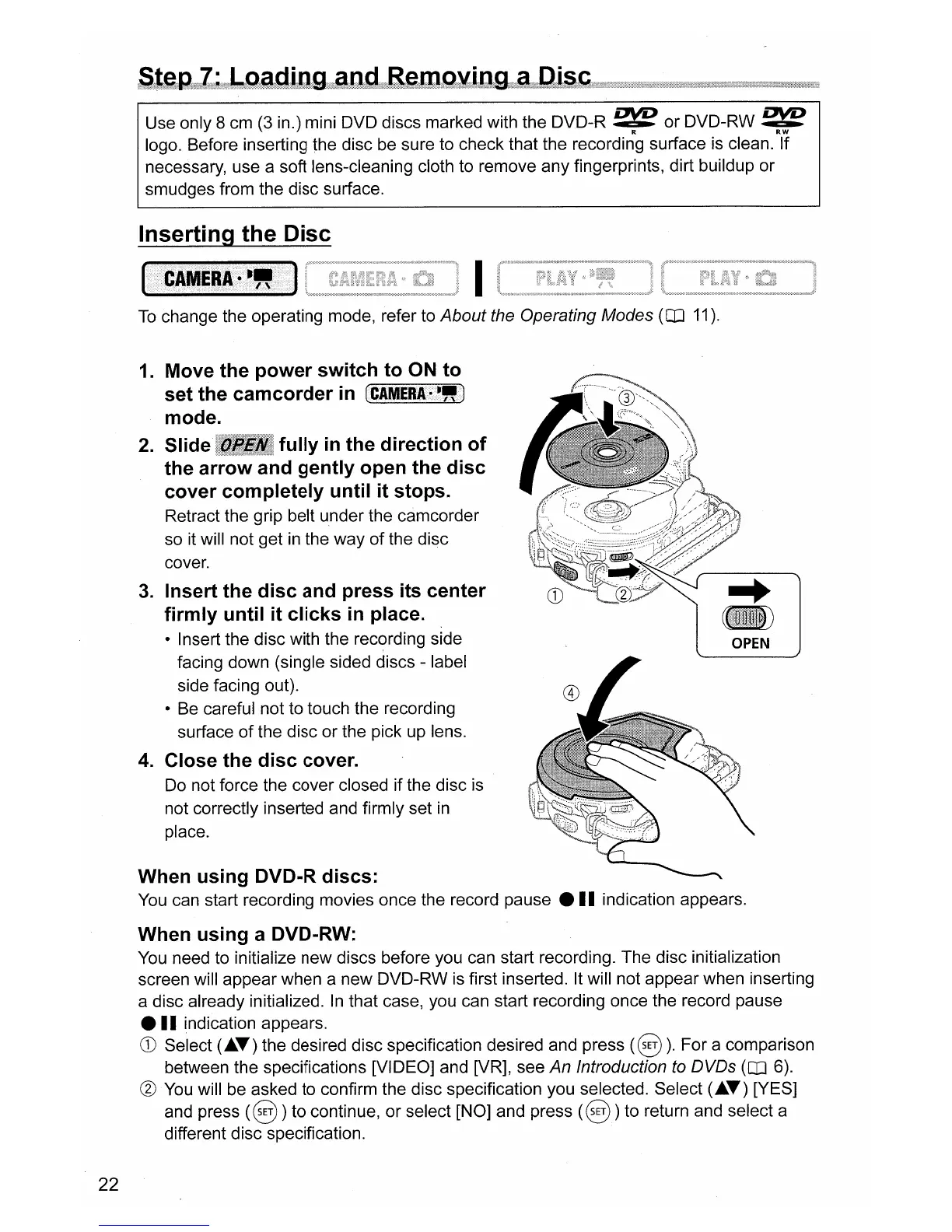
OPEN
1.
Move the power switch to
ON
to
set the camcorder
in
(CIMERlr~.)
mode.
2.
Slide fully
in
the direction of
the arrow and gently open the disc
cover completely until it stops.
Retract the grip belt under the camcorder
so it will not get
in
the way
of
the disc
cover.
3.
Insert the disc and press
its
center
firmly until it clicks
in
place.
• Insert the disc with the recording side
facing down (single sided discs - label
side facing out).
• Be careful not to touch the recording
surface
of
the disc or the pick up lens.
4.
Close the disc cover.
Do
not force the cover closed if the disc is
not correctly inserted and firmly set
in
place.
When using DVD-R discs:
You
can start recording movies once the record pause •
II
indication appears.
When using a DVD-RW:
You
need to initialize new discs before you can start recording. The disc initialization
screen will appear when a new DVD-RW
is
first inserted. It will not appear when inserting
a disc already initialized.
In
that case, you can start recording once the record pause
•
II
indication appears.
CD
Select (
....
) the desired disc specification desired and press
(§
).
For a comparison
between the specifications [VIDEO] and [VR], see
An Introduction
to
DVDs (OJ 6).
®
You
will be asked to confirm the disc specification you selected. Select (
....
) [YES]
and press
(§
) to continue, or select [NO] and press
(§)
to return and select a
different disc specification.
22



 To Next Page