Setting
the
White
Balance
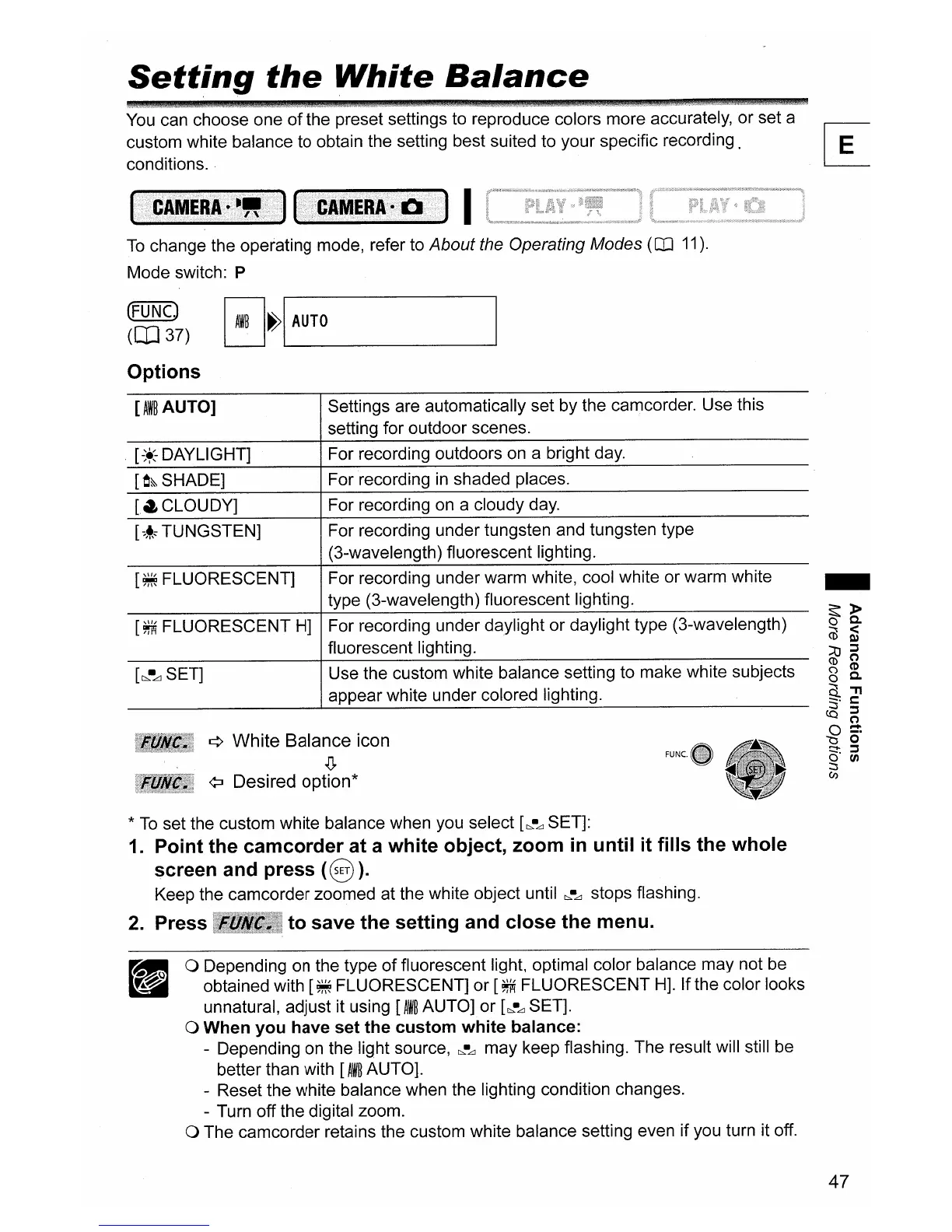
You can choose one
of
the preset settings to reproduce colors more accurately, or set a
custom white balance to obtain the setting best suited to your specific recording.
r-e-
conditions.
~
I
To
change the operating mode, refer to About the Operating Modes
(CD
11).
Mode switch: P
(FUNCJ
([037)
Options
EJ~IL..-A_UT_O
_
[AW~AUTO]
Settings are automatically set by the camcorder. Use this
setting for outdoor scenes.
[-*
DAYLIGHT]
For recording outdoors on a bright day.
[O&-SHADE]
For recording
in
shaded places.
[.CLOUDY]
For recording on a cloudy day.
[~~,
TUNGSTEN]
For recording under tungsten and tungsten type
(3-wavelength) fluorescent lighting.
[
~
FLUORESCENT] For recording under warm white, cool white or warm white
type (3-wavelength) fluorescent lighting.
[
~
FLUORESCENT
H]
For recording under daylight or daylight type (3-wavelength)
fluorescent lighting.
[b,.-LlSET]
Use the custom white balance setting to make white subjects
appear white under colored lighting.
¢ White Balance icon
.0.
¢:J
Desired option*
*
To
set the custom white balance when you select
[c:".~
SET]:
1.
Point the camcorder at a white object, zoom
in
until it fills the whole
screen and press
(§
).
Keep the camcorder zoomed at the white object until
c:".-LJ
stops flashing.
2.
Press to save the setting and close the menu.
o Depending on the type
of
fluorescent light, optimal color balance may not be
obtained with
[~
FLUORESCENT] or
[~
FLUORESCENT
H].
Ifthe color looks
unnatural, adjust it using
[AW~
AUTO] or
[~LJ
SET].
o When you have set the custom white balance:
- Depending on the light source,
c:".-LJ
may keep flashing. The result will still be
better than with
[AW~
AUTO].
- Reset the white balance when the lighting condition changes.
- Turn off the digital zoom.
o The camcorder retains the custom white balance setting even if you turn it off.
47



 To Next Page