EasyManua.ls Logo

Canon EOS 650D - Charging the Battery

Canon EOS 650D
376 pages
Print Icon
To Next Page IconTo Next Page
To Previous Page IconTo Previous Page
Loading...
28
1
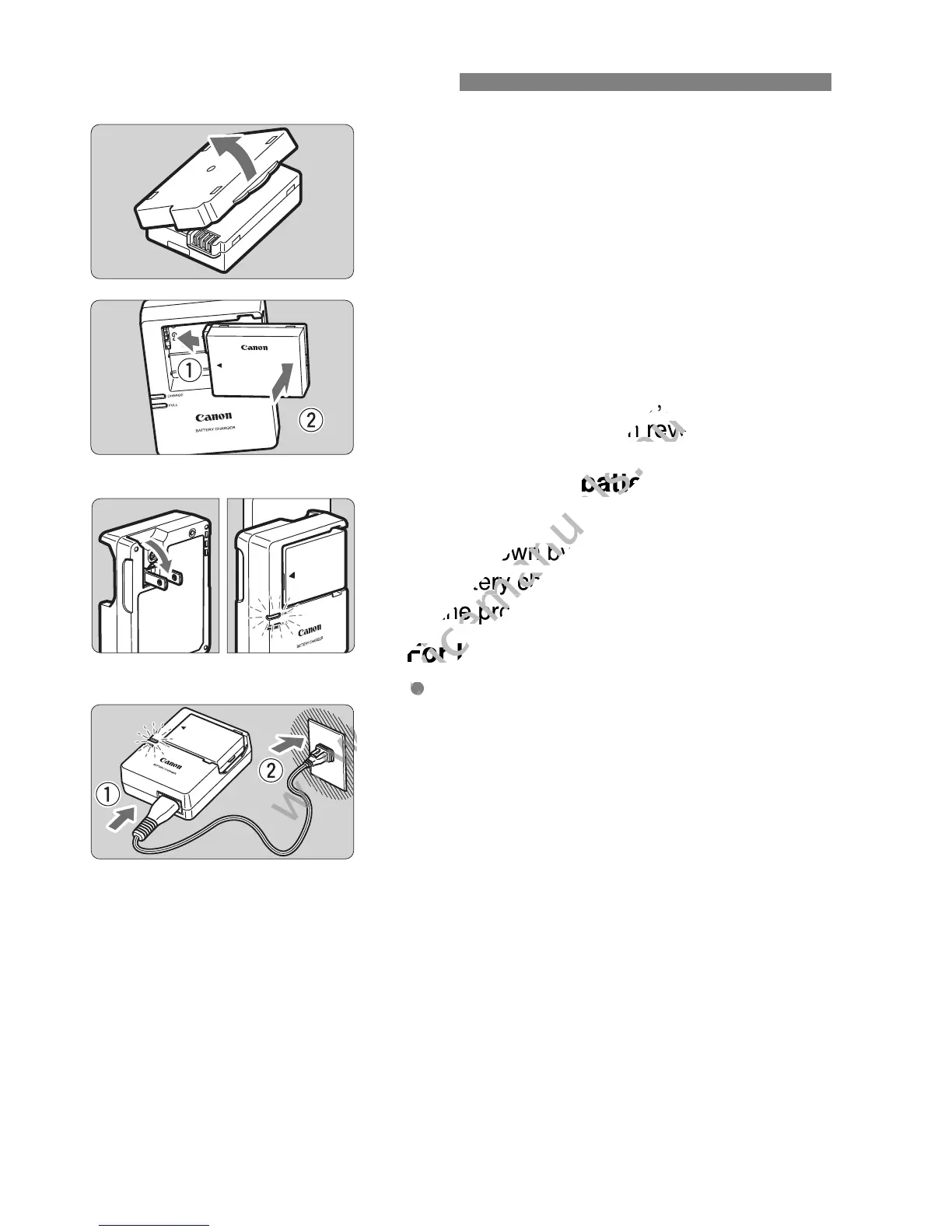
Remove the protective cover.
Detach the protective cover provided
with the battery.
2
Attach the battery.
As shown in the illustration, attach the
battery securely to the charger.
To detach the battery, follow the
above procedure in reverse.
3
Recharge the battery.
For LC-E8
As shown by the arrow, flip out the
battery charger’s prongs and insert
the prongs into a power outlet.
For LC-E8E
Connect the power cord to the
charger and insert the plug into a
power outlet.
Recharging starts automatically and
the charge lamp lights up in orange.
When the battery is fully recharged,
the full-charge lamp will light up in
green.
It takes approx. 2 hours to fully recharge a completely
exhausted battery at 23°C / 73°F. The time required to recharge
the battery will vary greatly depending on the ambient
temperature and the battery’s remaining capacity.
For safety reasons, recharging in low temperatures (6
°
C - 10
°
C /
43
°
F - 50
°
F) will take longer (up to approx. 4 hours).
Charging the Battery

LC-E8
LC-E8E
www.devicemanuals.eu
To detach the battery, follow the
www.devicemanuals.eu
To detach the battery, follow the
above procedure in reverse.
www.devicemanuals.eu
above procedure in reverse.
Recharge the battery.
www.devicemanuals.eu
Recharge the battery.
As shown by the arrow, flip out the
www.devicemanuals.eu
As shown by the arrow, flip out the
battery chargers prongs and insert
www.devicemanuals.eu
battery chargers prongs and insert
the prongs into a power outlet.
www.devicemanuals.eu
the prongs into a power outlet.
For LC-E8E
www.devicemanuals.eu
For LC-E8E
www.devicemanuals.eu

Table of Contents

Related product manuals