EasyManua.ls Logo

Canon EOS 650D - Turning on the Power

Canon EOS 650D
376 pages
Print Icon
To Next Page IconTo Next Page
To Previous Page IconTo Previous Page
Loading...
34
If you turn on the power switch and the time zone and date/time
setting screens appear, see page 36 to set the time zone and date/
time.
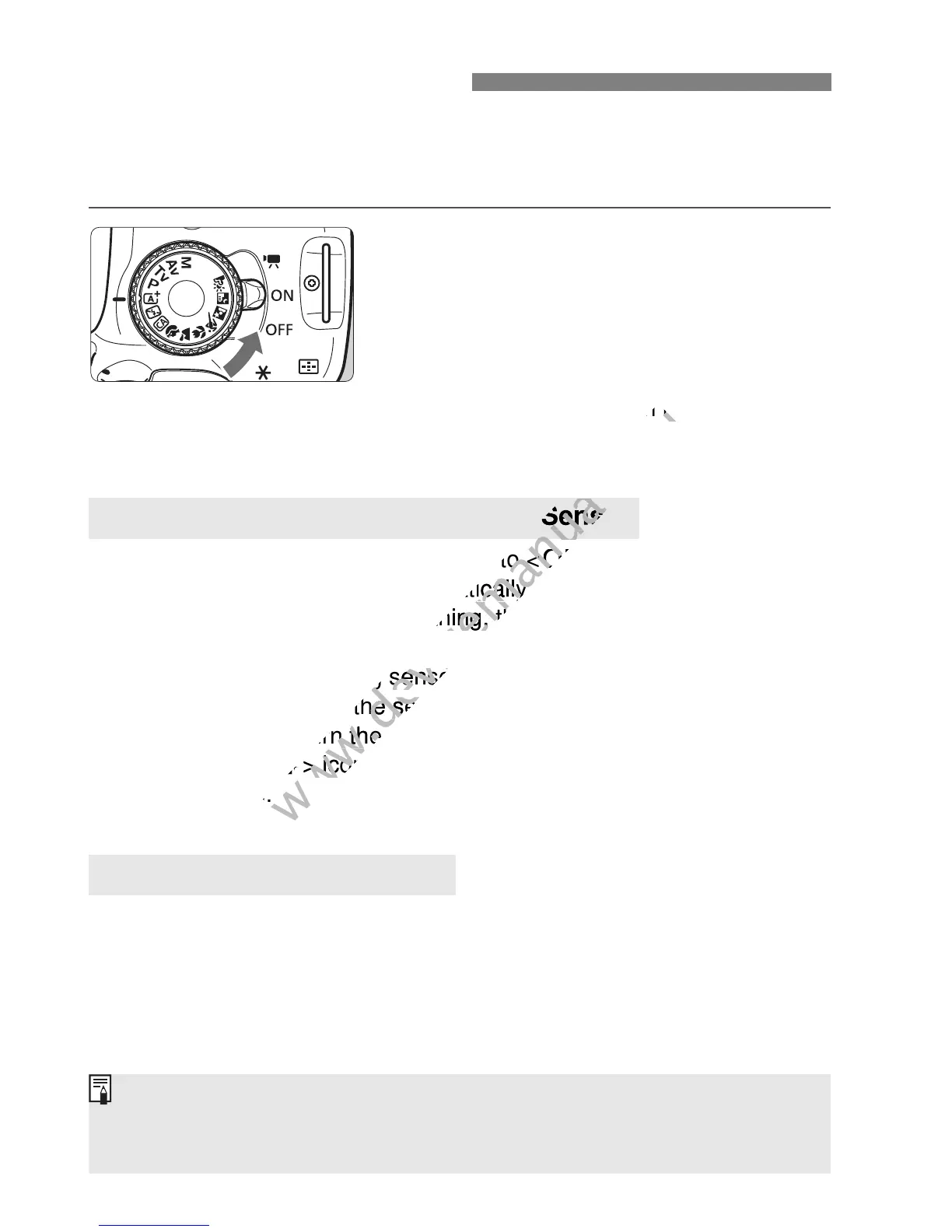
<k> : The camera turns on. You can
shoot movies (p.169).
<1> : The camera turns on. You can
shoot still photos.
<2> : The camera is turned off and
does not operate. Set to this
position when not using the
camera.
Whenever you set the power switch to <1> or <2>, sensor
cleaning will be executed automatically. (A small sound may be
heard.) During the sensor cleaning, the LCD monitor will display
<f>.
You can still shoot during sensor cleaning. Press the shutter button
halfway (p.43) to stop the sensor cleaning and take a picture.
If you repeatedly turn the power switch <1>/<2> at a short
interval, the <f> icon may not be displayed. This is normal and
not a problem.
To save battery power, the camera turns off automatically after
approx. 30 seconds of non-operation. To turn on the camera again,
just press the shutter button halfway (p.43).
You can set the auto power off time with [52: Auto power off]
(p.201).
Turning on the Power
About the Automatic Self-Cleaning Sensor
3 About Auto Power Off
If you set the power switch to <2> while an image is being recorded to
the card, [Recording...] will be displayed and the power will turn off after the
card finishes recording the image.

www.devicemanuals.eu
position when not using the
www.devicemanuals.eu
position when not using the
www.devicemanuals.eu
Whenever you set the power switch to <
www.devicemanuals.eu
Whenever you set the power switch to <
1
www.devicemanuals.eu
1
cleaning will be executed automat
www.devicemanuals.eu
cleaning will be executed automat
ically. (A small sound may be
www.devicemanuals.eu
ically. (A small sound may be
heard.) During the sensor cleaning, the LCD monitor will display
www.devicemanuals.eu
heard.) During the sensor cleaning, the LCD monitor will display
You can still shoot during sensor
www.devicemanuals.eu
You can still shoot during sensor
halfway (p.43) to stop the sensor cleaning and take a picture.
www.devicemanuals.eu
halfway (p.43) to stop the sensor cleaning and take a picture.
www.devicemanuals.eu
If you repeatedly turn the power switch <
www.devicemanuals.eu
If you repeatedly turn the power switch <
f
www.devicemanuals.eu
f
> icon may not be displayed. This is normal and
www.devicemanuals.eu
> icon may not be displayed. This is normal and
not a problem.
www.devicemanuals.eu
not a problem.
www.devicemanuals.eu

Table of Contents

Related product manuals