EasyManua.ls Logo

Canon EOS 650D - Setting the Image-Recording Quality

Canon EOS 650D
376 pages
Print Icon
To Next Page IconTo Next Page
To Previous Page IconTo Previous Page
Loading...
86
You can select the pixel count and the image quality. Ten image-
recording quality settings are provided: 73, 83, 74, 84, 7a,
8a, b, c, 1+73, 1.
1
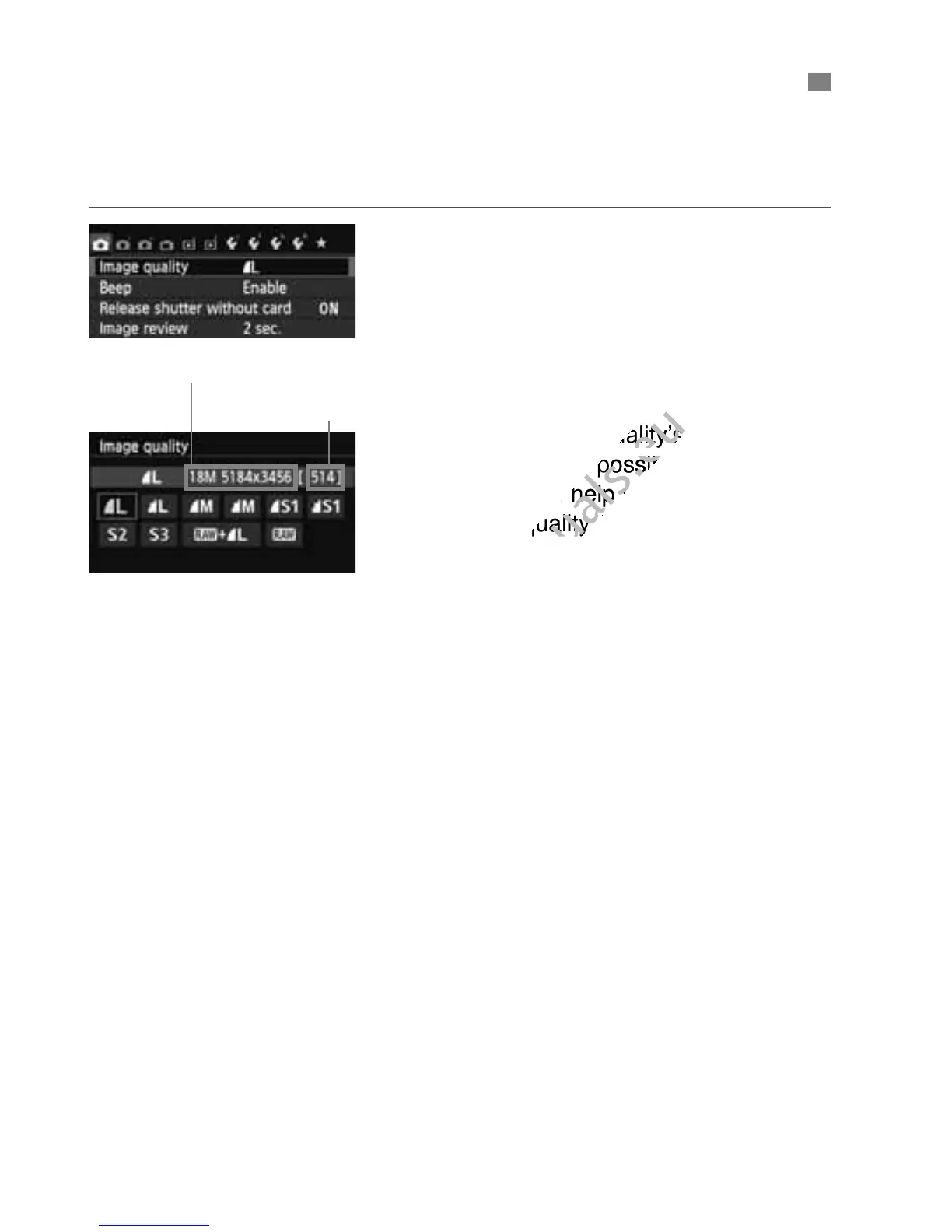
Select [Image quality].
Under the [z1] tab, select [Image
quality], then press <0>.
[Image quality] will appear.
2
Select the image-recording
quality.
The respective quality’s pixel count
and number of possible shots will be
displayed to help you select the
desired quality. Then press <0>.
3 Setting the Image-Recording Quality

Pixels recorded (pixel count)
Possible shots
www.devicemanuals.eu
The respective quality’s pixel count
www.devicemanuals.eu
The respective quality’s pixel count
and number of possible shots will be
www.devicemanuals.eu
and number of possible shots will be
displayed to help you select the
www.devicemanuals.eu
displayed to help you select the
desired quality. Then press <
www.devicemanuals.eu
desired quality. Then press <

Table of Contents

Related product manuals