97
In Basic Zone modes, the camera will normally focus the closest subject
automatically. Therefore, it may not always focus your target subject.
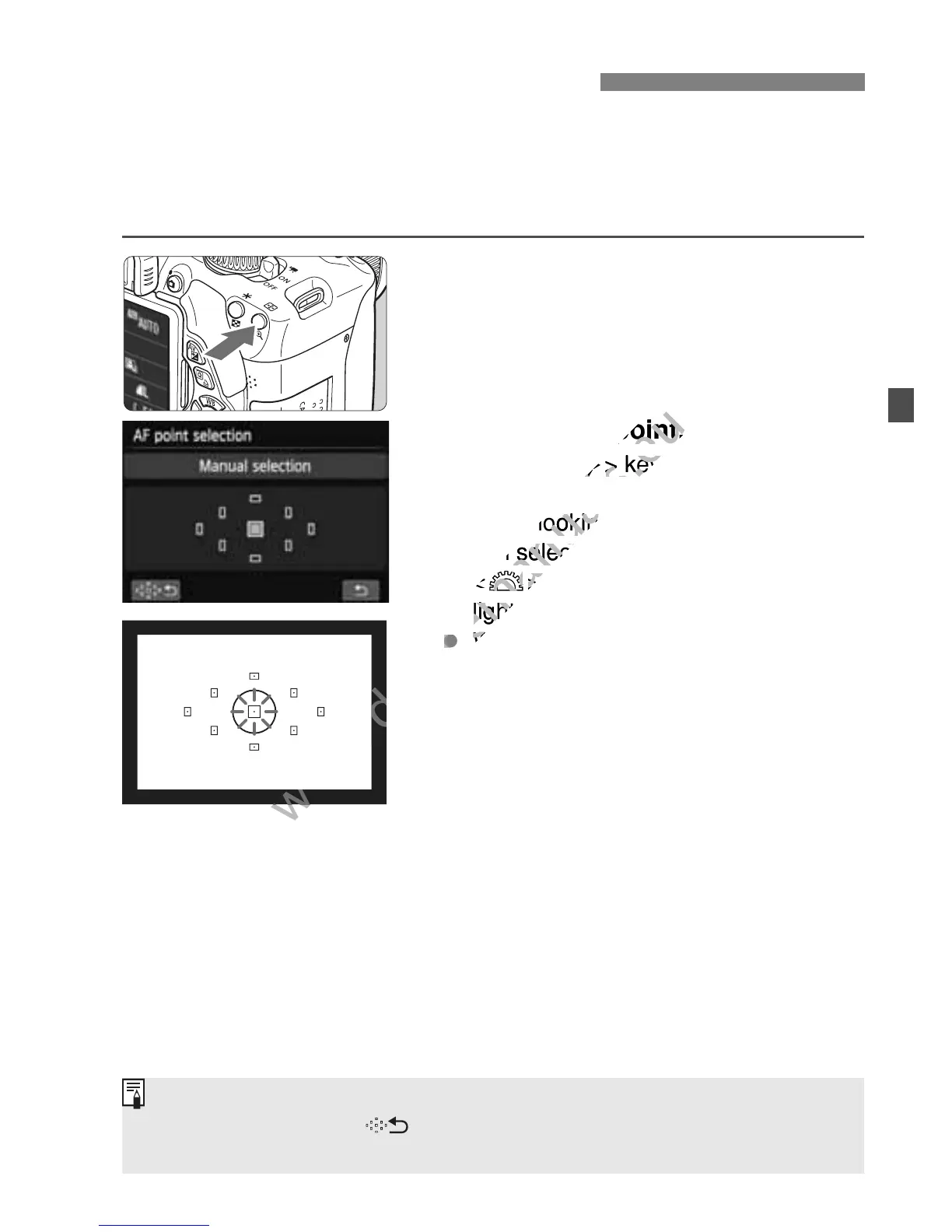
In the <d>, <s>, <f>, and <a> modes, you can select the AF
point and use it to focus the target subject.
1
Press the <S> button. (9)
The selected AF point will be
displayed on the LCD monitor and in
the viewfinder.
2
Select the AF point.
Use the <S> key to select the AF
point.
While looking at the viewfinder, you
can select the AF point by turning the
<6> dial until the desired AF point
lights up in red.
When all the AF points light up,
automatic AF point selection will be
set. The AF point will be selected
automatically to focus the subject.
Pressing <0> toggles the AF point
selection between the center AF point
and automatic AF point selection.
3
Focus the subject.
Aim the selected AF point over the
subject and press the shutter button
halfway to focus.
S Selecting the AF PointN
You can also tap the screen to select AF points. During manual AF point
selection, tapping the [ ] icon at the bottom left of the screen will switch
to automatic AF point selection.



 To Next Page