Chapter 3
3-13
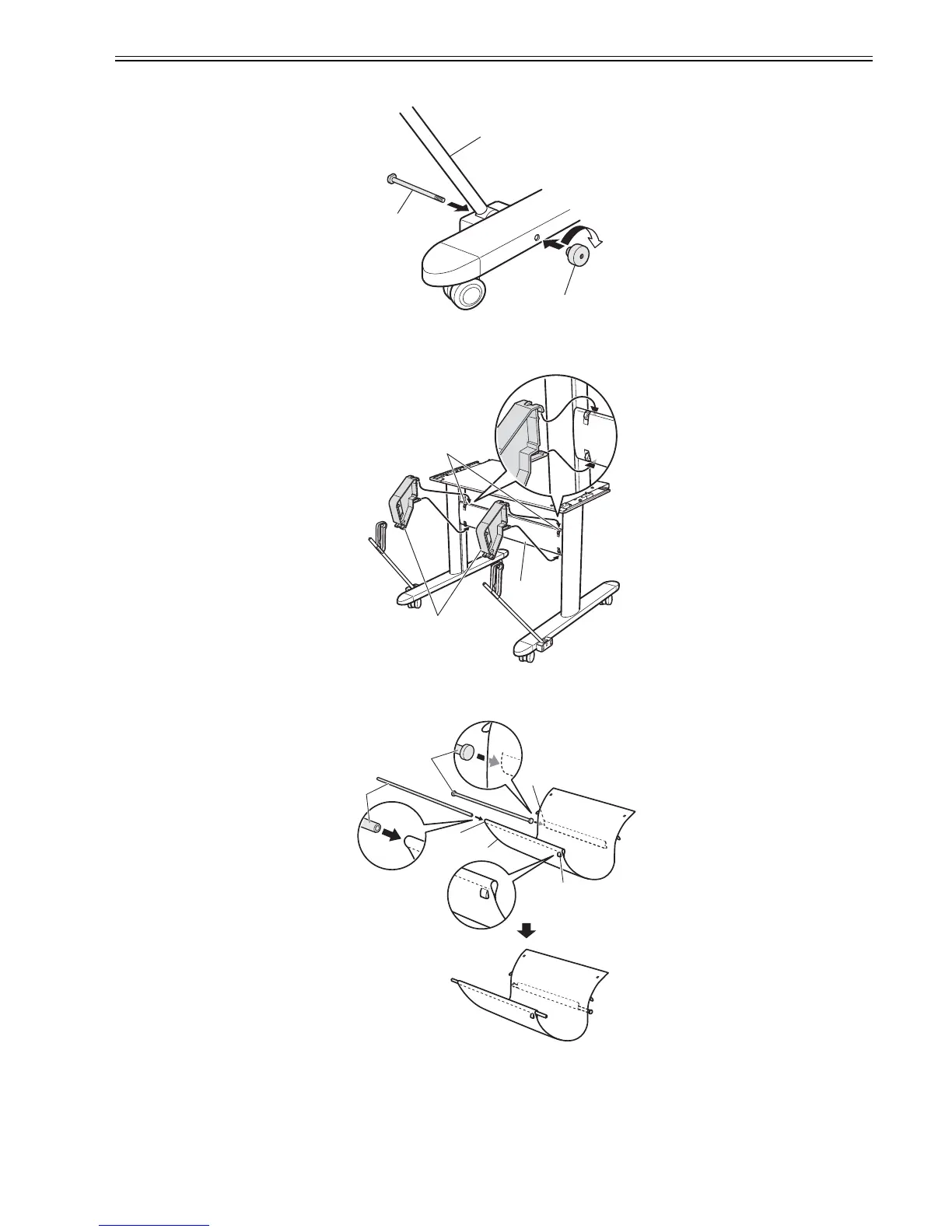
(4) As in steps 1 to 3, insert Basket Rod #1 [1] in the Basket Fastener on the left so that the Support Rod Holder faces up. Secure it with Basket Bolts [2] and Basket
Decorative Nuts [3].
F-3-41
(5) Hang the hooks of the top of the Basket Arms [1] over the grooves [3] on the top of the Stand Stay [2], and hang the hooks of the bottom of the Basket Arms
on the bottom of the Stand Stay.
F-3-42
(6) Spread out the Output Stacker [2] so that the white tag [1] is face-down in the front right corner. Insert Basket Rod #2 [4] in the front hole [3] of the Output
Stacker and Basket Rod #3 [6] in the hole [5] in the middle of the Output Stacker on the bottom surface.
F-3-43
[1]
[2]
[3]
[1]
[3]
[2]
[1]
[2]
[3]
[4]
[6]
[5]














 To Next Page