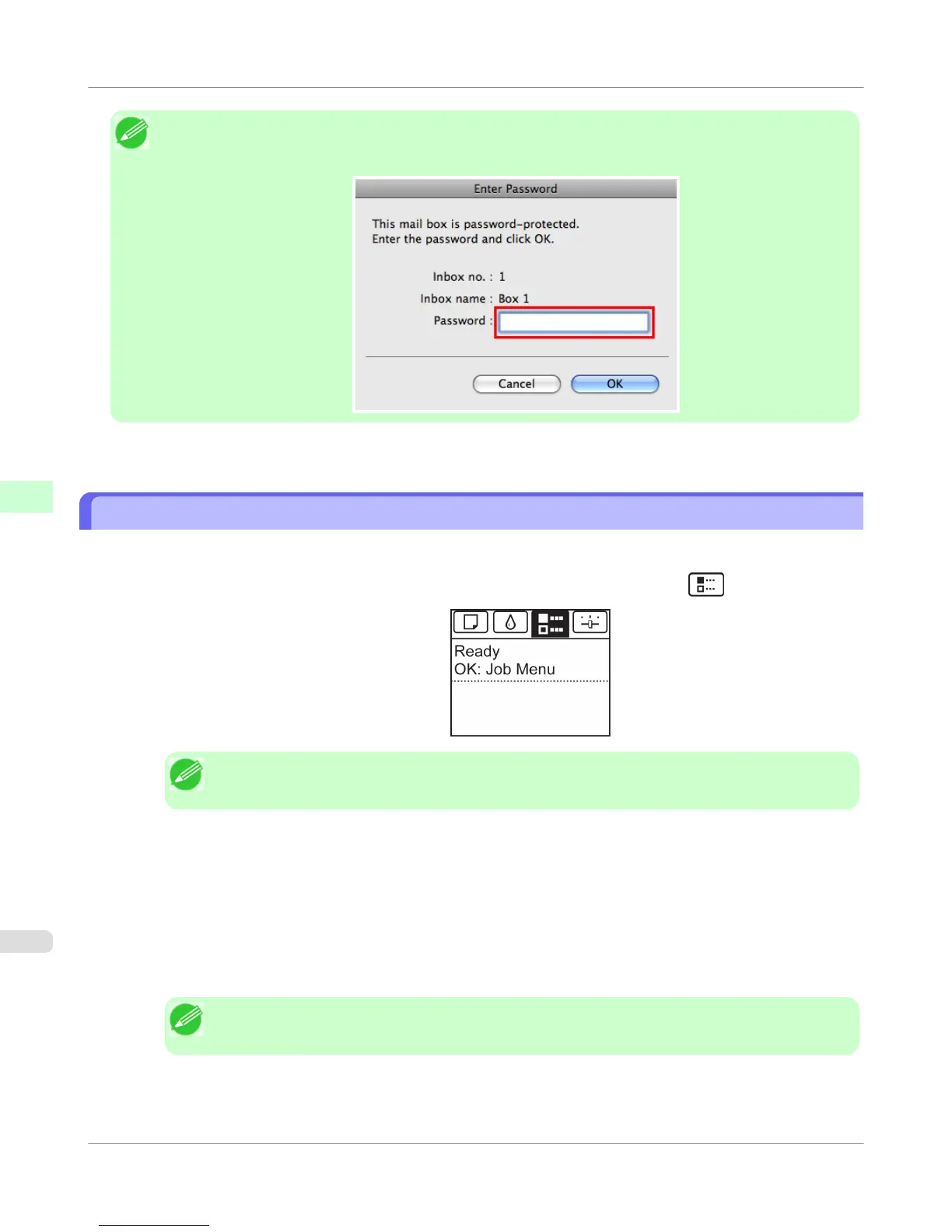
Note
• Enter a password if one has been set.
The password is a four-digit number.
For details, refer to the imagePROGRAF Printmonitor help file.
Printing a List of Saved Jobs
The list of print jobs stored on the printer's hard disk (saved jobs) can be printed by box as follows.
1.
On the Tab Selection screen of the Control Panel, press ◀ or ▶ to select the Job tab ( ).
Note
• If the Tab Selection screen is not displayed, press the Menu button.
2. Press the OK button.
The Job Menu is displayed.
3. Press ▲ or ▼ to select Stored Job, and then press the OK button.
4. Press ▲ or ▼ to select the box number (in the range 00–29), and then press the OK button.
Note
• Enter a password if one has been set, and then press the OK button.
5. Press ▲ or ▼ to select Print Job List, and then press the OK button.
Print Job Operations
>
Advanced Print Job Operations
>
Printing a List of Saved Jobs
iPF755
5
614





 To Next Page