CHAPTER 4 IMAGE FORMATION SYSTEM
COPYRIGHT
©
1999 CANON INC. CANON NP6512/6612/7120/7130/7130F REV.0 AUG. 1999 PRINTED IN JAPAN (IMPRIME AU JAPON)
4-48
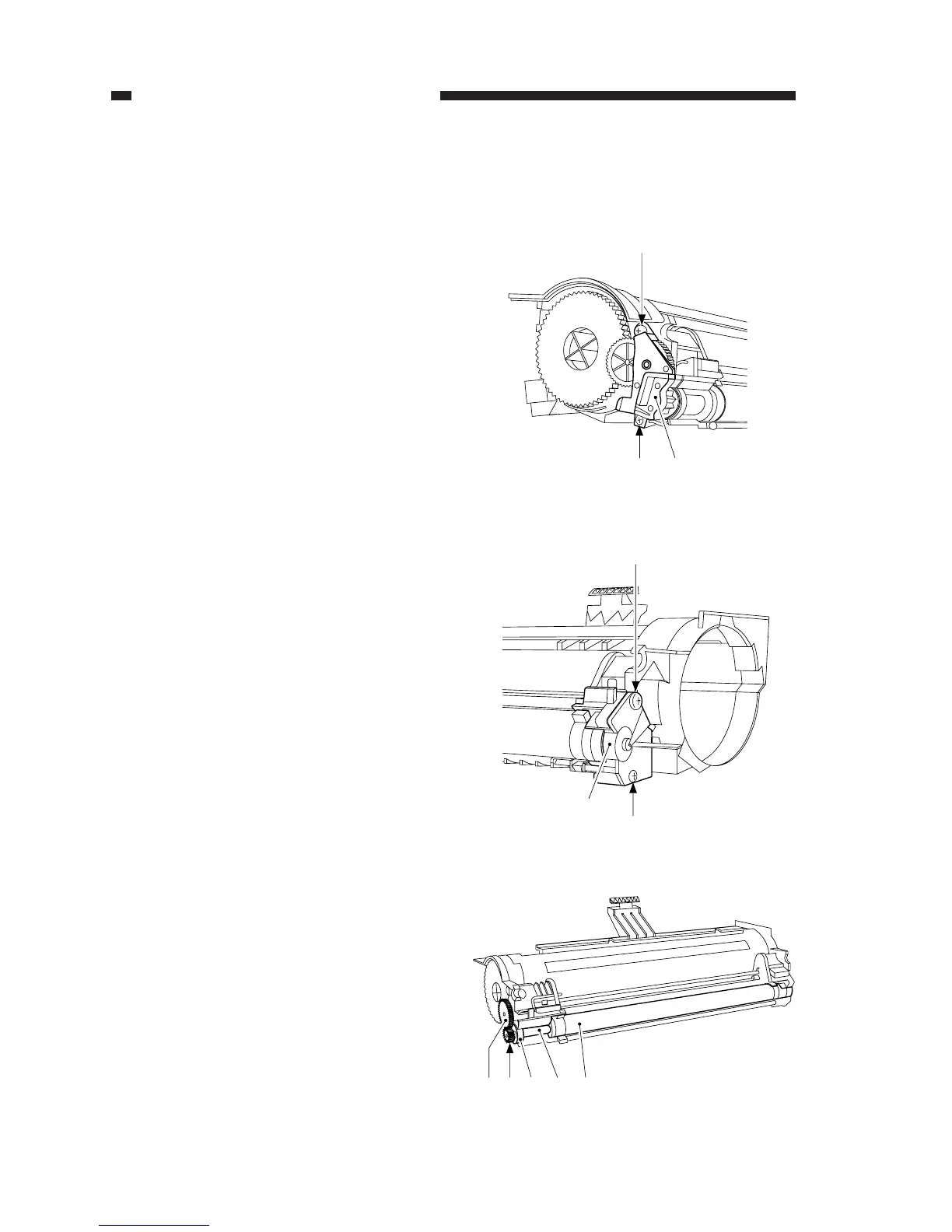
8) Remove the gear [8], gear [9], bearing
[10], and spacer [11]; then, remove the
developing cylinder [12].
Figure 4-328
[8] [9][10] [11] [12]
5) Place a newspaper on the floor, and pour
out the toner from the developing cylin-
der.
6) Remove the two screws [4], and remove
the gear support plate [5] from the rear.
Figure 4-326
7) Remove the two screws [6], and remove
the developing cylinder support plate [7]
at the front.
[4]
[4] [5]
Figure 4-327
[6]
[7]
[6]






 To Next Page