Paper Presence/Absence Detection Control
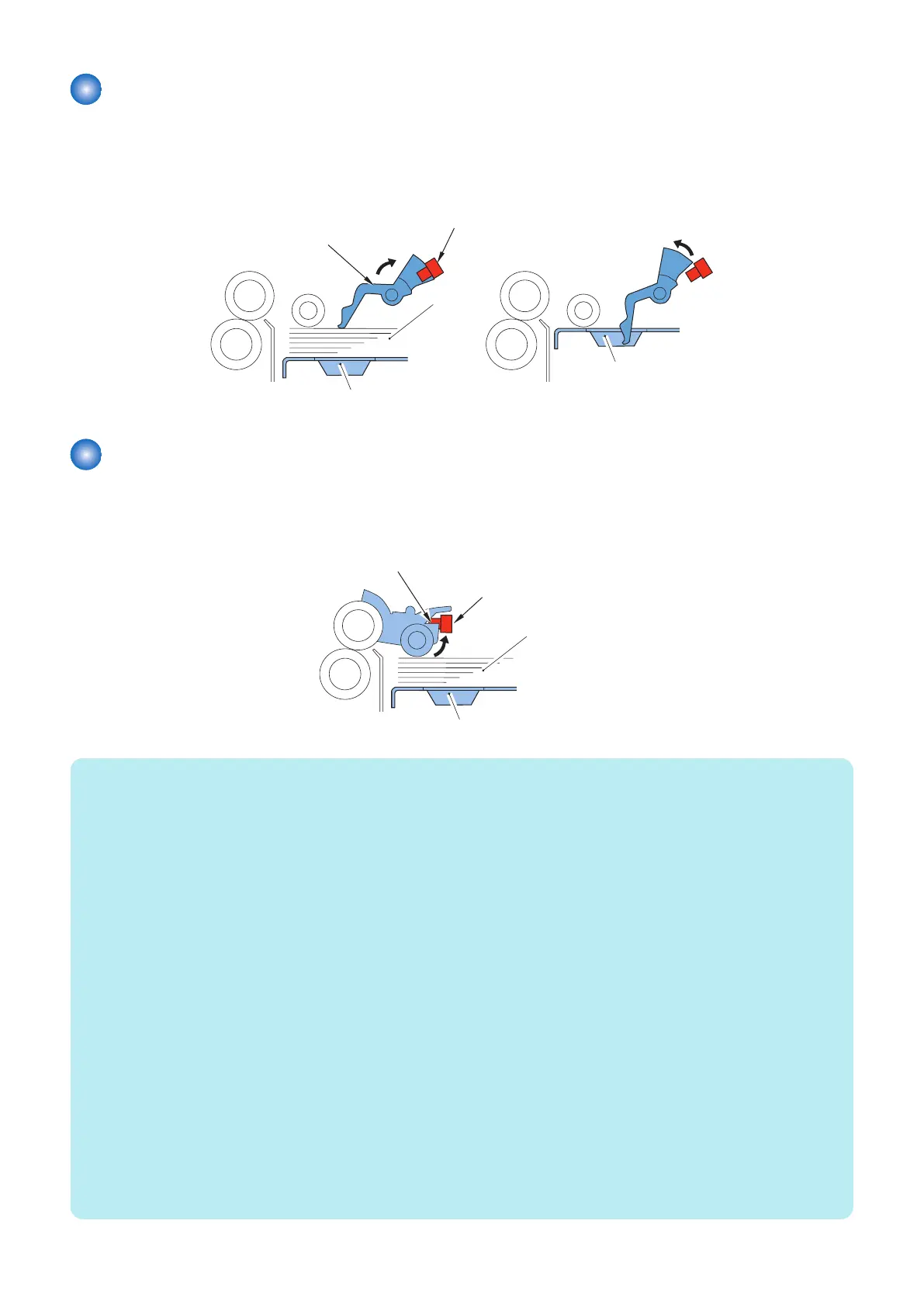
The presence/absence of paper inside the compartment is checked by the deck paper sensor (SR15) of the pickup assembly.
When the paper runs out and the paper detecting lever of the pickup assembly passed the deck paper sensor (SR15) as a result,
the host machine indicates the absence of paper on its control panel.
Deck paper
sensor(SR15)
<Paper presence>
Paper detecting lever
Paper
<Paper absence>
Lifter
Lifter
Paper Surface Detection Control
The paper level sensor (SR3) mounted at the pickup assembly is used to detect the paper surface. When the detection flag of
the pickup roller holder is pushed up by the top surface of paper with the upward movement of the lifter, the paper level sensor
(SR3) detects it and the lifter stops to keep the top surface of paper at the pickup position.
Paper level sensor (SR3)
Detection flag
Paper
Lifter
NOTE:
Service Mode
• Adjustment of paper surface height: Deck
Lv2) COPIER > ADJUST > FEED-ADJ > DK1-PKLV
To adjust the pickup position of the POD Deck Lite
+: Move up ( When a pickup failure occurs )
-: Move down ( When double feed occurs)
< Setting value >
-10 to -1: Move down by 1 mm, 0: 0 mm, 1: Move up by 1 mm, 2 to 10: Move up by 2 mm
< Use case >
When a pickup failure occurs, When double feed occurs
< Caution >
If the value is too large, double feed may occur. If the value is too small, a pickup failure may occur.
• Set paper surface level down: Deck standby
Lv2) COPIER > OPTION > FEED-SW > DK1-LDWN
To set whether to lower the paper surface level in the POD Deck Lite below pickup position during standby. When a trace which
looks like that the Pickup Roller had contact with a paper occurs, set 1. It returns to pickup position at the time of starting a job.
< Setting value >
0 to 1
0: Normal (Pickup Roller is in contact), 1: Paper surface level moves down
< Use case >
When Pickup Roller trace occurs on transparency paper.
< Caution >
When 1 is set, FCOT becomes longer.
2. Technology
16









 To Next Page