NOTE:
Service Mode
• ON/OFF of POD Deck Lite air assist
(Lv.2) COPIER > OPTION > FEED-SW > DK1-AIR
• Deck Air Float Fan airflow amnt: dwstm
(Lv.2) COPIER > OPTION > FEED-SW > DK1-ALVD
• Deck Air Float Fan airflow amnt: upstream
(Lv.2) COPIER > OPTION > FEED-SW > DK1-ALVU
To adjust the airflow amount of the Air Floatation Fan of the POD Deck Lite.
When making an adjustment, be sure to adjust the setting of DK1-ALVD and DK1- ALVU at the same time.
<Setting value >
-10 to 10 [default: 0]
<Use case >
When double-feed occurs
<Caution >
If the value is large, uneven transfer may occur. If the value is small, double feed may occur.
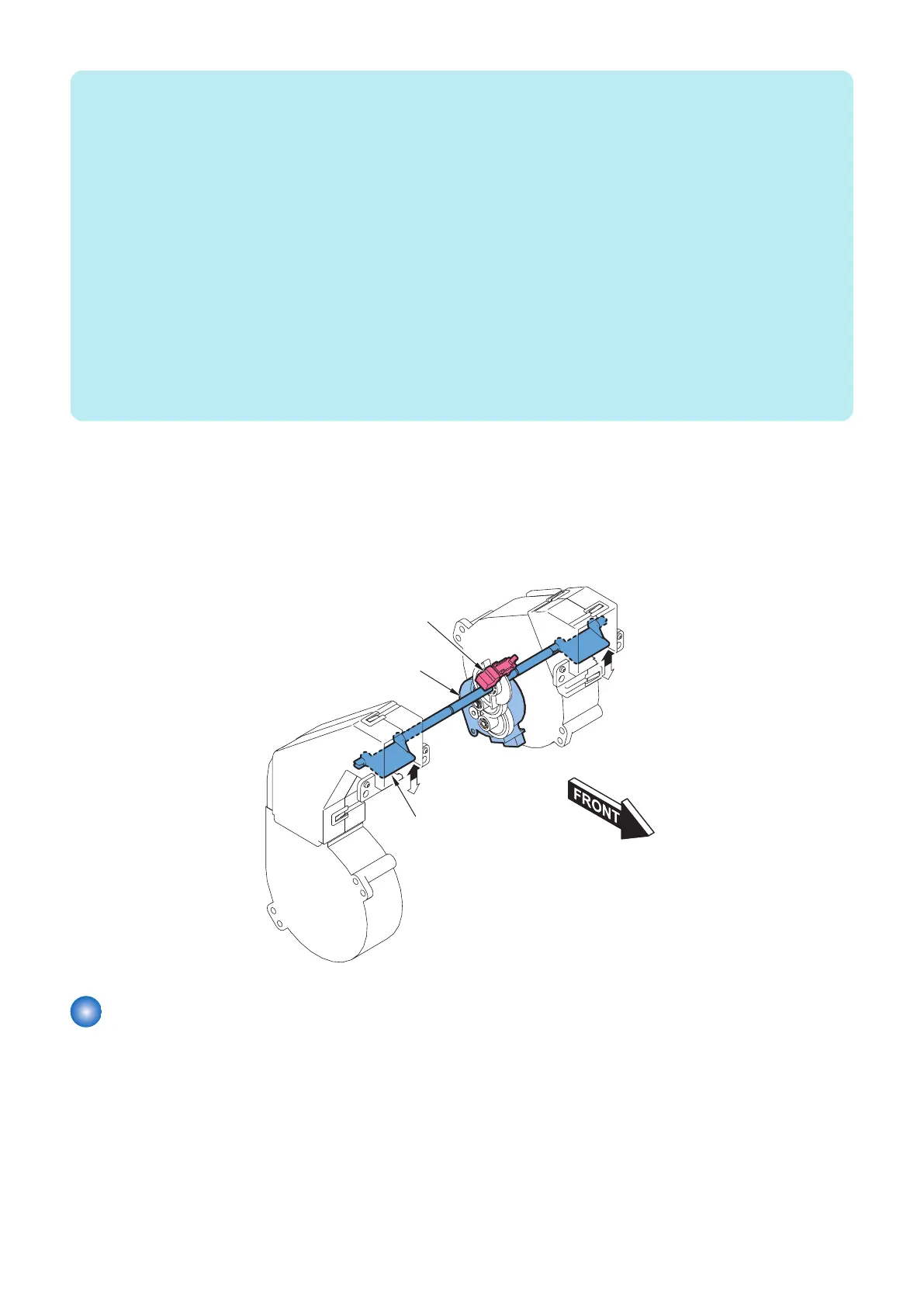
■ Swing Operation
This equipment combines the air blowing operation against paper with the swing operation of the shutter to improve separation
of paper. The swing motor (M4) drives the shutter to move up and down.
The direction of air blow against paper changes up or down repeatedly, vibrating the paper for easier separation.
The swing HP sensor (SR16) detects a failure of up and down operation of the shutter and the home position of the shutter.
Paper type: Different depending on the host machine.“Air Assist Control” on page 21
Swing motor(M4)
Swing HP sensor(SR16)
Shutter
Cassette Heater Control (Option)
To facilitate separation of paper in a high humidity environment, a cassette heater unit is available optionally. When the cassette
heater (H1) is powered, the temperature in the deck becomes suitable and thereby the humidity lowers, facilitating separation of
paper. When the cassette heater switch mounted at the rear of this equipment is set at OFF, the cassette heater (H1) is not
powered. When the cassette heater switch is set to ON, the cassette heater is continuously powered.
2. Technology
22









 To Next Page