• Please use only the paper types specified for use by Canon.
• Paper must be printed on the glossy side (the side without any printed markings).
Always load paper into the cassette with the glossy side up. Loading the paper the wrong
way may result in poor print quality, and in some cases may cause
damage
to the printer.
•
Do
not
tear
or
bend the paper's perforated edges before printing.
Tearing the paper's perforated edges will cause the ink sheet to wind up automatically and
waste
one
print's
wor~h
of
ink. If this happens, there will not be enough ink left
to
print all
the
paper
sheets inclutled in the kit.
•
Do
not use label sheets on which labels are partially peeled off.
•
Do
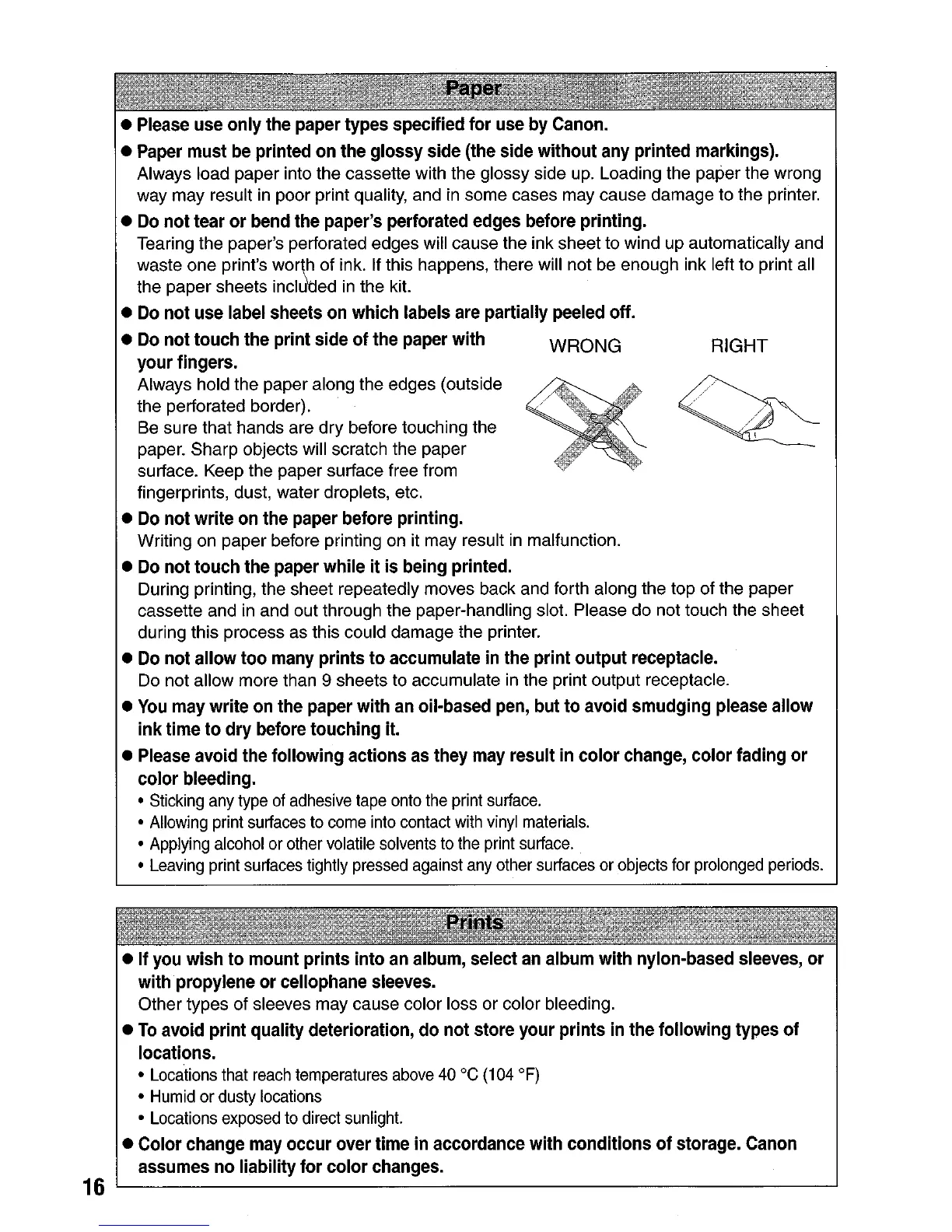
not touch the print side
of
the paper with WRONG RIGHT
your fingers.
Always hold the paper along the edges (outside
the perforated border).
Be sure
that
hands are
dry
before touching the
paper.
Sharp
objects will scratch the paper
surface. Keep the paper surface free from
fingerprints, dust, water droplets, etc.
•
Do
not
write on the paper before printing.
Writing
on
paper before printing on it may result in malfunction.
•
Do
not touch the paper while it is being printed.
During printing, the sheet repeatedly moves back and forth along the top
of
the paper
cassette and in and out through the paper-handling slot. Please do not touch the sheet
during this process as this could damage the printer.
•
Do
not allow too many prints
to
accumulate in the print output receptacle.
Do not allow more than 9 sheets to accumulate in the print output receptacle.
•
You
may write on the paper with an oilwbased pen, but
to
avoid smudging please allow
ink
time
to
dry
before touching it.
• Please avoid the following actions as they may result in color change, color fading
or
color bleeding.
• Sticking any type
of
adhesive tape onto the print surface.
• Allowing print surfaces to come into contact
with
vinyl materials.
• Applying alcohol or other volatile solvents
to
the print surface.
• Leaving print surfaces tightly pressed against
any
other surfaces or objects for prolonged periods.
• If you wish to mount prints into an album, select
an
album with nylon-based sleeves, or
withpropylene
or
cellophane sleeves.
Other types
of
sleeves may cause color loss or color bleeding.
•
To
avoid print quality deterioration, do not store your prints in the following types
of
locations.
• Locations that
reach
temperatures
above
40°C
(104
OF)
•
Humid
or dusty locations
• Locations exposed to direct sunlight.
• Color change may occur over time in accordance with conditions
of
storage. Canon
assumes no liability for
color
changes.
16
L.....-
----'









 To Next Page