o Do not load two
or
more
memory
cards
at
the same time.
Press the printer's power button.
• The power button lights green once the printer powers up.
• After a while, the startup screen is displayed on the LCD monitor.
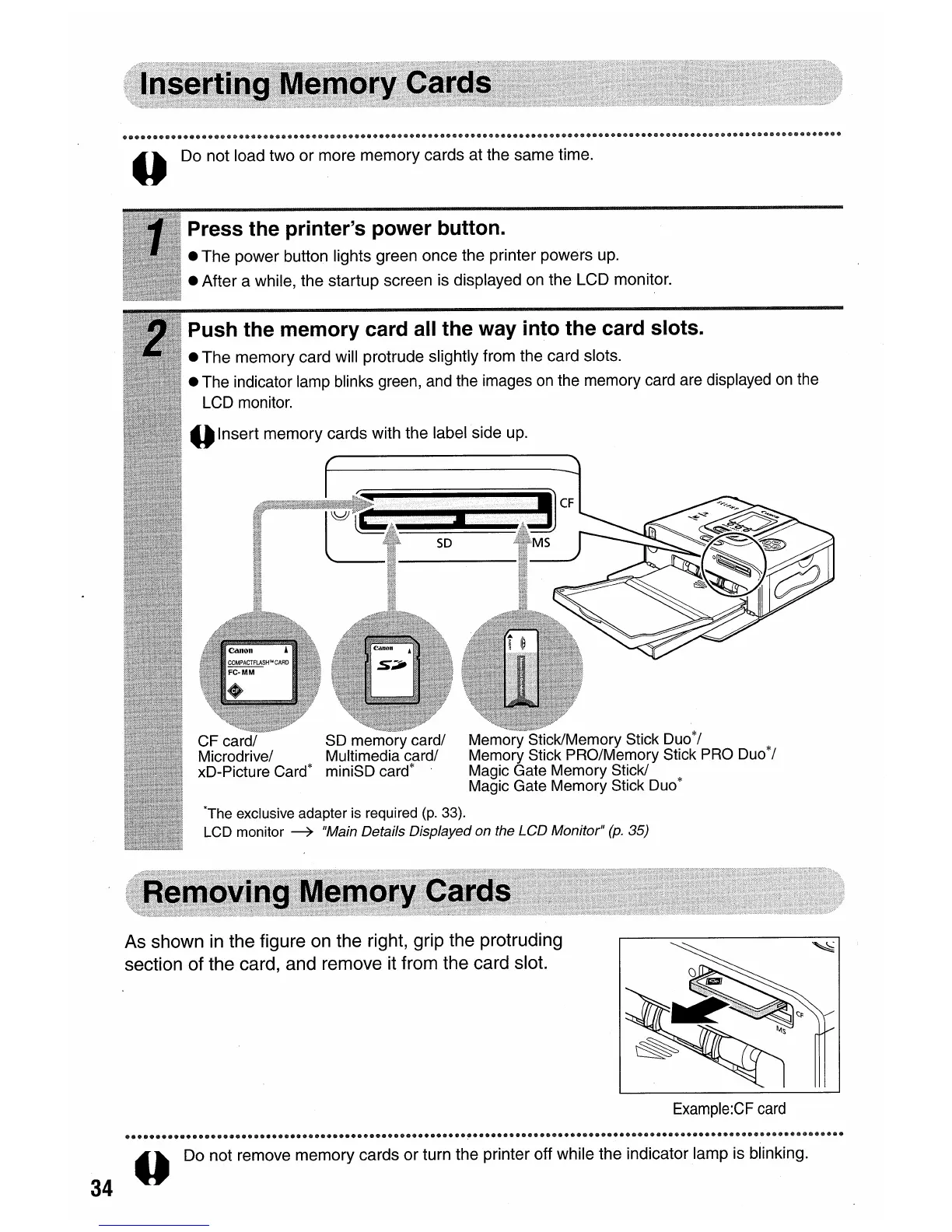
Push the memory card all the way into the card slots.
•
The
memory card will protrude slightly from the card slots.
• The indicator lamp blinks green, and the images
on
the memory card are displayed
on
the
LCD monitor.
oInsert memory cards with the label side up.
CF card/
SO
memory card/ Memory Stick/Memory Stick Duo*/
Microdrive/ Multimedia card/ Memory Stick PRO/Memory Stick
PRO
Duo*/
xD-Picture Card* miniSD card* Magic Gate Memory Stick/
Magic Gate Memory Stick Duo*
*The exclusive adapter is required
(p.
33).
LCD monitor
~
"Main Details Displayed on the LCD Monitor"
(p.
35)
As shown
in
the figure on the right, grip the protruding
section of the card, and remove it from the card slot.
34
Example:CF
card
o Do not remove memory cards
or
turn the printer off while the indicator lamp is blinking.









 To Next Page