Connecting to a Computer for Printing
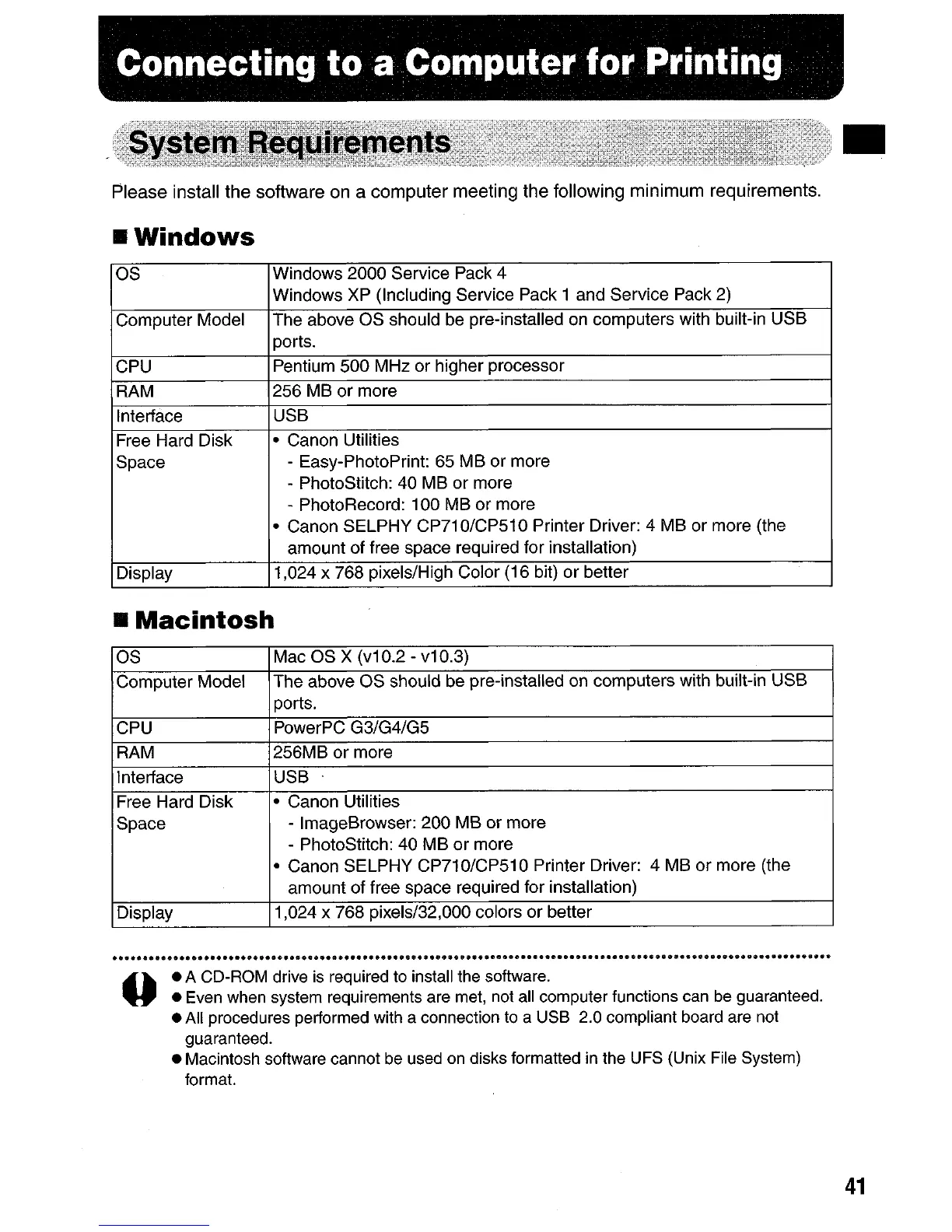
Please install
the
software on a
computer
meeting
the
following
minimum
requirements.
•
Windows
as Windows 2000 Service Pack 4
Windows XP (Including Service Pack 1 and Service Pack 2)
Computer Model
The above
as
should be pre-installed
on
computers with built-in USB
ports.
CPU
Pentium 500 MHz or higher processor
RAM
256 MB
or
more
Interface
USB
Free Hard Disk
• Canon Utilities
Space
- Easy-PhotoPrint: 65 MB or more
- PhotoStitch: 40 MB or more
- PhotoRecord: 100 MB
or
more
• Canon SELPHY CP71 0/CP51 0 Printer Driver: 4 MB or more (the
amount of free space required for installation)
Display
1,024 x 768 pixels/High Color (16 bit)
or
better
•
Macintosh
as
Mac
as
x
(v1
0.2 - v10.3)
Computer Model
The above
as
should be pre-installed on computers with built-in USB
ports.
CPU
PowerPC G3/G4/G5
RAM 256MB or more
Interface
USB
Free Hard Disk
• Canon Utilities
Space - ImageBrowser: 200 MB or more
- PhotoStitch: 40 MB or more
• Canon SELPHY CP710/CP510 Printer Driver: 4 MB
or
more (the
amount of free space required for installation)
Display
1,024 x 768 pixels/32,000 colors or better
•
o
• A CD-ROM drive
is
required
to
install the software.
•
Even
when system requirements are
met,
not
all
computer functions
can
be
guaranteed.
•
All
procedures performed with a connection
to
a USB 2.0 compliant board are
not
guaranteed.
• Macintosh software cannot
be
used
on
disks formatted
in
the
UFS
(Unix File System)
format.
41









 To Next Page