• Preparing Your Ink Cassette/Paper Sets and Paper Cassette
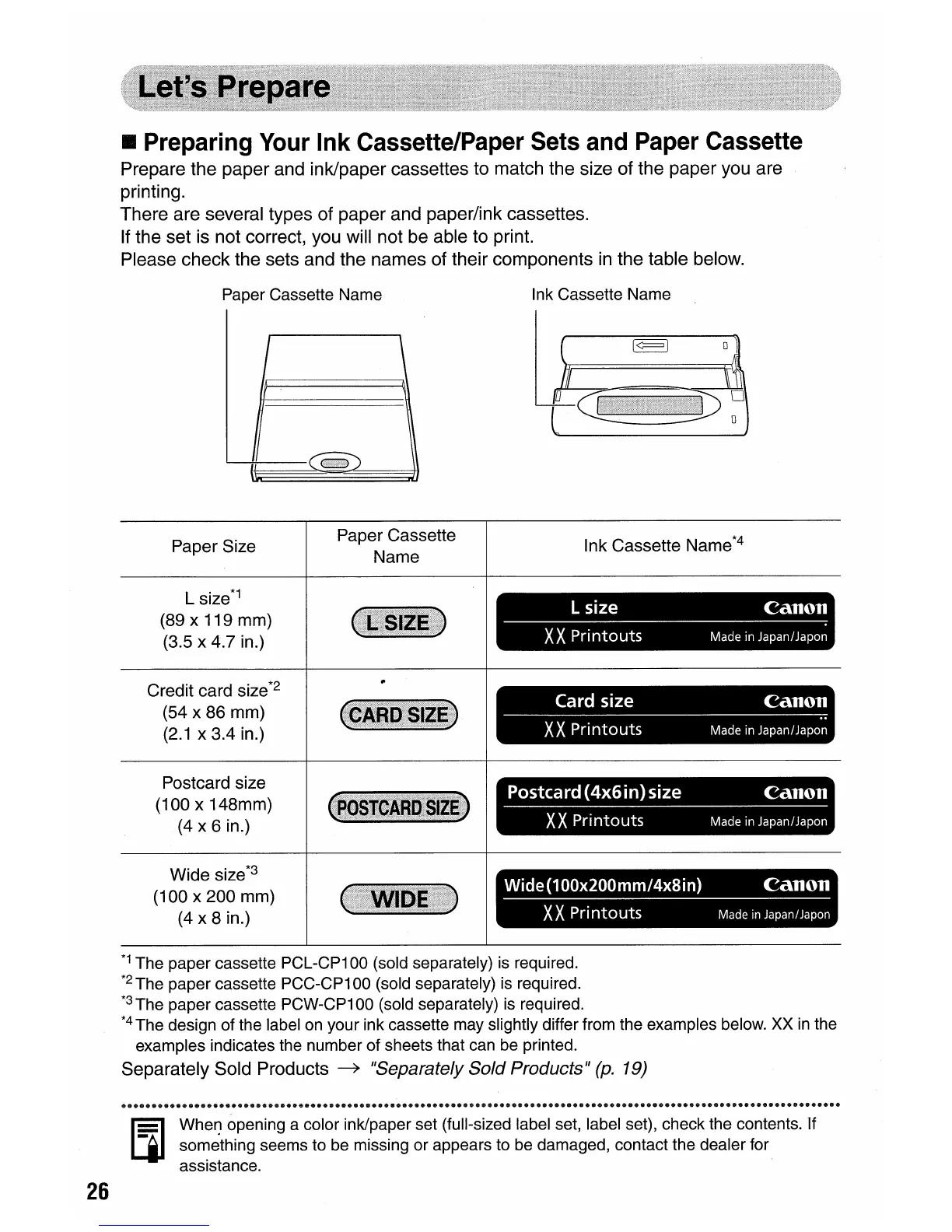
Prepare the paper and ink/paper cassettes to match the size of the paper you are
printing.
There are several types of paper and paper/ink cassettes.
If the set is not correct, you will not be able to print.
Please check the sets and the names of their components
in
the table below.
Paper Cassette Name
Ink Cassette Name
Paper Size
L
size*1
(89 x 119 mm)
(3.5 x 4.7 in.)
Credit card size
*2
(54 x 86 mm)
(2.1
x 3.4 in.)
Postcard size
(100
x 148mm)
(4 x 6 in.)
Wide size*3
(100
x
200
mm)
(4x
8 in.)
Paper Cassette
Name
Ink
Cassette Name*4
L size
Canon
XX
Printouts
Made
in
Japan/Japo~
Card size
Canon
XX
Printouts
Made
in
Japan/Japo'~
Postcard
(4x6in)
size
Canon
XX
Printouts
Made
in
Japan/Japon
Wide(100x200mm/4x8in)
Canon
XX
Pri
ntouts
Made
in
JapanlJapon
26
*1
The paper cassette PCL-CP100 (sold separately) is required.
*2
The paper cassette PCC-CP100 (sold separately) is required.
*3
The paper cassette PCW-CP100 (sold separately) is required.
*4
The design of the label on your ink cassette may slightly differ from the examples below. XX
in
the
examples indicates the number of sheets that can be printed.
Separately Sold Products
~
"Separately Sold Products"
(p.
19)
Ii¥l
Wher) opening a color ink/paper set (full-sized label set, label set), check the contents. If
LjI
something seems to be missing or appears to be damaged, contact the dealer for
assistance.















 To Next Page