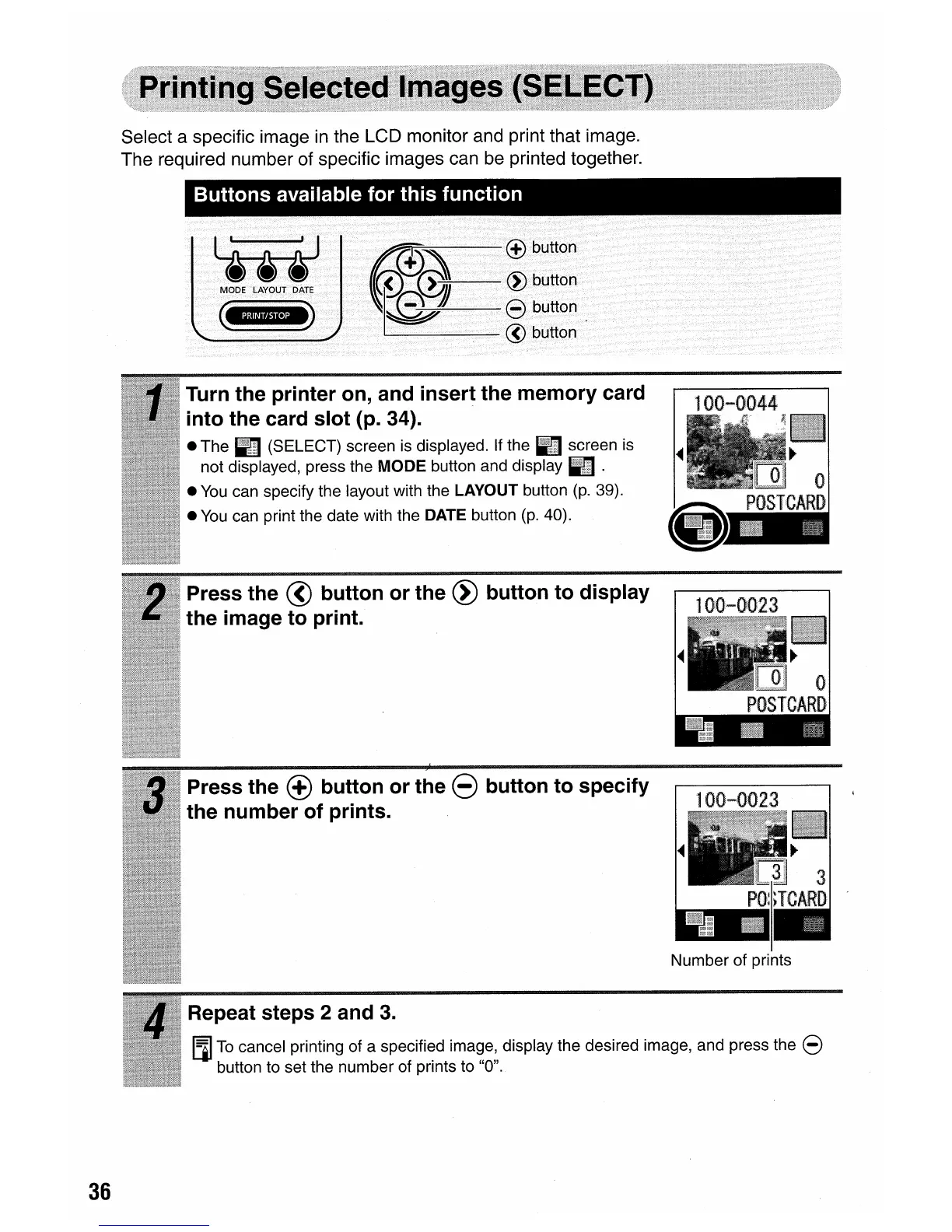
Select a specific image
in
the LCD monitor and print that image.
The required number of specific images can be printed together.
Buttons available for this function
Litt
MODE LAYOUT
DATE
(ii"nY"·'B)
tm~;,-,-\---®
button
(Pl~~
~
:~~:~
. @ button
Number of prints
Turn the printer on, and insert the memory card
into the card slot (p. 34).
• The R (SELECT) screen is displayed. If the R screen is
not displayed, press the
MODE
button and display R .
•
You
can specify the layout with the LAYOUT button
(p.
39).
•
You
can print the date with the DATE button
(p.
40).
Press the @ button or the
~
button to display
the image to print.
Press the
(±)
button or the 8 button to specify
the number of prints.
Repeat steps 2 and
3.
[l]
To
cancel printing of a specified image, display the desired image, and press the 8
button to set the number of prints to "0".
36









 To Next Page