_gg.Blli.
•
Cleaning
Inside
the
Printer
If faint stripes appear
in
the printed image, a probable cause is that dust has
accumulated inside the printer. Remove any dust using the cleaner stick included with
your printer.
Remove the ink cassette.
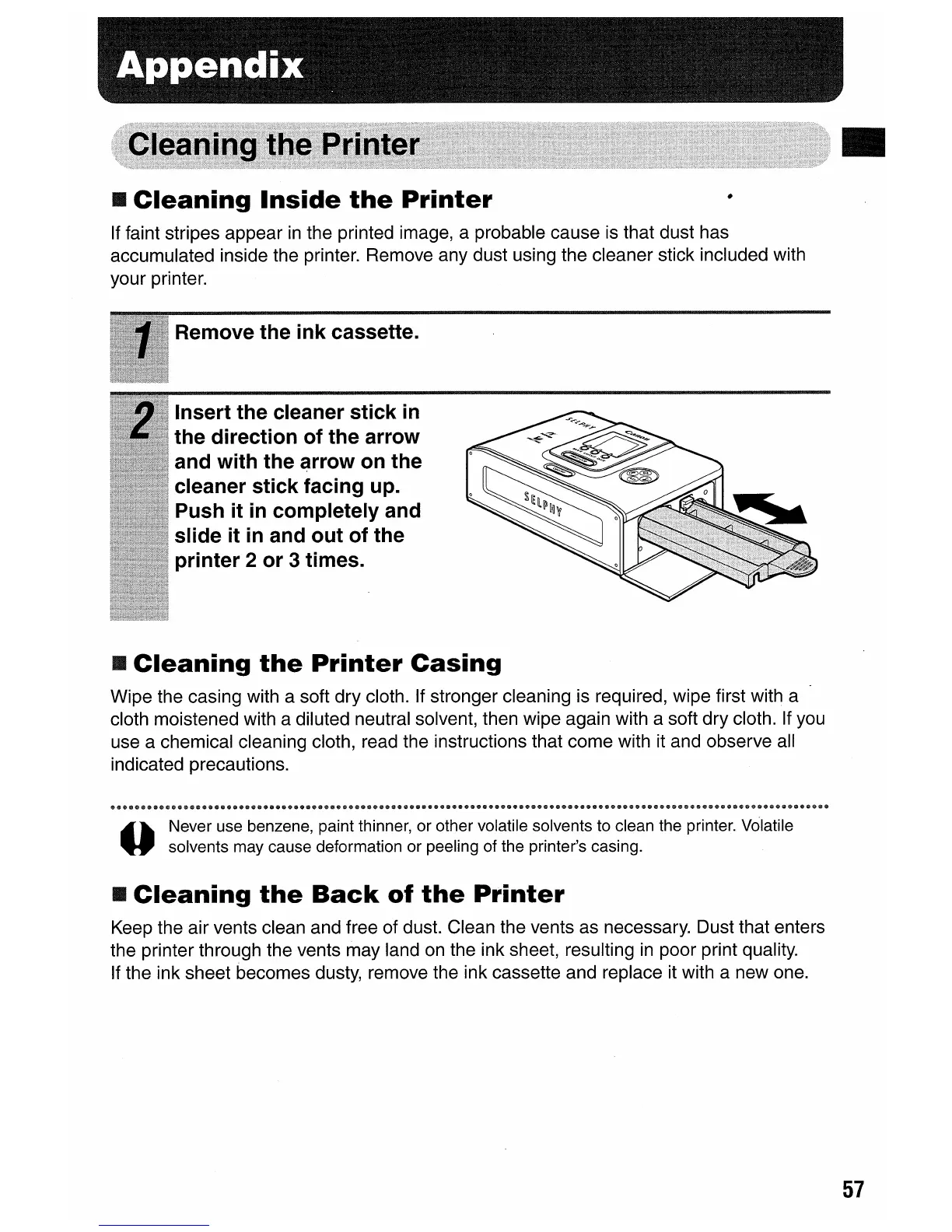
Insert the cleaner stick
in
the direction of the arrow
and with the
~rrow
on the
cleaner stick facing up.
Push it
in
completely and
slide it
in
and out of the
printer 2 or 3 times.
•
Cleaning
the
Printer
Casing
Wipe the casing with a soft dry cloth. If stronger cleaning is required, wipe first with a
cloth moistened with a diluted neutral solvent, then wipe again with a soft dry cloth. If you
use a chemical cleaning cloth, read the instructions that come with it and observe all
indicated precautions.
~
III.
Never use benzene, paint thinner, or other volatile solvents to clean the printer. Volatile
U solvents may cause deformation or peeling of the printer's casing.
•
Cleaning
the
Back
of
the
Printer
Keep the air vents clean and free of dust. Clean the vents as necessary. Dust that enters
the printer through the vents may land
on
the ink sheet, resulting
in
poor print quality.
If the ink sheet becomes dusty, remove the ink cassette and replace it with a new one.
•
57










 To Next Page